


July 15, 2022
Android App Development Trends that You Should Know
Enjoying this article?
Share it with the world!


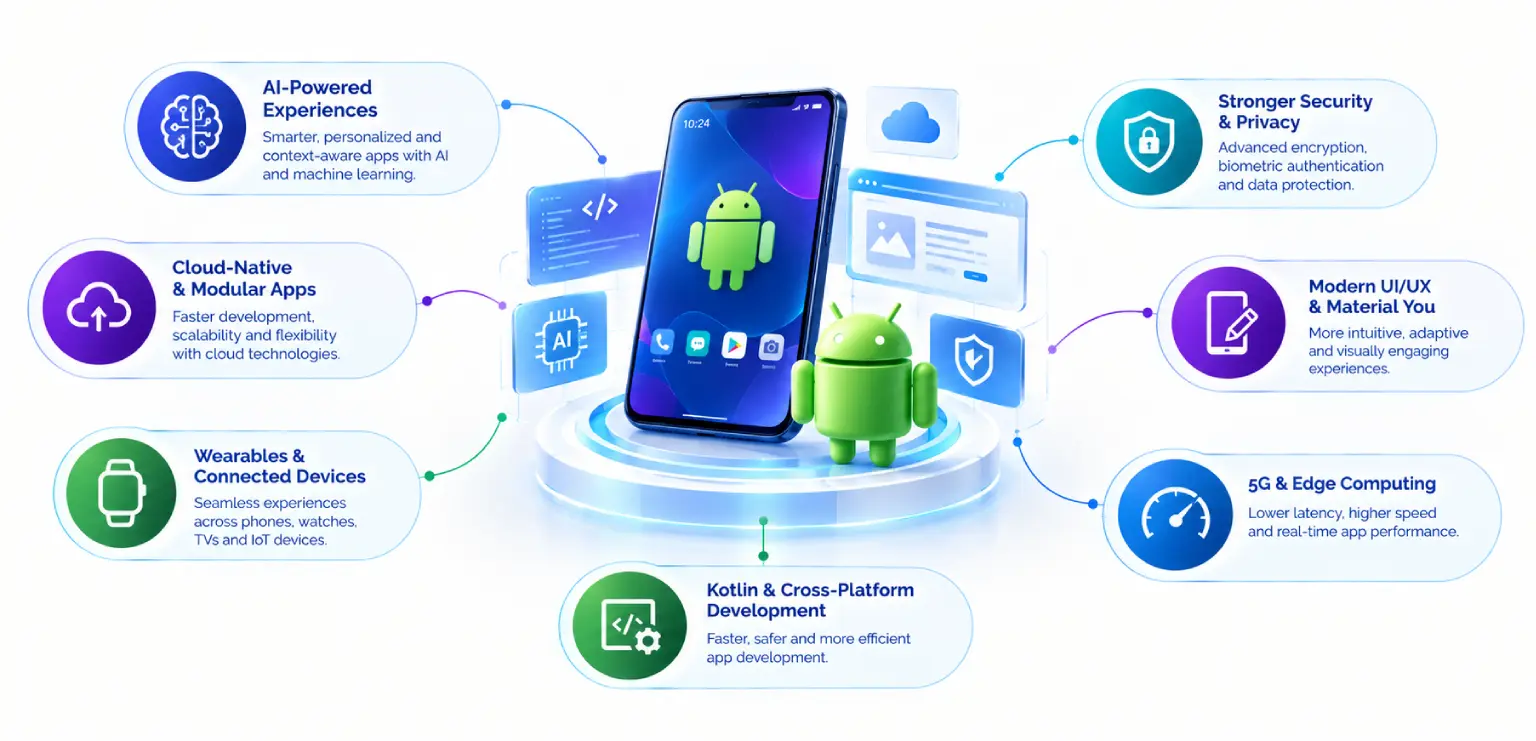
Explore the Android app development trends shaping 2026
| ⚡ Quick Answer The leading Android app development trends for 2026 are adaptive design for large screens, Compose as the default UI toolkit, shared Kotlin code across platforms, on-device AI with Gemini Nano, privacy-first APIs and stricter platform quality rules. Android 17, released in June 2026, turns several of these from good practice into requirements. |
Android moves quickly, and 2026 brings changes that touch design, architecture, privacy and release planning at the same time. This guide covers the Android app development trends that matter most for product owners, CTOs and engineering leads planning their next releases.
For each of the Android app development trends below, you will find what changed, why it matters and what to do next. You can read them in any order.
What Is Driving Android Development Trends 2026
Four forces shape the Android development trends 2026 teams are planning around:
| A new platform release. Android 17 reached stable on June 16, 2026, with new rules for large screens, privacy and background work. | |
| Stricter store requirements. Google Play now enforces technical standards such as 16 KB memory page support. | |
| More device types. Users move between phones, foldables, tablets, desktop windows, watches and cars. | |
| Practical generative AI. Models now run directly on the device for features that need speed and privacy. |
The Android app development trends below follow from these four forces.
1. Adaptive Layouts for Large Screens, Foldables and Desktop Windowing
Apps that target Android 17 must adapt to large screens. On tablets, foldables and desktop windowing, the system ignores orientation and resizability restrictions. A portrait-locked phone layout will be stretched and resized whether or not it was designed for that.
This makes adaptive layouts a core design task. Teams benefit from planning for:
| Window size classes instead of fixed device categories | |
| List-detail and supporting-pane layouts that make use of wider screens | |
| Correct state handling when a window resizes or a foldable unfolds | |
| Keyboard, mouse and stylus input on larger form factors |
The outcome is one app that feels natural on every screen a user owns. It also opens doors to tablet and productivity use cases that a phone-only layout cannot serve well.
2. Jetpack Compose as the Default UI Toolkit
Compose is now the standard way to build Android interfaces. New Jetpack libraries, design guidance and adaptive layout components are built with Compose first.
For teams, the benefits are practical:
| Less UI code to write, read and test | |
| State-driven screens that are easier to reason about | |
| Built-in support for Material 3 and adaptive UI patterns | |
| Smooth interoperability with existing XML views, so migration can be gradual |
A sensible path is to write new screens in Compose and migrate older ones as they come up for change. Teams avoid a risky big-bang rewrite while the codebase steadily modernizes.
3. Kotlin Multiplatform for Shared Business Logic
Kotlin Multiplatform lets teams share business logic, networking, data and validation code across Android, iOS, desktop and web. Each platform can keep a fully native UI, or teams can share UI as well with Compose Multiplatform.
This approach suits organizations that want one source of truth for rules and data handling while keeping a native feel on each platform. Common shared modules include:
| API clients and data models | |
| Offline storage and sync logic | |
| Pricing, eligibility and other business rules | |
| Analytics and logging layers |
Choosing between fully native, shared-logic and cross-platform UI depends on team skills, product roadmap and performance needs. Our overview of hybrid application development covers how these options compare. For many enterprise teams, shared Kotlin code offers a balanced middle path.
4. On-Device AI on Android with Gemini Nano
On-device AI on Android has moved from experiment to product feature. Gemini Nano runs locally on supported devices, and the ML Kit GenAI APIs give developers ready-made capabilities such as summarization, proofreading, rewriting and image description.
Running models on the device brings clear benefits:
| Privacy: user content can stay on the phone. | |
| Speed: responses arrive without a network round trip. | |
| Availability: features keep working offline. | |
| Cost control: fewer calls to cloud inference services. |
Good candidates include smart replies, note summaries, form assistance and accessibility features. Cloud models still suit heavier tasks, so many teams use a hybrid setup. For broader context, see our guides on machine learning and AI in mobile app development.
5. Privacy-First APIs and Passwordless Sign-In
Android continues to give users finer control over their data. Android 17 adds new privacy pickers, including a Contacts Picker, an EyeDropper API for color selection and a one-time precise location button. Each lets an app get exactly what it needs for a single task without broad, ongoing permissions.
Sign-in is changing in the same direction. Credential Manager brings passkeys, passwords and federated sign-in into one consistent API. Passkeys remove passwords from the flow and resist phishing by design.
For product teams, this is an opportunity. Requesting less data builds trust, shortens permission prompts and supports compliance with GDPR in the EU and equivalent laws elsewhere.
6. 16 KB Memory Page Size Support
Since November 1, 2025, Google Play requires updates to apps targeting Android 15 or higher to support 16 KB memory page sizes. The change mainly affects apps that include native code, such as C or C++ libraries, game engines and some third-party SDKs.
Teams can prepare by:
| Auditing native libraries and SDKs for 16 KB compatibility | |
| Updating build tools and recompiling native code with the right alignment | |
| Testing on 16 KB emulator images before release |
Treating this as a standard release checklist item keeps update pipelines smooth and avoids last-minute store rejections.
7. Cross-Device Continuity: Handoff, Wear OS and Companion Devices
Users expect their tasks to follow them. Android 17 introduces a Handoff API, shown to users as “Continue On”, that lets an app resume its state on a nearby device. A user can start a task on a phone and finish it on a tablet.
Continuity also extends to wearables and connected hardware:
| Wear OS apps for quick actions, notifications and health data | |
| Companion device profiles, including new Medical and Fitness Tracker profiles in Android 17 | |
| Consistent account and session state across every surface |
| ⚙ Sourcing The Handoff API and its “Continue On” surface are confirmed in Google’s Android 17 announcement. The Medical and Fitness Tracker companion device profiles are not named there, so that detail is worth confirming against the platform release notes before publishing. |
These features suit health, fitness, field service and productivity apps where work moves between devices during the day.
8. Performance and Stability as Product Features
Android 17 introduces per-app memory limits and stricter rules for background audio. Apps that manage memory carefully and follow background work guidelines will run more reliably under these limits.
Teams can strengthen performance with:
| Baseline Profiles to speed up app startup and key user journeys | |
| Regular profiling of memory, rendering and battery use | |
| Clear foreground service and media session handling for audio apps | |
| Release monitoring through Android vitals in Play Console |
Fast startup and stable sessions support better ratings, retention and store visibility.
How to Prioritize Android App Development Trends in Your Roadmap
Not every trend needs action at once. A practical order for most teams:
| Compliance first: confirm 16 KB support and Android 17 large-screen behavior. | |
| Foundation next: adopt Compose for new screens and plan for large screens. | |
| Architecture choices: decide where shared Kotlin code adds value. | |
| Differentiators: add on-device AI on Android and continuity features where they serve users. |
Mapping each item to discovery, design, build and testing phases keeps the work predictable. Our guide to the mobile app development process explains how those stages fit together.
Key Takeaways
| Android app development trends for 2026 center on screens, privacy, AI and platform quality. | |
| Apps targeting Android 17 must handle large screens, so adaptive layouts are essential. | |
| Jetpack Compose is the default UI toolkit and supports gradual migration. | |
| Shared Kotlin modules carry business logic while keeping native UI where it matters. | |
| Gemini Nano and ML Kit GenAI APIs make on-device features practical. | |
| 16 KB page size support is a Google Play requirement for updates targeting Android 15+. |
Frequently Asked Questions
| What are the top Android app development trends in 2026? The top Android app development trends in 2026 are large-screen adaptive design, Compose-based UI, shared Kotlin code, on-device AI with Gemini Nano, privacy-first APIs with passkeys, 16 KB page size support and cross-device continuity. Android 17 makes large-screen adaptation a requirement for apps that target it, so many teams start there. |
| Do apps have to support large screens on Android 17? Yes, for apps that target Android 17. On tablets, foldables and desktop windowing, the system ignores orientation and resizability restrictions. Apps should use window size classes and flexible layouts so screens resize cleanly. Planning flexible layouts early avoids stretched interfaces and creates room for tablet and productivity features. |
| Is Jetpack Compose ready for enterprise apps? Yes. Compose is the recommended UI toolkit for Android and is used in large production apps. It works alongside existing XML views, so enterprises can migrate screen by screen. Compose also includes Material 3 components and adaptive layout support, which reduces custom UI code and simplifies testing. |
| When should a team choose Kotlin Multiplatform? This approach fits teams that want to share business logic, networking and data code across Android and iOS while keeping native interfaces. It works well when consistent rules matter, such as pricing or eligibility logic. Teams can start with one shared module and expand once the approach proves itself. |
| What is the 16 KB page size requirement? Since November 1, 2025, Google Play requires updates to apps targeting Android 15 or higher to support 16 KB memory page sizes. Apps with native code or native SDKs are most affected. Teams should update build tools, recompile native libraries and test on 16 KB emulator images before submitting updates. |
Your Next Android Release with Confidence
Turning these trends into a clear roadmap is easier with an experienced partner. Impressico helps teams modernize Android apps with Compose, adaptive design, shared code and on-device AI.
| Ready to plan your next Android release? We start where the compliance deadlines are, then work outward to the features that differentiate the product. |
Impressico Business Solutions — Android, iOS and hybrid app development, with the QA and platform engineering behind every release.

IBS
Similar articles

AI in Mobile App Development: What the Research Actually Shows
July 9, 2025
Mobile App Testing Process: Types, Devices and Automation Explained
November 4, 2022
How Does Custom Mobile App Development Help Boost Your Business?
October 24, 2022
Importance of Mobile App Testing: 7 Benefits for Quality and Growth
October 12, 2022
How Does Mobile App Development Benefit A Small Business?
September 18, 2022
How Mobile Apps Help Businesses Grow: 7 Growth Levers That Compound
September 16, 2022
