


September 14, 2026
Vector Databases Compared: Pinecone vs Weaviate vs Qdrant vs pgvector for Enterprise RAG
Enjoying this article?
Share it with the world!


Best Vector Database for RAG: 4 Options Compared
| ⚡ Quick Answer There is no single best vector database for RAG — Pinecone, Weaviate, Qdrant and pgvector were each built around a different constraint. On Pinecone vs Weaviate: Pinecone is a managed cloud service, with a Bring Your Own Cloud option on Enterprise plans that runs the data plane in your own AWS, GCP or Azure account; Weaviate is open-source and provides an integrated BM25 plus vector hybrid search experience with configurable fusion and weighting, at the cost of running infrastructure yourself. Qdrant offers strong, flexible filtering and hybrid search through its Query API, with RRF and DBSF fusion built in. pgvector is a PostgreSQL extension rather than a separate system, so it adds no separate vector database service cost, though vector storage, indexing and compute still draw on your Postgres resources. There is no universal cost winner: each vendor meters differently, so model your own workload. |
If you’re building a RAG system for your company right now, chances are you’ve typed “best vector database for RAG” into Google at least once this week. Maybe “Pinecone vs Weaviate” too. Or “pgvector vs Pinecone” while trying to figure out if you even need a separate database at all. You’re not alone. This is one of the questions we get asked most often at Impressico Business Solutions when enterprise teams start planning their RAG architecture, and it usually comes up earlier in the conversation than people expect.
The honest answer? There’s no single winner. Pinecone, Weaviate, Qdrant, and pgvector were each built with a different kind of team and a different kind of problem in mind. So instead of giving you a “just pick this one” answer, we’re going to walk through what each one actually does, where it wins, where it falls short, and how to figure out which one fits your business without spending three months stuck in analysis paralysis.
1. What is the best vector database for RAG?
| There isn’t one, and any answer that arrives before someone has asked about your data residency rules, your scale and your team is a guess. The database matters, but it sits underneath a pipeline that matters more. |
Here’s something a lot of teams get wrong right out of the gate: they treat the vector database like it’s the whole RAG system. It isn’t.
In a real enterprise setup, the vector database is just one part of a much bigger machine. Before anything even reaches the database, your documents get broken into chunks. Those chunks turn into embeddings. Then, on top of that, you usually need metadata filters and access control checks so employees only see what they’re allowed to see. After that comes hybrid retrieval, mixing keyword search with vector search. Then reranking, pushing the best results to the top. Only after all of that does the system build the final context that actually gets sent to the language model.
| Where the database actually sits
↓
One component of seven — important, but not the whole system |
So when someone asks “what’s the best vector database for RAG,” what they’re really asking is bigger than the database itself. It’s closer to “what’s the best way to build a retrieval pipeline that fits my company’s data, security rules, and scale.” The database matters, obviously, but it’s not the only decision, and picking one in isolation, without thinking about everything sitting around it, is how a lot of enterprise RAG projects get into trouble six months down the road.
That said, since the database sits underneath everything else, getting it wrong can be genuinely expensive to fix later. So yes, it’s worth the time to get right.
2. What Role Does a Vector Database Play in a RAG Pipeline?
Think of a vector database as the memory of your RAG system. When someone types a question, that question gets turned into a vector, basically a long list of numbers representing its meaning. The database’s job is to search through millions, sometimes billions, of stored vectors and pull out the ones closest in meaning to that question.
But in an enterprise setting, that’s really only half the job. The database also has to:
| ▪ Filter results by metadata, like department, document type, region, or client ▪ Respect access permissions, so a finance document doesn’t show up for someone in marketing ▪ Blend vector similarity with keyword matching, because pure vector search can miss exact terms like product codes or contract numbers ▪ Handle multiple tenants if you’re running a platform used across several customers or business units ▪ Stay fast and reliable as your data grows from a few thousand documents into tens of millions |
A vector database that looks great on a demo with 10,000 records can behave completely differently once you throw real enterprise scale, real security rules, and real concurrent users at it. That’s exactly why this choice deserves more than a five-minute decision.
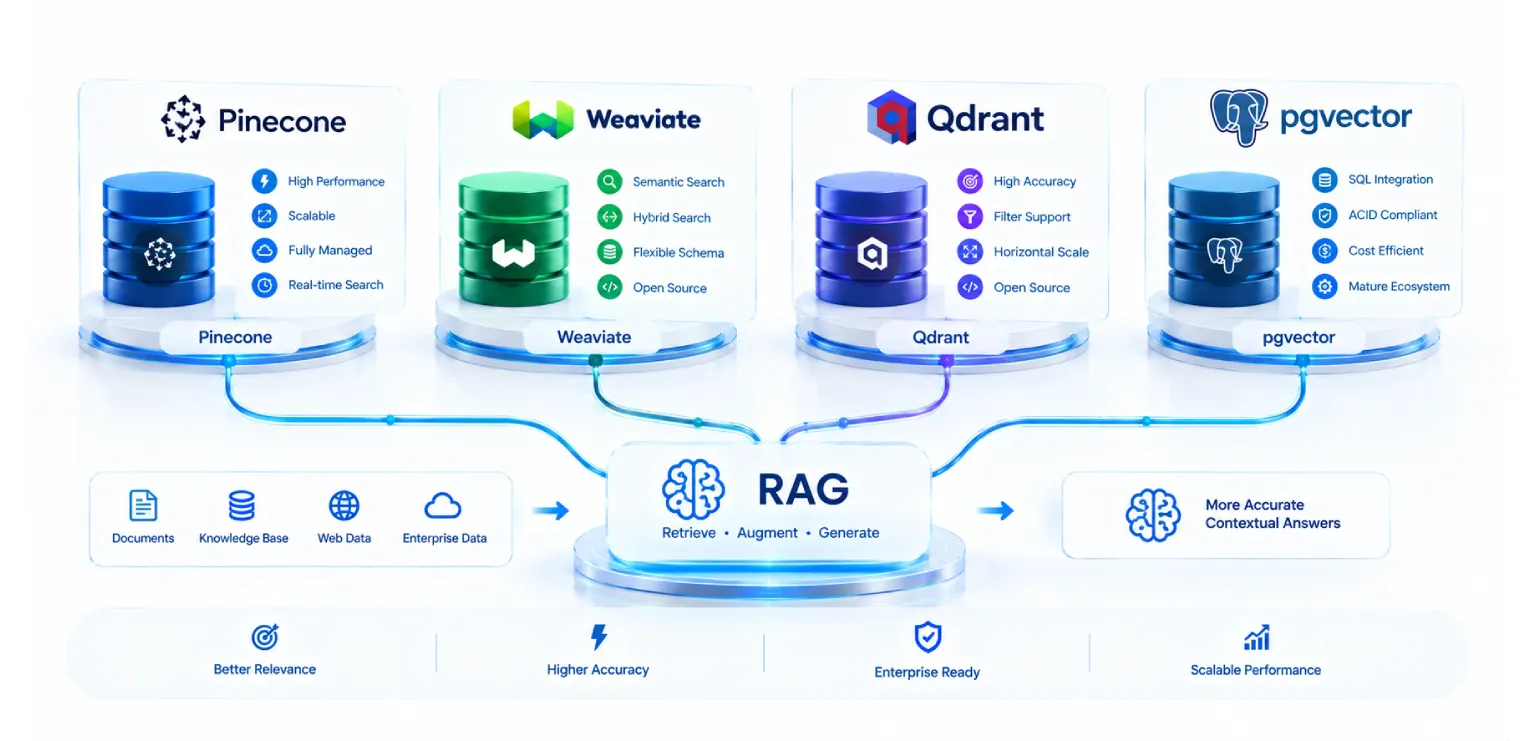
3. The Four Contenders
| The Four Contenders — and the Catch
|
Figure 1 — The four contenders, each with the catch.
Pinecone — Managed Vector Infrastructure
Pinecone is fully managed and cloud-hosted, with a Bring Your Own Cloud (BYOC) option on Enterprise plans that runs the data plane inside your own AWS, GCP, or Azure account. No servers to install, nothing to patch. You get an API key and start sending vectors. That’s really the whole pitch, and it’s a good one if you want to move fast without hiring a team of infrastructure engineers just to keep a database running.
Pinecone has solid documentation, an easy SDK, and probably the shortest path from zero to a working RAG prototype of any option here. There’s a free Starter tier for testing and usage-based pricing once you go to production (more on that shortly). It also lets you combine dense and sparse vectors, so you can bring in some keyword-style matching, though its hybrid search is generally less feature-rich than Weaviate’s native, integrated approach.
| The catch: there is no fully self-hosted, on-premises option. For companies with strict data residency rules, healthcare or government being the obvious examples, the Enterprise BYOC deployment is the route that keeps vectors and query execution inside your own cloud account, so it is worth scoping that early rather than treating Pinecone as ruled out. |
Weaviate — Search-Focused and Flexible
Weaviate is open-source at its core, with a managed cloud option if you’d rather not run it yourself. What sets it apart is that it was built as a search engine from day one, not just a place to dump vectors. It has native hybrid search built in, blending keyword-based BM25 scoring with vector similarity in a single query, and you can tune the balance between the two with a simple setting.
It also comes with genuinely strong multi-tenancy out of the box, which matters a lot if you’re running a SaaS product where each customer’s data has to stay walled off from the rest. And because it’s open-source, you can run it inside your own network, solving the data residency problem Pinecone can’t.
| The catch: running Weaviate yourself means someone on your team needs to be comfortable with Kubernetes and infrastructure work. More power comes with more operational responsibility, plain and simple. |
Qdrant — Performance and Deployment Control
Qdrant is written in Rust, which is usually the first thing people mention when performance comes up. It’s open-source, can be self-hosted or run through Qdrant Cloud, and gives you a lot of control over how indexes are tuned, including memory-saving tricks like quantization.
Where Qdrant tends to shine is when a team wants tight control over performance and filtering without wanting to build a full search engine on top the way Weaviate does. Its metadata filtering is particularly strong, which enterprise teams rely on heavily for access control.
| The catch: like Weaviate, self-hosting means the operational work lands on your team. |
pgvector — Vector Search Inside PostgreSQL
pgvector is a bit of an outlier here because it isn’t a separate database at all. It’s an extension you add to PostgreSQL, letting you store vectors right alongside the rest of your business data in the same tables.
For a lot of enterprises, this is a big deal, because most companies already run PostgreSQL somewhere. Adding pgvector means no new service to deploy, nothing new to secure, no new vendor contract to negotiate. You keep everything Postgres already gives you, transactions, joins, mature backup tooling, and just add vector search on top.
| The catch: at very large scale, pgvector needs careful tuning of its indexing parameters to keep performance and recall where you want them, and it doesn’t come with the specialized extras that dedicated vector databases build in by default, like native hybrid search or purpose-built multi-tenancy tooling. Still, depending on hardware, RAM, index configuration, and query requirements, pgvector can comfortably handle workloads ranging from millions to tens of millions of vectors, and it holds up as a genuinely production-grade option in 2026, not a toy you outgrow immediately. |
4. Comparison Across Enterprise Requirements
Let’s line all four up against the things that actually matter when you’re buying for an enterprise, not just building a weekend prototype.
Figure 2 — The nine enterprise requirements above, side by side.
Deployment. Pinecone is fully managed with nothing to install, and offers Bring Your Own Cloud (BYOC) on Enterprise plans, which deploys the data plane into your own AWS, GCP, or Azure account. Weaviate and Qdrant can be self-hosted, run on Kubernetes, or used through a managed cloud tier. pgvector runs wherever your PostgreSQL already runs, on-prem, private cloud, or a managed service like RDS or Supabase.
Scalability. Pinecone and Weaviate both scale past 100 million vectors without much manual babysitting. Qdrant scales well too and gets praised often for throughput under load. pgvector can absolutely handle tens of millions of vectors, but you’ll be doing more hands-on index tuning as you grow, and it starts hitting its limits sooner than the purpose-built options do at extreme scale.
Operations. Pinecone can be particularly attractive for teams without dedicated DevOps capacity. Weaviate and Qdrant need someone comfortable managing infrastructure if you self-host, though the managed cloud tiers ease that burden considerably. pgvector needs basically zero new operational skill if you already run Postgres, which is often its biggest selling point to IT teams who don’t want another system to babysit.
Filtering. All four handle metadata filtering, but not equally well. Qdrant is known for particularly strong, flexible filtering. Weaviate’s runs through GraphQL and is expressive. Pinecone supports metadata filters fine, though very complex logic can bump into some limits. pgvector gets to lean on SQL’s native filtering power, which a lot of engineers find refreshingly straightforward since it’s just a WHERE clause.
Hybrid search. Weaviate provides an integrated BM25 plus vector hybrid search experience out of the box, with configurable fusion and weighting between the two built into the query itself. Qdrant supports hybrid search through its Query API, combining dense and sparse vectors with built-in fusion mechanisms including Reciprocal Rank Fusion (RRF) and Distribution-Based Score Fusion (DBSF). Pinecone supports combining dense and sparse vectors for a similar effect, with a less integrated hybrid experience than Weaviate’s. pgvector can do hybrid search too, since Postgres has full-text search built in, but you’re the one wiring the two together yourself.
Multi-tenancy. Weaviate has the strongest native support here, built specifically for SaaS-style isolation. Qdrant and Pinecone handle tenant separation through collections or namespaces, which works but takes more manual design on your end. pgvector benefits from Postgres’s mature row-level security, something a lot of enterprise teams already know and trust.
Security. Weaviate and Qdrant, when self-hosted, let you keep everything inside your own network, which matters a lot for regulated industries. Pinecone is cloud-hosted by default, and its Bring Your Own Cloud option on Enterprise plans keeps the data plane, your vectors and your queries inside your own VPC, at custom negotiated pricing. pgvector inherits whatever security setup your existing PostgreSQL instance already has, encryption, audit logging, access roles your security team is probably already familiar with.
Cost. This is where things get genuinely interesting, and we’ll dig into it properly in a minute. Short version: there’s no universal cost winner among Pinecone, Qdrant, and Weaviate. Each prices differently, Pinecone per read and write unit, Qdrant Cloud on its own resource-based tiers, and Weaviate Cloud based on vector dimensions stored, so which ends up cheapest depends heavily on your storage volume, query volume, dimensionality, replication needs, and infrastructure requirements. pgvector doesn’t add a separate vector database service cost, but the vector storage, indexing, compute, and memory it uses still draw on your existing PostgreSQL resources, so it isn’t free, just consolidated into infrastructure you’re likely already paying for.
Data integration. pgvector wins here almost by default, since your vectors sit in the same database as your transactional data, letting you join vector results with regular business tables in a single query. The other three need your application layer to stitch vector results together with data pulled from somewhere else.
| Shortlisted two, and stuck between them? The trade-offs above rarely settle it on paper. Impressico runs this evaluation against your actual data volumes, permission model and query patterns, as part of designing the retrieval pipeline around it. |
5. Dedicated Vector Database vs PostgreSQL
Should I use pgvector or a dedicated vector database?
| Start with pgvector if you already run PostgreSQL and your vector search needs sit in the millions-to-tens-of-millions range — the exact ceiling depends on your hardware, RAM, index configuration and query requirements rather than any fixed number. Reach for a dedicated vector database once you outgrow that, or once you need capabilities Postgres was never designed to provide. |
This is probably the single most common question we hear: should I use pgvector, or go with a dedicated vector database?
Here’s the honest, non-salesy answer. If your company already runs PostgreSQL and your vector search needs stay in the millions-to-tens-of-millions range (the exact ceiling depends on your hardware, RAM, index configuration, and query requirements), pgvector is a legitimately strong default in 2026. Zero new infrastructure, transactional consistency between vectors and the rest of your data, and a system your database team already knows how to operate, back up, and secure.
Where a dedicated vector database starts to earn its keep is once you cross that scale threshold, or once you need something that’s hard to build well on top of Postgres, like native hybrid search with a tunable blend, advanced multi-tenancy for a SaaS product, or extremely high query throughput at massive scale.
There’s a skills angle too. If your engineers are strong in SQL and Postgres administration but haven’t run specialized search infrastructure before, pgvector lets you lean on what you already know. If you’ve got a platform team that’s comfortable with Kubernetes and dedicated search systems, a purpose-built database opens up more headroom.
| Rule of thumb Start with pgvector if you’re unsure. It’s a lot easier to migrate off Postgres once you’ve proven out real usage patterns and actually hit real scale limits, than to over-build a dedicated vector database setup on day one for a workload that might never need it. |
6. Metadata Filtering and Access Control
This is the part of vector database selection that most tutorials skip over completely, and it’s often the actual deciding factor for enterprise buyers.
In a business setting, not every employee should see every document. A RAG system built for a large company has to respect the same access boundaries that already exist across the organization. That could mean filtering by department, by client account, by sensitivity level, by geography, or by several of these stacked together.
| This is where the gap between “works in a demo” and “actually works in production” becomes very real. A vector database that returns technically correct semantic matches but ignores who’s allowed to see those matches isn’t just unhelpful, it’s a security and compliance problem waiting to happen. |
Qdrant tends to get praised for how flexible and fast its filtering is, even with complex combined conditions. Weaviate’s filtering is expressive and pairs well with its multi-tenancy features, useful when different tenants have entirely separate access rules. Pinecone’s metadata filters handle most common cases fine, though very complex filter logic can hit some walls. pgvector, living inside Postgres, gets the full power of SQL, including row-level security policies a lot of enterprise security teams already understand and trust.
| Whatever you choose, work out your metadata and access control strategy before you load production data, not after. Bolting access control onto an existing vector index after the fact is one of the more painful re-architecture jobs a team can take on. |
7. Hybrid Search, and Why Vector Similarity Alone Is Not Enough
Pure vector search is great at understanding meaning, and surprisingly bad at exact matches. Someone searches for a specific product code, an error code, a contract number, an exact name, and a pure vector search system will sometimes return results that are “close enough” in meaning while completely missing the exact term. In an enterprise setting, that’s often a dealbreaker, because business users expect exact terms to work exactly.
That’s why hybrid search, combining keyword-based search (usually BM25) with vector similarity, has gone from nice-to-have to close to non-negotiable for serious enterprise RAG systems.
Weaviate provides an integrated BM25 plus vector hybrid search experience natively, with a configurable fusion and weighting setting for how much weight goes to keyword matching versus semantic matching. That matters a lot for technical or regulated content full of specific codes or terminology, healthcare records with ICD codes, legal documents with case numbers, that kind of thing.
Qdrant combines dense and sparse vectors through its Query API, with built-in fusion mechanisms including Reciprocal Rank Fusion (RRF), which merges results by rank position, and Distribution-Based Score Fusion (DBSF), which normalises each score distribution before combining. Pinecone supports blending dense and sparse signals for a similar effect. pgvector can support hybrid search too, since Postgres has its own full-text search, but again, you’re wiring it together yourself rather than getting a managed blend.
If your business content leans heavily on exact terminology, product names, or codes, weigh hybrid search maturity heavily. If your content is more conversational or narrative, pure vector similarity will probably get you most of the way there on its own.
8. Which Database Fits Which Scenario?
Let’s make this a bit more concrete with some real-world scenarios.
| A startup building an MVP with no dedicated DevOps team Pinecone. You get a working RAG prototype fast without needing to hire infrastructure specialists, and you can revisit the decision later as costs or requirements grow. |
| Healthcare or financial services with data residency requirements Weaviate or Qdrant, self-hosted inside your own private network, are well-established paths. Pinecone’s Enterprise BYOC option is also a genuine candidate, since vectors and query execution stay inside your own cloud account. |
| A SaaS platform serving many customers with isolated data Weaviate. Its native multi-tenancy makes this considerably easier to build correctly, compared to manually managing separate namespaces or collections elsewhere. |
| Already running PostgreSQL, with moderate-scale RAG needs pgvector is the pragmatic default. No new infrastructure, no new vendor, and your existing database team can run it from day one. |
| High query throughput with fine-grained indexing control Qdrant. Its Rust-based architecture and tuning options make it a strong technical pick, especially for high-throughput workloads. |
| Scaling past 100 million vectors with spiky traffic Pinecone or Weaviate. Pinecone’s serverless pricing and Weaviate’s horizontal scaling both handle this well, though the cost profile between the two can differ quite a bit depending on your query volume, so it’s worth modeling both before you commit to either. |
9. How do I choose a vector database?
| By answering six questions in order, and scoring your shortlist against each one rather than starting from a vendor you already like. |
Strip away all the marketing noise, and choosing a vector database for enterprise RAG really comes down to answering a short list of questions honestly.
| The Six-Question Scoring Framework
|
Figure 3 — The six decision questions as a scoring framework.
Where does your data need to physically live? If you’ve got strict data residency or compliance rules, that alone narrows the field early, before you look at features or pricing. Check which options can run inside your own network or cloud account, including self-hosting and Pinecone’s Enterprise BYOC deployment.
How big is your dataset today, and how big will it realistically get in two years? If you’re confidently staying in the millions-to-tens-of-millions range and already run Postgres, pgvector deserves serious consideration before you add a whole new system to your stack, though the actual ceiling depends heavily on your hardware, RAM, index configuration, and workload.
Does your content rely heavily on exact terms, codes, or names? If yes, prioritize databases with mature, native hybrid search, which right now points pretty clearly to Weaviate.
Do you need strict tenant isolation for a multi-customer platform? If so, weigh Weaviate’s built-in multi-tenancy against how much custom engineering you’d need to replicate that elsewhere.
Does your team actually have the operational appetite to self-host? If not, a fully managed option like Pinecone, or a managed cloud tier of Weaviate or Qdrant, takes that burden off your plate, at a cost.
And the one people tend to underweight the most: how much will this actually cost at your real production scale, not the free tier scale? Vector database pricing models vary a lot, and depend on storage, query volume, dimensions, replication, and infrastructure requirements, so there’s no universal cheapest option. Some charge for storage plus read and write units, some charge based on vector dimensions stored, and pgvector doesn’t add a separate vector database bill, though the compute, memory, and storage it uses still come out of your existing Postgres resources. Model your expected query volume and data size honestly before signing anything, because the gap between a small test workload and a full production one can be several multiples in monthly cost, sometimes more than people expect.
Run through these six questions as a simple scoring exercise across your shortlist, and the right answer for your business usually becomes obvious pretty quickly.
10. Which is better: Pinecone or Weaviate?
| Neither, in the abstract. Pinecone is better when you want the database to be somebody else’s job and a managed service is acceptable, whether that is the standard cloud offering or Enterprise BYOC in your own account. Weaviate is better when an integrated hybrid search experience, native multi-tenancy or self-hosted data residency are genuine requirements. The question only has an answer once your constraints are on the table. |
So, is Pinecone or Weaviate better? Should you use pgvector or a dedicated vector database? How much does Pinecone actually cost you at scale? By now you’ve probably guessed the honest answer to all three is “it depends on your constraints,” and anyone giving you a flat, confident one-word answer without asking about your setup first probably hasn’t thought it through very carefully.
If we had to boil it down to simple starting guidance for most enterprise teams in 2026, it would look something like this.
| Start with pgvector if you already run PostgreSQL and expect your vector search needs to stay in the millions-to-tens-of-millions range, since it’s typically the lowest-friction option and doesn’t require standing up a separate vector database service, while still being genuinely production-grade. |
| Reach for Pinecone if you need to move fast, don’t have dedicated infrastructure resources, and are fine with a managed, usage-based model — with Enterprise BYOC available if the data plane needs to sit in your own cloud account. |
| Go with Weaviate if an integrated hybrid search experience, native multi-tenancy, or self-hosted data residency are must-haves for what you’re building. |
| Pick Qdrant if high query throughput, fine-grained tuning, and cost-efficient self-hosting matter most to your engineering team. |
None of these are wrong choices, really. They’re just built around different priorities. The actual mistake is picking a database because it’s popular on a tech blog somewhere, rather than because it matches your data scale, your compliance needs, your team’s skills, and your budget.
At Impressico Business Solutions, we help enterprise teams work through exactly this kind of decision as part of building complete, production-ready RAG pipelines, not just picking a database in isolation, but designing the chunking, filtering, hybrid retrieval, and re-ranking layers around it too. If you’re in the middle of this evaluation and want a second set of eyes on your specific requirements, we’re happy to talk it through with you.
| Choosing the database is the easy half Chunking, metadata filtering, hybrid retrieval and re-ranking are what turn a vector store into a RAG system that survives production. Impressico designs the whole pipeline, not just the database underneath it. Talk to our RAG architecture team → |

IBS
Similar articles

Hybrid Search: Combining Semantic and Keyword Retrieval for Better RAG Results
September 21, 2026
Chunking Strategies for RAG: What Actually Works in Production
September 16, 2026
RAG at Scale: Enterprise Retrieval-Augmented Generation Architecture
September 11, 2026
7 Signs Your Organization Is Ready for AI Agents
August 14, 2026
Governance and Safety for Autonomous AI Agents: A Practical Guide for Enterprises
August 3, 2026
Designing Multi-Agent Systems: Orchestration, Tools & Guardrails
July 24, 2026
