


September 11, 2026
RAG at Scale: Enterprise Retrieval-Augmented Generation Architecture
Enjoying this article?
Share it with the world!


How to Build Enterprise RAG That Survives Production
| ⚡ Quick Answer To build an enterprise RAG system, you assemble a six-stage pipeline: ingest content from every source your company uses, chunk it into retrievable pieces, index those chunks as vectors with permission metadata, retrieve the relevant ones at query time, rerank them for quality, and hand them to a language model to generate a grounded answer. What separates enterprise RAG architecture from a proof of concept is everything around those stages — hybrid search, row-level security, incremental indexing, and continuous evaluation. Most teams discover that running RAG in production is a data engineering problem with an AI model attached to the end of it. |
Chances are, if you’ve been anywhere near an AI team this year, someone has said “RAG” to you at least once. Retrieval-Augmented Generation is the full name, and yes, it sounds a bit intimidating. But honestly, the idea is not that complicated once you break it down. Rather than letting an AI model just guess an answer from whatever it happens to remember (which, let’s be honest, can be wrong or flat out made up), you first pull the actual relevant info from your company’s own data. Then you hand that to the model so it has something real to work with before it writes an answer.
Okay, so that part’s simple enough. The hard part is making it actually work once you’re not just testing it on your laptop anymore. There’s a big difference between a demo that pulls answers from twenty PDFs sitting in a folder, and a real system that has to search through millions of documents scattered across ten different tools, used by thousands of employees who are hitting it at the same time, every single day.
This blog walks through what it really takes to build enterprise RAG architecture that holds up in production, not just in a proof of concept.
What is enterprise RAG, really?
| Enterprise RAG is retrieval-augmented generation built to run against real company data at real company scale – many sources, strict permissions, constant change, and hundreds or thousands of concurrent users. Here is what that means in practice. |
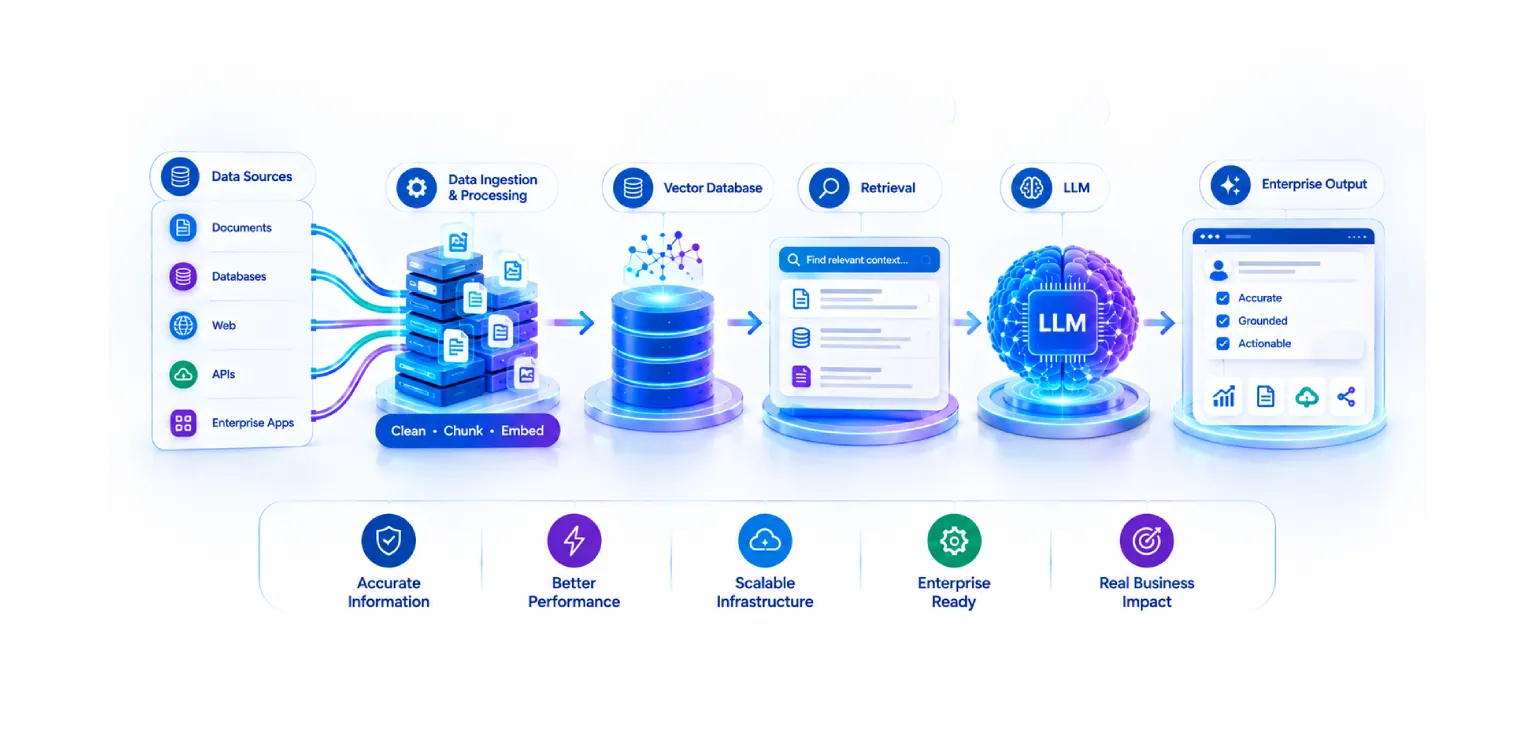
If you strip it down, RAG really just has four moving parts. Someone asks a question, the system goes and searches your knowledge base for pieces of info that seem relevant, those pieces get handed to a language model along with the original question, and the model writes an answer using that context instead of just guessing.
Enterprise RAG is that same basic idea, except now it has to survive contact with the real world. You’re dealing with huge piles of data, a bunch of different sources all at once, strict rules about who’s allowed to see what, information that keeps changing, and enough horsepower to serve hundreds or thousands of people without falling over. Honestly, once you get to this scale, it stops feeling like an AI project and starts feeling like a plumbing project, with the AI model sitting somewhere near the end of the pipe.
How do you build a RAG system for enterprise data?
| You build it as a pipeline, not as a model. Six stages carry a question from raw enterprise content to a grounded answer – ingestion, chunking, indexing, retrieval, reranking, and generation. Each one is walked through below. |
The end-to-end architecture
Let’s walk through the full pipeline, step by step, the way it actually flows in a working system.
| | |||||||||||||||||
| The Six Stages of an Enterprise RAG Pipeline From raw enterprise data to a grounded answer
Each stage carries its own scaling and quality problems — that is what separates production RAG from a proof of concept. |
Figure 1 — The six stages of an enterprise RAG pipeline, from ingestion to generation.
1. Data ingestion Everything starts here, and honestly this is where most of the real headache is. Think about where your company’s knowledge actually sits. SharePoint folders, Confluence pages, random PDFs someone emailed around, support tickets, CRM records, databases, and let’s be real, probably a few old file shares that nobody has touched in years but everyone’s too scared to delete. An ingestion pipeline goes and pulls content from all of these places, cleans it up so it’s usable, and gets it ready to move on to the next step.
2. Chunking Here’s the thing, you can’t just take a 200 page policy document and dump the whole thing into a model and expect a quick, accurate answer back. It doesn’t work that way. Documents need to get broken down into smaller pieces, usually called chunks, so the system can go find and pull out just the part that’s actually relevant instead of the whole document every time. And getting the chunk size right actually matters more than people expect. Make the chunks too small and you lose the context around them. Make them too big and you’re dragging in a bunch of noise that slows everything down. Most enterprise setups land somewhere around a few hundred words per chunk, usually with a bit of overlap between chunks so nothing important gets cut off right at the edge.
3. Indexing Once you’ve got your chunks, each one gets turned into a vector, basically a string of numbers that captures what that chunk actually means, and that gets stored in a vector database. Along with the vector, you also store extra info about it, things like who owns the document, which department it belongs to, when it was created, who’s allowed to see it, and what type of file it is. That extra info doesn’t seem like much now, but it ends up mattering a lot later on.
4. Retrieval Someone types a question, and the system goes digging through the index to pull back whatever chunks look the most relevant to what they asked.
5. Reranking That first pass at retrieval is quick, but it’s a bit rough around the edges. So there’s usually a second step where the top results get looked at more carefully and re-scored, so the genuinely best pieces of context actually end up on top before anything gets sent to the model.
6. Generation And finally, the question plus whatever chunks got picked go over to the language model, which puts together an answer based on that actual retrieved information instead of just winging it.
Sounds simple when you lay it out like that. But each one of these six steps has its own scaling headaches and its own quality problems hiding underneath it, and that’s really what separates a solid enterprise RAG implementation from one that quietly falls apart under real usage.
Scaling for real enterprise conditions
A pilot project might index a few thousand documents and get poked at by five people on the team. A real production system is a different animal entirely, we’re talking millions of documents, hundreds of people hitting it at the same time, and data pouring in from a dozen systems at once. A few things have to change once you’re operating at that level.
For starters, your vector database can’t just be one server holding everything in memory, it needs proper sharding and distributed search built in from the start. Query traffic needs load balancing and caching so the same popular questions aren’t hammering your infrastructure over and over. You also need clean support for multiple teams or departments, so one group’s heavy usage doesn’t drag down everyone else’s experience. And your ingestion pipeline has to actually keep up with new and changing documents, not fall further and further behind.
| This is usually right about when companies realize RAG isn’t really an AI project at all. It’s a data engineering project, and there just happens to be an AI model bolted on top of it. |
| Not sure whether your current setup will hold at scale? Most teams find out the hard way, once real users arrive. Impressico’s RAG implementation services team can walk your architecture with you before that happens. |
Hybrid search: combining semantic and keyword search
Pure vector search, also called semantic search, is genuinely good at understanding meaning. Ask about “reducing employee attrition” and it’ll happily surface a document titled “staff retention strategies” even though not a single word matches up exactly. But it’s not perfect. Vector search alone tends to fumble exact terms, things like a product code, an invoice number, or a specific legal clause reference.
That’s exactly where old school keyword search still pulls its weight. Something like BM25 is really good at catching exact terms and specific phrases that vector search might gloss over. The smarter move for enterprise RAG is to just use both, and that combination is what people call hybrid search. You run a semantic search and a keyword search at the same time, then merge and rank whatever comes back from both. End result, you get the meaning behind the question and any exact terms it happened to contain.
| | ||||||
| Hybrid Search Semantic and keyword search, running in parallel
↓
↓
You get the meaning behind the question and any exact terms it happened to contain. |
Figure 2 — Semantic and keyword search running in parallel, then merged and ranked.
Getting the right context: chunking, metadata, and reranking
If you’re going to spend real engineering effort anywhere, spend it here, because retrieval accuracy is where most of the actual work lives.
Chunking isn’t a “set it and forget it” kind of setting. A legal contract needs to be chunked differently than a support ticket log or a spreadsheet full of sales numbers. Some teams stick with fixed-size chunks, others go for structure-aware chunking that pays attention to headings, paragraphs, or table boundaries. There’s really no shortcut here, you kind of just have to test it on your own data and see what actually works.
Metadata filtering is another lever worth pulling. Say someone asks a question about HR policy, you can filter the search so it only looks inside HR documents and skips right past engineering or finance content that might otherwise sneak into the results. Narrower search space, faster results, better accuracy.
And reranking is basically your last quality check before anything gets handed off. Even after running both semantic and keyword search, the top results aren’t always sitting in the perfect order. A reranking model takes a closer look at each candidate chunk against the actual question and reshuffles things so the model ends up with the best possible context, not just whatever got there first.
Security, authorization, and data isolation
Of everything covered here, this one probably matters the most, and it’s also one of the easiest things to get wrong.
| Not everyone at a company should be able to see everything, that much is obvious. An HR document listing salary bands has no business showing up in some random employee’s search results. A finance report should stay locked down to finance folks and leadership. If your RAG system doesn’t respect those boundaries, you’ve basically built a data leak machine, just one with a fancy AI front end. |
The right way to handle it is to build permissions into every layer from the start, not tack them on at the end as an afterthought. Access checks need to happen right at retrieval time, so if someone isn’t authorized to see a document, it gets filtered out before it ever reaches the language model, not after the fact. A lot of enterprise RAG implementation services handle this through row-level security tied directly to the metadata, checking each user’s role and permissions against each document’s access rules in real time. And this needs to hold up consistently across departments, business units, or separate client accounts in multi-tenant setups, every single time a query runs, no exceptions.
Keeping information fresh
Company knowledge doesn’t just sit there frozen in time. Policies get updated, products change, new documents show up daily, old ones get archived or quietly deleted. If your RAG system is working off a stale index, it’ll answer confidently with outdated information, which honestly might be worse than not answering at all.
The fix is incremental indexing, where only new or changed documents get reprocessed instead of rebuilding the whole index from scratch every single time. Document versioning matters too, so the system pulls the current version of a policy or contract instead of some outdated copy that’s still floating around somewhere. Good setups also build direct sync pipelines to source systems like SharePoint or Confluence, so when something changes there, it gets picked up within minutes or hours, not weeks later.
Evaluation and monitoring: how do you know it’s working?
You can’t really improve something you’re not measuring, and that holds just as true for RAG systems as anything else. A handful of metrics matter here.
|
|
|
|
|
Retrieval quality tells you whether the system is actually grabbing the right chunks for a given question. Groundedness checks whether the model’s answer is actually backed by what got retrieved, or whether it wandered off and made something up. Answer relevance is about whether the response actually addresses what was asked in the first place. Latency matters because a slow assistant gets abandoned fast, no matter how accurate it is underneath. And cost per query really adds up at scale, a system fielding thousands of queries a day can rack up a surprisingly large bill if nobody’s watching it.
Ongoing monitoring, with real feedback from actual users and regular spot checks on sample queries, is what turns a one-time launch into something that keeps getting better instead of quietly getting worse.
Performance and cost optimization
Running RAG in production at scale isn’t cheap if you’re careless about it, so optimization needs to be part of the plan from day one, not something you bolt on later when the bill shows up.
Caching common questions and their answers saves both time and money on repeat traffic. Running vector search and keyword search in parallel instead of one after the other cuts down response time noticeably. Efficient indexing, using approximate nearest neighbor techniques instead of brute-force search, keeps things fast even at large scale. Model selection matters too, not every query needs your biggest, most expensive model, plenty of simple questions can get routed to something smaller and cheaper. And context optimization, meaning you only send the model the chunks that actually matter instead of a giant wall of text, helps on both cost and accuracy, since a confused model with too much irrelevant context tends to give worse answers anyway.
Connecting RAG to your actual enterprise systems
A RAG system is only ever as good as the data it can actually reach. For most companies, that means hooking into CRM systems like Salesforce, ERP systems like SAP, internal databases, data lakes, SharePoint, Confluence, and a handful of internal knowledge bases that have piled up over the years.
People tend to underestimate this integration layer, but it’s a big chunk of the work. Every single system has its own API, its own data format, its own permission model, and its own little quirks that nobody documented anywhere. Building solid connectors, and keeping a clean way to pull fresh data from each source, is a big part of what separates a working enterprise RAG implementation from something that only ever worked in a lab.
Why enterprise RAG projects fail in production?
| Many enterprise RAG failures are caused by data, retrieval, security, and architecture decisions rather than the AI model alone. They tend to surface late, long after the decisions that caused them were made. |
Worth being honest about this one, because it happens constantly. Plenty of RAG pilots look great in a demo and then quietly fall apart the moment real users and real data volumes show up.
The usual suspects are poor chunking that breaks context in awkward places, weak or missing metadata filtering that lets irrelevant or unauthorized documents slip through, skipping the reranking step so the model gets handed mediocre context, treating security and permissions as an afterthought until it turns into a compliance headache, and having no monitoring in place so nobody even notices when quality starts slipping. Scaling problems are common too, a system that ran fine for fifty test users can grind to a halt with five thousand real ones. And honestly, most of these failures aren’t really about the AI model at all. They’re architecture and engineering problems wearing an AI costume.
| Recognize any of these in your own pilot? Most of these failures are fixable, and considerably cheaper to fix before launch than after. An architecture review catches them while the decisions are still reversible. |
What is the difference between RAG and fine-tuning?
| The short version: fine-tuning changes the model, RAG changes what the model is given to work with. That single distinction drives almost every practical trade-off between the two. |
This one comes up a lot, so let’s just address it head on. Fine-tuning actually changes the model itself, you train it further on your own data so it adapts its behavior and picks up task-specific patterns or a new style. RAG doesn’t touch the model at all, it dynamically provides relevant enterprise knowledge right at the moment someone asks a question.
For most enterprise use cases built around company knowledge, RAG tends to be the better fit. It’s easier to keep current, updating a document in your knowledge base is a lot simpler than retraining an entire model. It’s more transparent too, you can actually show people which documents an answer came from. And it’s generally cheaper to maintain for knowledge that keeps changing. Fine-tuning still has its place, especially for teaching a model a specific tone, format, or narrow specialized skill, but if the goal is keeping an AI assistant accurate and current on business knowledge, RAG is usually where you want to start.
| |
| RAG vs Fine-Tuning: What Actually Differs Both have a place — they solve different problems For most enterprise use cases built around company knowledge, RAG tends to be the better starting point. |
Figure 3 — Where RAG and fine-tuning actually differ, and what each is best suited to.
How much does building an enterprise RAG system cost?
Costs vary a lot depending on how big you’re going, but it’s worth setting realistic expectations up front. Generally it breaks down into a few buckets: infrastructure for your vector database and search systems, the compute cost of running the language model on every single query, the engineering time it takes to build ingestion pipelines and connectors to all your data sources, and then ongoing costs for monitoring, evaluation, and general upkeep as your data keeps shifting.
A small pilot connected to one or two data sources can be put together fairly quickly and without breaking the bank. A full enterprise rollout, connected to a dozen systems, serving thousands of users, with proper security and monitoring baked in, is a much bigger commitment, both in engineering hours and ongoing infrastructure spend. Working with an experienced RAG implementation services partner tends to save money down the line, mostly because a lot of these architecture decisions are genuinely hard to walk back once real users are already depending on a live system. Our guide to measuring ROI from generative AI projects covers how to frame that investment.
What this means for the business
None of this engineering effort is just for show. Done properly, enterprise RAG architecture actually turns into business outcomes that leadership genuinely cares about.
Employees stop wasting time digging through folders and old email threads looking for information, and that adds up to real productivity gains across the whole company. Decisions get made faster when people can just ask a question and get a grounded answer in seconds instead of waiting on someone else to track it down. Support costs come down when customers or employees can find accurate answers on their own instead of opening a ticket every time. And the overall experience gets better on both sides, employees get their work done faster, customers get help that’s actually accurate, current, and relevant to their specific situation.
Final thoughts
Building RAG at scale was never really about grabbing the fanciest language model out there. It’s about everything around that model, how you ingest and index your data, how you retrieve and rerank the right context, how you keep it all secure and up to date, and how you measure and tune the system once real people are actually using it.
Get that foundation right, and RAG stops being a cool demo and starts being something your whole organization genuinely leans on every single day.
| Build enterprise RAG architecture that survives production Impressico designs, builds and scales retrieval systems for enterprises with real data volumes, real permission models, and real users. Bring us your architecture — or a blank page. Request an Enterprise RAG Architecture Review → |

IBS
Similar articles

Hybrid Search: Combining Semantic and Keyword Retrieval for Better RAG Results
September 21, 2026
Chunking Strategies for RAG: What Actually Works in Production
September 16, 2026
Vector Databases Compared: Pinecone vs Weaviate vs Qdrant vs pgvector for Enterprise RAG
September 14, 2026
7 Signs Your Organization Is Ready for AI Agents
August 14, 2026
Governance and Safety for Autonomous AI Agents: A Practical Guide for Enterprises
August 3, 2026
Designing Multi-Agent Systems: Orchestration, Tools & Guardrails
July 24, 2026
