


July 29, 2026
Salesforce Data Cloud Explained: Unifying Customer Data for AI
Enjoying this article?
Share it with the world!


Salesforce Data Cloud vs CDP: What's the Difference?
| EDITOR’S NOTE — In October 2025 (at Dreamforce 2025), Salesforce renamed Data Cloud to Data 360. The capabilities described here are unchanged; “Data Cloud” remains the widely used term. See Salesforce’s official Data 360 (formerly Data Cloud) page for the current product name. |
Most companies have way more customer data than they know what to do with. Some of it lives in the CRM. Some is stuck in a marketing tool. A chunk is buried in support tickets, another chunk in the website analytics, and there’s probably a spreadsheet somewhere that only one person on the team actually understands. Sound familiar?
Here’s the problem in plain terms: none of this data talks to each other. And when your data doesn’t talk, your AI tools can’t either. They end up guessing, repeating questions customers already answered, or just giving flat, generic responses.
This is the exact gap Salesforce Data Cloud was built to fix. Below, we’ll walk through what Data Cloud actually is, how it works with Agentforce, why Salesforce AI leans on it so heavily, and how it’s different from a regular customer data platform (CDP).
What is Salesforce Data Cloud?
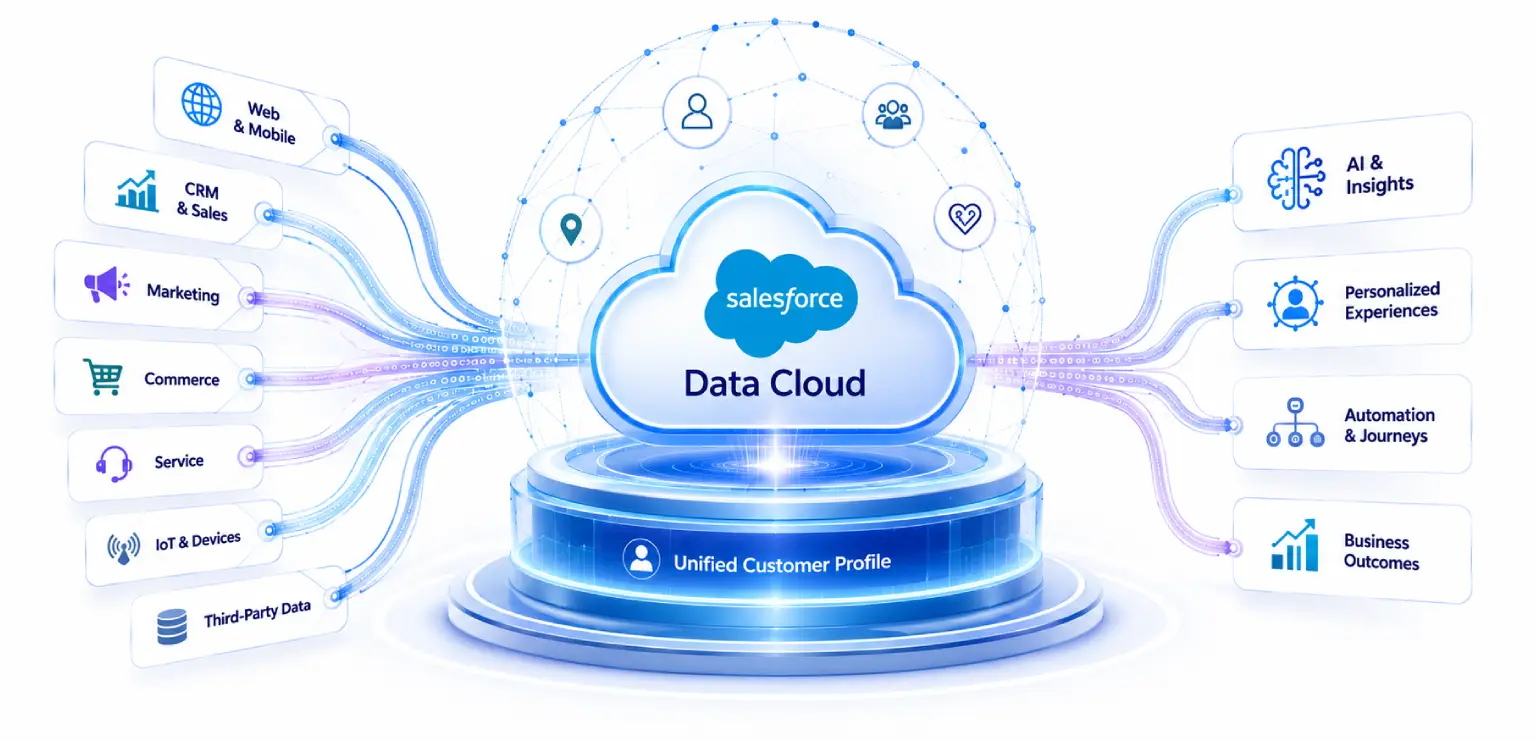
Imagine a central hub where every piece of customer information finally lands in one place. Data Cloud pulls in records from your CRM, your website, your online store, your email campaigns, your call logs, even tools outside the Salesforce ecosystem. Once it’s all in there, Data Cloud cleans it up, matches records that belong to the same person, and organizes everything into one coherent profile.
Say you have a customer named Priya. She browses your site, signs up for your newsletter, calls support once about a delivery issue, and later buys something in store. Without Data Cloud, your systems might treat her as four separate people. Four different “Priyas,” none of them talking to the others. With Data Cloud, it’s just one Priya, and everyone in your company, whether it’s sales, marketing, or support, sees the same complete picture of her.
| From Four “Priyas” to One Complete Profile
|
Identity resolution turns scattered records into one real-time, unified customer profile.
That’s really the point of a Salesforce customer data platform. It’s not just storage. It’s the cleanup and connection work that makes the data usable. And this step, building unified customer data, is what everything downstream depends on, especially AI. (For a wider view of how the Salesforce clouds fit together, see our overview of Salesforce cloud solutions.)
How does Data Cloud work with Agentforce?
Agentforce is Salesforce’s AI agent system, the part that can answer customer questions, complete tasks, and take action without a human clicking every button. But an AI agent is only as sharp as what it can see. Cut off its access to a customer’s history, and you get vague answers, or answers that are just wrong. (We cover how these agents work in more depth in What is Salesforce Agentforce.)
This is where Data Cloud comes in. It feeds Agentforce real time, unified customer data, so the agent always has the full picture before it says or does anything. Back to Priya. If she messages support about a recent order, an agent running on Agentforce and connected to Data Cloud can pull up her past purchases, her browsing history, her earlier support call, and her preferences instantly. She doesn’t have to repeat her whole story to a bot that has no memory of her.
Without Data Cloud, Agentforce is basically a new hire who was never handed the customer files. With it, Agentforce behaves more like your best, most experienced employee, someone who already knows the customer walking in. That’s the real partnership here. Data Cloud handles the knowing. Agentforce handles the doing.
| GO DEEPER — For a full look at how Agentforce, Einstein, and Data Cloud work together as one AI stack, read AI-Powered Salesforce: Agentforce, Einstein & Data Cloud. You can also see it applied in Einstein Copilot use cases for Salesforce. |
Why does Salesforce AI need Data Cloud?
Fair question, and the answer isn’t complicated. AI is only as good as the data behind it. Feed it messy, incomplete, scattered information, and you’ll get messy, incomplete, scattered results back. Doesn’t matter how advanced the model is. This holds for chatbots, prediction engines, and the agents running inside Agentforce. (This is the same principle behind embedding AI in Salesforce the right way.)
A few reasons Salesforce AI leans so hard on Data Cloud:
It needs something real to stand on. AI tools tend to fill gaps with guesses when the facts aren’t there. Clean, unified data from Data Cloud gives the AI something solid to work from instead of improvising.
It needs current information, not last week’s. Customer behavior shifts by the hour. A cart gets abandoned, a support call comes in, and a bad review gets posted, all within the same afternoon. Data Cloud keeps everything fresh so the AI isn’t working off stale data.
It needs one version of the truth across teams. When sales, marketing, and service all draw from the same unified records, the AI gives consistent answers no matter who’s asking. That consistency is what actually builds trust in the system over time.
And it needs to know the person to personalize anything. Generic responses happen when the AI doesn’t really know who it’s talking to. Data Cloud is what turns “Dear Customer” into something that actually feels relevant to that one individual.
Basically, Data Cloud for AI isn’t a nice extra bolted on the side. It’s the foundation everything else sits on. Skip it, and your Salesforce AI tools are operating half blind. (If you’re planning AI more broadly, our guide to generative AI data readiness walks through getting that foundation right.)
What is the difference between Data Cloud and a CDP?
This one comes up constantly, and it’s worth untangling because on paper, Data Cloud sounds a lot like any other CDP out there.
A traditional CDP mostly focuses on pulling data together to build customer profiles, usually for marketing use cases like email targeting or ad campaigns. Useful, sure, but it often sits somewhat apart from your other systems and needs extra work to actually connect.
Salesforce Data Cloud does that same job, but goes further in a few important ways.
A CDP organizes the data; Data Cloud organizes it and immediately puts it to work — especially for AI.
It’s built directly into the Salesforce platform, not bolted on. Your unified data flows straight into your CRM, your service tools, your commerce platform, and your AI agents, without a pile of custom integration work.
It was designed with AI in mind from day one. Most CDPs weren’t built thinking about AI agents at all. Data Cloud was built specifically to power tools like Agentforce, so the data is instantly usable for AI, not just for a marketing dashboard.
It handles real time data at real scale. Data Cloud can process huge volumes of information, including data from outside Salesforce, and update profiles almost the moment something changes. That immediacy matters a lot when an AI agent needs to respond right now, not tomorrow.
And it doesn’t just tell you things, it can act on them. A typical CDP might flag that a customer is likely to churn and leave it there. Data Cloud, paired with Agentforce, can trigger an actual response, like an AI agent reaching out with a relevant offer at the right moment.
So while both tools aim to bring customer data together, a regular CDP is more like a well-organized filing cabinet. Data Cloud is closer to a living system that organizes the data and immediately puts it to work, particularly for AI.
Bringing It All Together
Scattered data is just noise. Ten systems that don’t talk to each other don’t add up to insight, they add up to confusion. Salesforce Data Cloud takes that noise and turns it into one unified view of each customer, updated in real time, ready to power everything from service to marketing to the AI agents running inside Agentforce.
For any business serious about getting value from Salesforce AI, Data Cloud isn’t a setting you toggle on later. It’s the engine room. Without it, your AI tools are guessing. With it, they’re actually informed, and that shows up in every interaction, for your team and for your customers. (For the specific AI features that ride on top of this data, see our rundown of Salesforce Einstein AI use cases.)
If your organization is still juggling disconnected systems, that’s usually the place to start before rolling out AI more broadly. Get the data unified first, and every AI investment after that has a real shot at paying off. (A structured rollout helps here — see our Salesforce implementation guide, and for larger organizations, the enterprise Salesforce implementation guide.)
At Impressico Business Solutions, we help businesses set up and get real value out of Salesforce Data Cloud, so AI initiatives are built on something solid instead of guesswork. If you’re weighing how Data Cloud and Agentforce could fit into your setup, our team is happy to talk through what that would actually look like for you. (It’s also worth understanding the role of a Salesforce consulting partner before you start.)
| IMPRESSICO · SALESFORCE SERVICES Get your data foundation right before you scale AI Unified customer data is the difference between AI that guesses and AI that actually knows your customer. At Impressico Business Solutions, our Salesforce services team helps you set up Salesforce Data Cloud and Agentforce so every AI investment after that has something solid to stand on. Whether you’re just untangling disconnected systems or planning a full rollout, we can help you map the path.
|
Impressico Business Solutions — Helping teams unify customer data so Salesforce AI is built on something solid, not guesswork.

IBS
Similar articles

Salesforce Manufacturing Cloud: Account-Based Forecasting for Sales Agreements
October 21, 2026
Salesforce Health Cloud: Modernizing Patient Engagement and Provider Workflows
September 25, 2026
Salesforce Financial Services Cloud vs Sales Cloud: Which One Fits Wealth, Banking, and Insurance
September 23, 2026
Salesforce Industry Clouds: When Vertical CRM Beats Sales Cloud
September 18, 2026
Agentforce Readiness: What to Fix in Your Salesforce Org First
August 17, 2026
Is Your Salesforce Org Ready for AI? An Enterprise Readiness Checklist
August 7, 2026
