


June 24, 2026
AI-Powered Salesforce: Agentforce, Einstein & Data Cloud for Enterprise CRM
Enjoying this article?
Share it with the world!


Agentforce, Einstein & Data Cloud: Building AI-Powered Salesforce
| ⚡ Quick Answer “AI-powered Salesforce” means three connected layers working as one system. Data Cloud unifies your customer data into a single profile. Einstein uses that data to predict what’s coming and generate content. Agentforce deploys autonomous AI agents that actually complete tasks on their own. None work well in isolation — the value shows up only when all three run together inside one connected CRM. Start with your data foundation, not the flashy agents. |
Everyone’s talking about AI like it’s some magic switch you flip on and suddenly your business runs itself. It’s not. AI only works if it has good data to chew on and a system that can actually do something with what it learns. That’s really the whole story behind AI-powered Salesforce, and it’s why three names keep coming up in every CRM conversation lately: Agentforce, Einstein, and Data Cloud.
At Impressico Business Solutions, we work with many companies who feel their CRM has become little more than a record-keeping tool. It stores contact details, deal stages, and call logs well enough, but that’s about where it stops. What they really want is a system that can think a bit, predict a bit, and act on its own, without someone having to drive every step manually. That’s the real promise here.
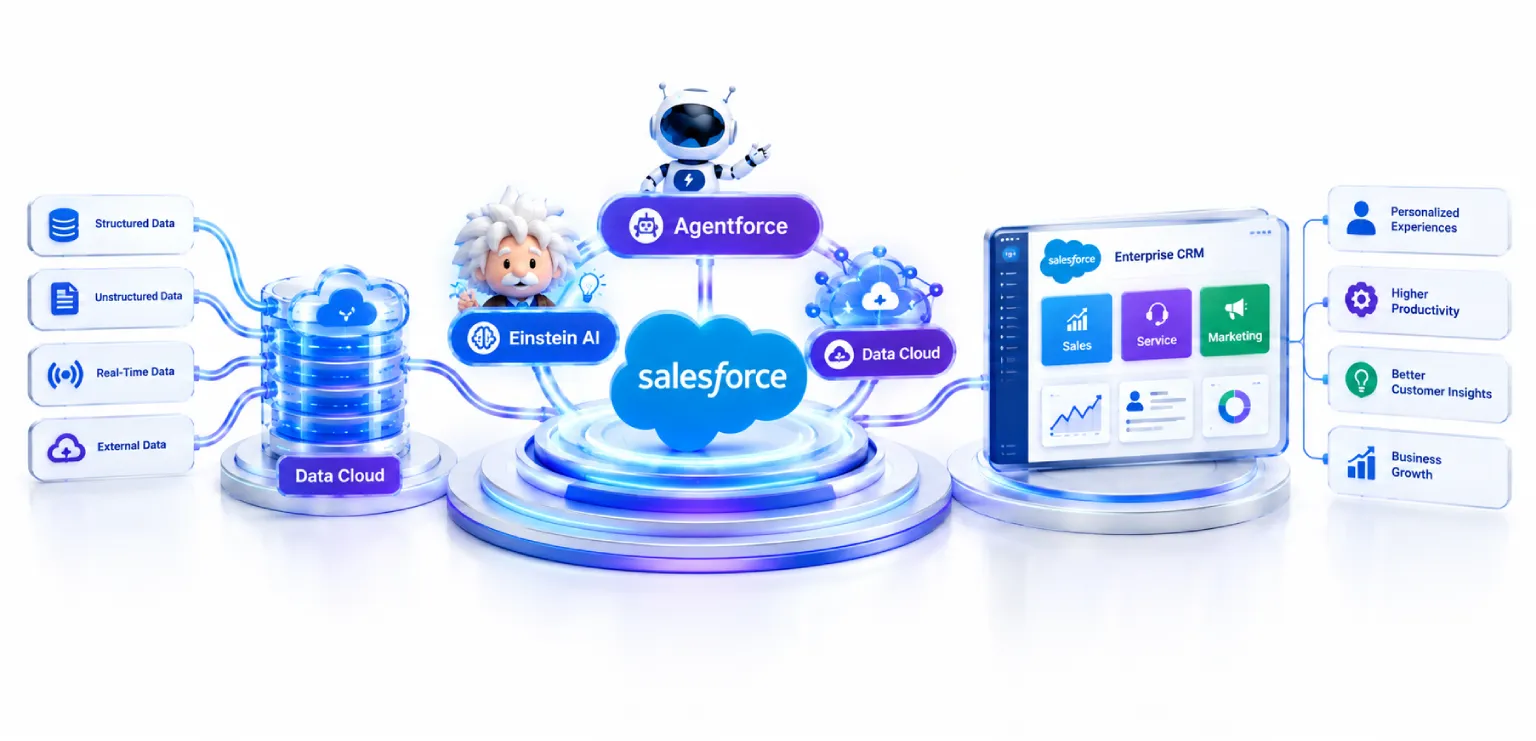
| The AI-Powered Salesforce Stack — One Connected System
Each layer builds on the one before it — data first, then intelligence, then autonomous action |
Why Did Enterprise CRM Even Need an AI Upgrade?
From passive record keeper to active decision engine
Old-school CRM software was built for one job: writing down what already happened. Rep talks to customer, logs the call, moves the deal to the next stage, done. It’s a record keeper. Useful, sure, but it doesn’t help you make sense of anything.
Here’s the actual problem, though. Businesses today are buried in data. Emails, support tickets, website clicks, past purchases, social media comments, it just keeps piling up faster than any team could ever read through, let alone act on. Most companies have way more customer data sitting around than they know what to do with. That’s the gap AI was meant to fill.
| The Reality A traditional CRM records what already happened, but it doesn’t help you make sense of the flood of emails, tickets, clicks, and purchases piling up faster than any team can act on. That gap is exactly what AI was built to close. |
Salesforce saw this coming early and, instead of bolting AI on as a separate tool you have to buy and configure, they built it straight into the platform. So now you’ve got one connected stack: your data, your AI, your automation, all under one roof. And that stack breaks down into three pieces, each doing something different.
What is Salesforce Agentforce?
Autonomous AI agents that act, not just chat
Let’s start here since it’s the one everyone asks about first.
Agentforce, in plain terms, is Salesforce’s way of building AI agents that don’t just chat, they actually go do things. There’s a real difference between a chatbot that answers your question and an assistant that handles the whole task for you. Agentforce leans toward the second kind.
|
|
| “A Customer Asks About a Delayed Order” — What Agentforce Does Agentforce · Delayed Order Resolution
The agent runs the whole task end to end — and knows when to escalate to a human |
Say a customer asks about a delayed order. An Agentforce agent can check the order status, notice it’s running late, issue a discount code based on rules your company already set, and fire off a personalized email, all without a human touching it. And if the situation gets messy or sensitive, the agent is smart enough to know when to just hand it off to a real person instead of winging it.
This is what people mean when they say “autonomous agents” in CRM. Not bots running a fixed script, but something that actually understands context, makes decisions inside the boundaries you give it, and takes real action inside your Salesforce org. For bigger teams this usually means quicker customer service, less time wasted on repetitive stuff, and support that doesn’t stop at 6 pm.
One thing worth knowing: these agents run on your company’s own data and your own rules. They’re not pulling random answers off the internet like a generic chatbot. They operate inside what Salesforce calls Customer 360, basically one full picture of a customer pulled together from sales, service, and marketing all at once.
| Curious where your CRM stands today? Explore what AI-powered Salesforce could look like for your team — no commitment, just a clear picture. |
What Can Salesforce Einstein AI Actually Do?
The predictive and generative layer across the platform
Now the second question people usually ask.
Einstein is Salesforce’s predictive and generative AI engine. It’s actually older than Agentforce, it started out doing simple things like lead scoring years ago and has since grown into a whole suite of AI features spread across the platform.
|
|
On the predictive side, Einstein looks at patterns in your past data and tells you what’s probably coming next. Which leads are likely to convert. Which deals look shaky. Which customers might cancel. Even how much stock you’ll need next quarter. Stuff that used to take an analyst days to figure out, Einstein just does quietly in the background, updating its guesses as new data rolls in.
On the generative side, it writes things for you. Follow-up emails, quick summaries of long support cases, suggested replies to tickets, marketing copy tailored to a specific customer group. Sales reps use this mostly to stop wasting half their day writing the same kind of email over and over, so they can spend more time actually talking to people.
There’s also Einstein Copilot, which sits right inside your Salesforce screens like a built-in helper. You can literally type something like “what are my top three deals this week” and get an answer right there, no digging through five different reports.
Bottom line, Einstein isn’t really one tool. It’s more of a layer of predictive and generative AI spread across sales, service, marketing, and commerce, all working off the same underlying customer data.
What is Salesforce Data Cloud?
The data foundation that makes everything else work
This is the piece that, honestly, makes the other two actually work properly.
Data Cloud is Salesforce’s data engine. It pulls customer info together from everywhere- your CRM, your website, your email tool, your point-of-sale system, even outside third-party apps, and merges it all into one unified profile per customer. No more wondering if the person in your support system is the same lead sitting in your marketing tool. It’s just one person, one record.
| Data Cloud — Many Sources Into One Profile
▼
No more wondering if the lead in marketing is the same person in support — it’s one record |
| Industry Insight Agentforce and Einstein are only ever as good as the data they’re fed. Scatter customer info across ten disconnected systems and your AI ends up making calls on half the picture. Data Cloud acts like a central nervous system — constantly cleaning, matching, and updating records in real time. |
Why does this matter so much for AI? Because Agentforce and Einstein are only ever as good as the data they’re fed. If your customer info is scattered across ten systems that don’t talk to each other, your AI agents end up making calls based on half the picture. Data Cloud fixes that by acting like a central nervous system, constantly cleaning, matching, and updating records in real time.
This is also where the term “generative CRM” really starts to make sense. When your CRM has one accurate, real-time view of a customer, your generative AI tools produce content that’s actually relevant, and your predictive tools make forecasts that are actually trustworthy. Data Cloud is the foundation on which everything else gets built on top of.
Agentforce vs Einstein vs Data Cloud at a glance
How Do You Actually Add AI to Your Salesforce Org?
A staged, readiness-first rollout path
This is the practical question once people get the basics.
Honest answer, it depends on your AI readiness. Meaning, how clean and connected is your data right now. A lot of companies want to jump straight into building flashy autonomous agents without fixing their data first, and that’s usually a mistake. Here’s a more realistic path.
| The Staged Rollout Staircase
Don’t jump straight to the agents — build each step on a solid data foundation first |
Start by getting your data in order. That usually means setting up Data Cloud to unify your customer records across systems. Skip this step and whatever AI feature you turn on later will be working off patchy, incomplete information.
Next, turn on Einstein features that actually match what you need right now. Most businesses start small, maybe lead scoring, maybe email summaries, before moving into anything more advanced.
Then, once your data is solid and your team is comfortable, start looking at Agentforce for specific repetitive tasks, answering common support questions, qualifying inbound leads, that kind of thing.
| Important — The Trust Layer A set of safeguards that keep AI responses grounded in your actual company data, mask anything sensitive, and log what the AI did and why. For any enterprise dealing with compliance or customer privacy, this isn’t optional. |
Salesforce also talks a lot about something called the trust layer. It’s basically a set of safeguards that keep AI responses grounded in your actual company data, mask anything sensitive, and keep a log of what the AI did and why it did it. For any enterprise dealing with compliance or customer privacy, this isn’t optional. It’s the whole reason a lot of companies feel safe rolling this stuff out in the first place.
This is also exactly where having someone who’s done this before saves you a lot of headaches. At Impressico Business Solutions, we help businesses figure out where they actually stand on AI readiness, get their data cleaned up and connected through Data Cloud, set up Einstein features tied to real goals instead of guesswork, and build Agentforce agents that fit how the team actually works rather than some generic setup that needs six months of fixing later. You can see the full scope of our Salesforce services if you want a sense of how that engagement looks in practice.
| Worried your data isn’t ready for AI? Most companies aren’t — and that’s fine. We’ll assess your AI readiness and map a staged rollout that fits how your team actually works. |
Bringing It All Together
Three layers, one connected system
So when people say “AI-powered Salesforce,” what they really mean is three connected layers working as one system. Data Cloud pulls your customer data together. Einstein uses that data to predict what’s coming and generate content. Agentforce takes it a step further and lets agents actually go complete tasks on their own.
| The Biggest Problem A brilliant AI agent running on messy data is still going to make bad calls. A predictive model without unified customer data is just guessing with extra steps. The real value only shows up once all three layers work together. |
None of these work well in isolation, by the way. A brilliant AI agent running on messy data is still going to make bad calls. A predictive model without unified customer data is just guessing with extra steps. The real value only shows up once all three layers are working together inside one connected CRM.
If you’re thinking about bringing this kind of AI into your own Salesforce setup, don’t start with the flashy agents. Start with your data foundation, make sure your team actually understands what each piece does, and roll it out in stages instead of all at once.
That’s the approach we follow at Impressico Business Solutions. And honestly, it’s the difference between AI that genuinely moves your business forward and AI that just becomes another tool collecting dust six months in.
| Key Takeaways
|
Frequently Asked Questions
Quick answers on AI-powered Salesforce
| What’s the difference between Agentforce and Einstein? Einstein is the predictive and generative AI layer — it forecasts outcomes and writes content. Agentforce goes a step further with autonomous agents that take real action and complete whole tasks inside your Salesforce org, not just answer questions. |
| Do I need Data Cloud to use Agentforce and Einstein? Agentforce and Einstein are only as good as the data they’re fed. If your data is scattered across disconnected systems, they make decisions on half the picture. Data Cloud unifies everything into one real-time profile, which is why it’s the recommended starting point. |
| Where should I start when adding AI to my Salesforce org? Start with your data foundation — set up Data Cloud to unify records. Then turn on Einstein features that match real needs (lead scoring, email summaries). Once data is solid and the team is comfortable, deploy Agentforce for specific repetitive tasks. |
| Is AI-powered Salesforce safe for compliance and privacy? Salesforce’s trust layer adds safeguards that keep AI responses grounded in your own company data, mask sensitive information, and log what the AI did and why. For enterprises handling compliance or customer privacy, this is essential rather than optional. |
| What does “generative CRM” actually mean? It describes a CRM with one accurate, real-time view of each customer, where generative AI produces genuinely relevant content and predictive tools deliver trustworthy forecasts. Data Cloud provides the unified foundation that makes this possible. |
| Let’s Talk Ready to make your Salesforce CRM think, predict, and act? Impressico helps you assess AI readiness, unify data through Data Cloud, and roll out Einstein and Agentforce in stages — built around how your team actually works. |

IBS
Similar articles

Salesforce Financial Services Cloud vs Sales Cloud: Which One Fits Wealth, Banking, and Insurance
September 23, 2026
Salesforce Industry Clouds: When Vertical CRM Beats Sales Cloud
September 18, 2026
Agentforce Readiness: What to Fix in Your Salesforce Org First
August 17, 2026
Is Your Salesforce Org Ready for AI? An Enterprise Readiness Checklist
August 7, 2026
Salesforce Data Cloud Explained: Unifying Customer Data for AI
July 29, 2026
Einstein AI Use Cases Across Sales, Marketing & Service Cloud
July 13, 2026
