

May 27, 2026
Einstein Copilot Use Cases Across Sales, Service and Marketing Cloud
Enjoying this article?
Share it with the world!


What Einstein Copilot Actually Does Inside Salesforce
| ⓘ QUICK ANSWER Einstein Copilot is a conversational AI assistant inside Salesforce that pulls real information from your CRM, drafts content, updates records, and answers questions in plain English. It runs as one connected assistant across Sales Cloud, Service Cloud, and Marketing Cloud. In this guide: what Einstein Copilot is, the specific use cases in each cloud, how the three clouds connect through one assistant, and how to get started. |
Salesforce has been building AI into its platform for a while now. Most of those features were fine. Useful, even. But they never really felt like a shift. Einstein Copilot does.
It’s not just a smarter button somewhere in your CRM. It’s more like having someone on your team who already knows everything about your customers, your deals, your open tickets, and your campaigns, and is sitting right next to you ready to help. You talk to it in plain English. It actually does something useful back.
We’ve spent a lot of time with this tool across different Salesforce implementations, and in this post we want to share what we’ve seen work in the real world. Not the polished demo stuff. The actual day-to-day wins that teams notice once they start using Einstein Copilot for Sales Cloud, Service Cloud, and Marketing Cloud.
If you’re a business owner, a team lead, or just someone who keeps hearing “AI” thrown around in Salesforce conversations and wants to know what it actually means for your work, this one’s for you.
What Is Einstein Copilot, Really?
A conversational AI assistant connected to your actual CRM data
People overthink this. At its core, Einstein Copilot is a conversational assistant that lives inside Salesforce. You type something in plain language. It responds with real information pulled from your actual data. Sometimes it writes something for you. Sometimes it updates a record. Sometimes it just answers a question you’d otherwise spend ten minutes figuring out yourself.
A plain-English question gets a specific, CRM-aware answer — not a generic one |
What makes it different from a generic AI tool is that it’s connected to your CRM. It knows your accounts, your contacts, your open cases, and your campaign history. So when it gives you an answer, it’s not a generic answer. It’s specific to what’s actually going on in your business.
That’s the part that changes how people work.
Einstein Copilot for Sales Cloud
Clearing the admin noise so reps can focus on selling
Let’s start here because honestly this is where most teams feel the pain first.
Sales reps are supposed to be out there building relationships and closing deals. But if you watch what they actually spend their day doing, a big chunk of it is admin. Updating records after calls. Writing follow-up emails from scratch. Prepping for meetings by digging through old notes. Trying to figure out which deals need attention before the end of the quarter.
None of that is selling. And all of it takes time.
Einstein Copilot for Sales Cloud is built to handle a lot of that background work so reps can focus on the conversations that actually move things forward.
|
| ||
|
|
Getting ready for a call
Before a big meeting, a rep used to flip through multiple tabs, Salesforce records, email threads, sometimes old call notes in a notebook somewhere. Now they can just ask: “What’s the latest on my call with Vertex Systems this afternoon?” Einstein Copilot pulls up the recent activity, open opportunities, anything flagged, past interactions. The rep walks in knowing the full picture instead of hoping they remembered something important.
Writing the follow-up
This one sounds small but it adds up fast. After every call, there’s an email to write. Most reps stare at that blank compose screen longer than they want to admit. With Einstein Copilot, they say “Draft a follow-up based on today’s call” and get something solid in seconds. They clean it up, make it sound like themselves, and hit send. That’s ten to fifteen minutes back per meeting.
Fixing the CRM data problem
Salesforce data is only as good as what people actually enter. And most reps hate data entry. It’s boring, it feels like bureaucracy, and it always comes at the end of a long day. Einstein Copilot lets reps just say what happened in plain English, and it updates the record. “Move this to Negotiation and note that they want final pricing by the end of month.” Done. The CRM actually stays current.
Keeping an eye on the pipeline
Sales managers constantly need to know which deals are healthy and which ones are quietly going sideways. Instead of pulling reports and reading through rows of data, they can ask Einstein Copilot “Which deals in Q3 look like they might slip?” and get a plain language summary with context. It looks at engagement patterns, deal age, recent activity, and tells you what needs attention.
| The Point: The point of all these Einstein Copilot use cases in Sales Cloud isn’t to automate the selling process. It’s to clear out the noise so the actual selling can happen. |
| Curious How This Would Look for Your Sales Team? If your reps are losing time to admin work, follow-ups, and pipeline review, we can walk through how Einstein Copilot would fit your specific workflow — no demo deck required. |
Einstein in Service Cloud
Backup for support agents — faster resolutions, less stress
Support teams have a tough job. Customers come in frustrated. Cases pile up. Every agent is juggling multiple conversations at once. And there’s this constant pressure to resolve things quickly without sacrificing quality.
Einstein in Service Cloud doesn’t replace agents. It makes them faster and a lot less stressed.
| Use Case 01 Case Summaries Twenty messages, three internal notes, and a call log condensed into a clear summary in seconds. Agents understand the case before they reply. |
| Use Case 02 Response Suggestions Suggested replies drawn from your knowledge base and what’s worked for similar cases. The agent tweaks, personalizes, and sends — not writing from zero. |
| Use Case 03 Tech Troubleshooting Pulls up the right documentation and suggests next steps based on what the customer has already tried — no “let me put you on hold” moments. |
| Use Case 04 Case Wrap-Up Drafts the after-action log — issue, resolution, category. Agent glances, approves, moves on. Small thing, real time saved. |
| Use Case 05 Escalation Detection Reads the tone of a conversation and flags it or suggests a softer response when a customer is heading toward frustrated. |
Agents feel like they have backup. They’re not doing everything alone — and customers feel it too.
Reading a case before you even start
When an agent picks up an escalated case that’s been passed around, there might be twenty messages, three internal notes, and a call log to sort through before they even understand what the customer wants. Einstein Copilot can give them a case summary in seconds. Who the customer is, what they originally asked for, what’s been tried, where things stand. That alone saves several minutes per case, which adds up to a lot across a full day.
Helping agents respond better
When someone’s stuck on how to word a reply, Einstein Copilot can suggest a response based on the knowledge base and what’s worked for similar cases before. The agent isn’t writing from zero every time. They tweak the suggestion, make it personal, and send it. Response quality gets more consistent, and the time it takes drops noticeably.
Walking through technical problems
Technical support is especially hard because you’re explaining something complicated to someone who might be frustrated and not very technical. Einstein Copilot can pull up the right documentation, suggest troubleshooting steps based on what the customer has already tried, and help the agent stay on track without putting the customer on hold to go look something up.
Wrapping up cases without the paperwork pain
After closing a case, agents have to log everything. What the issue was, how it was resolved, what category it falls into. Einstein Copilot can draft that wrap-up automatically. The agent glances at it, approves it, and they’re on to the next one. Small thing. Real time saved.
Catching escalations before they blow up
Sometimes you can tell a conversation is going in a bad direction. Einstein Copilot can read the tone and flag it or suggest a softer response. It doesn’t replace the agent’s judgment but it gives them something to work with when they’re not sure how to handle a frustrated customer.
The overall impact of Einstein in Service Cloud is that agents feel like they have backup. They’re not doing everything alone. And customers feel it too.
| Service Operations Service team buried in case volume? Most agent-time savings come from boring places — case summaries, wrap-up logs, response drafts. We can help you spot which Einstein use cases would land first for your team. |
Marketing Cloud AI Use Cases
What a small marketing team can actually do at scale
Marketing teams live under a very specific kind of pressure. The campaign calendar never stops. The channel list keeps growing. Personalization has become expected rather than impressive. And most teams are trying to do all of this without getting proportionally bigger.
Marketing Cloud AI use cases with Einstein Copilot are genuinely interesting because they change how much a small team can actually do.
| Use Case 01 Audience Segmentation “Customers who bought in the last 60 days but haven’t engaged since.” Plain-English segment building — no query writer or data analyst needed. |
| Use Case 02 First Drafts Email drafts, subject line options, SMS messages based on campaign goal and audience. Light editing, not blank-page paralysis. |
| Use Case 03 Personalization at Scale One campaign, many versions — each feeling relevant to the person receiving it. The kind of work that used to need a dedicated team. |
| Use Case 04 Campaign Analytics “How did Thursday’s email do compared to the one two weeks ago?” Plain-language answers, then follow-up questions until you actually understand what worked. |
| Use Case 05 Smarter Journeys Suggests the next step based on actual customer behavior — clicked but didn’t convert? A targeted follow-up two days later might land. |
Suggestions based on patterns in your actual data — not generic best practices.
Building segments without a data person
Creating a good audience segment used to mean either knowing how to write queries yourself or waiting on someone who did. With Einstein Copilot, a marketer can describe what they want in plain English and get the segment built for them. “Show me customers who bought in the last 60 days but haven’t engaged with any email since.” That’s it. The copilot does the logic.
First drafts that don’t feel like first drafts
The hardest part of writing marketing content is often just getting started. Einstein Copilot can produce a solid email draft, a few subject line options, or an SMS message based on your campaign goal and audience. It’s not always perfect on the first pass but it’s far better than a blank page, and most of the time it only needs light editing.
Personalization that actually scales
Everyone says they want personalized marketing. Very few teams can actually pull it off at scale because writing different versions of the same message for different segments takes forever. Einstein Copilot can generate those variations based on customer data. One campaign, multiple versions, each one feeling relevant to the person receiving it. That’s the kind of thing that used to need a dedicated team.
Making sense of campaign results
Digging through a campaign performance dashboard after a send is not most marketers’ favorite thing. With Einstein Copilot, they can just ask what happened. “How did Thursday’s email do compared to the one we sent two weeks ago?” They get a clear answer with the key numbers. Then they can keep asking follow-up questions until they actually understand what worked and why.
Smarter customer journeys
Marketing journeys can get complicated fast. Einstein Copilot can suggest what the next step should be based on what a customer just did. Clicked a product page but didn’t convert? Maybe a targeted message two days later makes sense. These suggestions are based on patterns in your actual data, not generic best practices.
It All Connects
One assistant across Sales, Service, and Marketing — data moving in the background
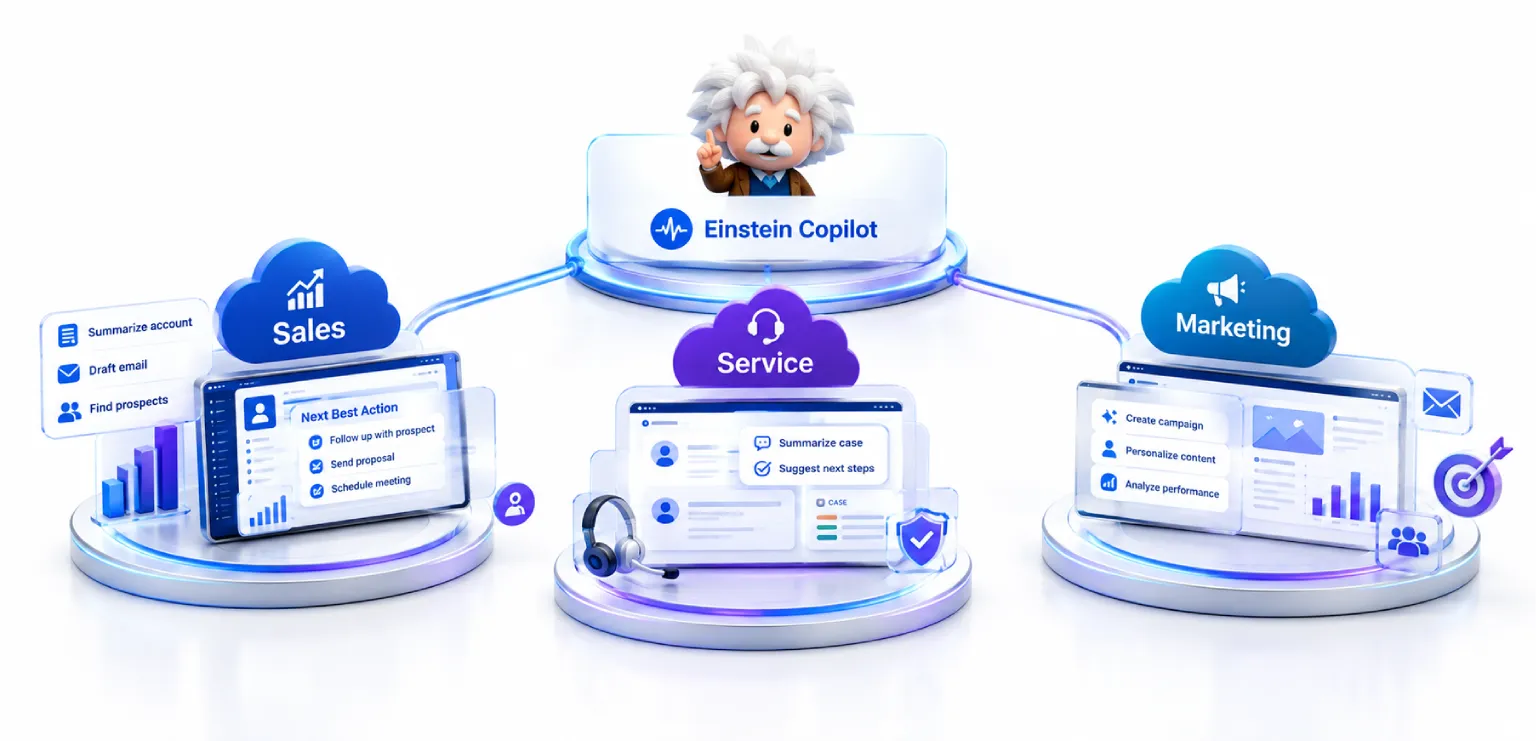
One thing worth saying clearly is that Einstein Copilot isn’t three separate tools stitched together. It runs across these clouds as one connected assistant. A service interaction updates what sales knows about a customer. A marketing campaign result informs how reps follow up. The data moves, and the copilot helps every team use it.
| Einstein Copilot — One Assistant Across Three Clouds
↓
A service interaction updates sales. A campaign result informs follow-up. Data moves — the copilot uses it. Not three tools stitched together — one connected assistant working across the entire customer lifecycle |
For companies already on Salesforce, getting started with Einstein Copilot isn’t a big lift. Your data is already there. Your processes stay mostly the same. You’re just adding a layer that makes everything faster and more informed.
| Key Takeaways
|
Frequently Asked Questions
| What is Einstein Copilot in Salesforce? Einstein Copilot is a conversational AI assistant built into Salesforce that pulls real information from your CRM. You ask in plain English, and it answers with data specific to your accounts, contacts, cases, and campaigns — or it drafts content, updates records, and surfaces what needs attention. |
| What are the best Einstein Copilot use cases in Sales Cloud? The most common Sales Cloud wins are pre-call preparation (full account context in seconds), drafting follow-up emails (10-15 minutes saved per meeting), updating CRM records by voice or plain text, and pipeline visibility (“which Q3 deals look like they might slip?”). |
| How does Einstein Copilot help Service Cloud agents? In Service Cloud, Einstein Copilot summarizes complex cases in seconds, suggests responses based on the knowledge base, helps walk customers through technical issues, drafts case wrap-up notes, and flags escalations by reading conversation tone. It doesn’t replace agents — it gives them backup. |
| What Marketing Cloud AI use cases work best with Einstein Copilot? Marketing teams use Einstein Copilot to build audience segments in plain English, draft emails and SMS messages, generate personalized variants at scale, ask conversational questions about campaign performance, and get smart suggestions for customer journey next steps. |
| How do I get started with Einstein Copilot? For companies already on Salesforce, getting started isn’t a big lift — your data is already there and your processes stay mostly the same. The harder part is connecting it properly to how your team actually works, which is where a Salesforce consulting partner usually adds the most value. |
Where to Start
At Impressico Business Solutions, we help teams figure out where Einstein Copilot fits into their specific workflow and how to set it up so it actually gets used. A lot of AI rollouts fail not because the tool is bad but because nobody takes the time to connect it properly to how real people work.
If you’re planning a broader rollout, our enterprise Salesforce implementation guide walks through how mature teams approach this kind of platform shift. And if you’re also thinking about agentic AI for Salesforce, our piece on Agentforce and Einstein AI for enterprises covers how the two work together.
If you’re thinking about where to start, or you’ve already started and want to get more out of it, we’re happy to talk it through. The technology is genuinely good. It just works better with a little guidance.
| No Demo Deck Required Talk through what Einstein Copilot could look like for your team. Whether you’re just starting to think about it or already have it set up and want to get more out of it, we’re happy to walk through what’s worked for teams like yours. |

IBS
Similar articles

Is Your Salesforce Org Ready for AI? An Enterprise Readiness Checklist
August 7, 2026
Salesforce Data Cloud Explained: Unifying Customer Data for AI
July 29, 2026
Einstein AI Use Cases Across Sales, Marketing & Service Cloud
July 13, 2026
What is Salesforce Agentforce? Autonomous AI Agents for Sales & Service
July 3, 2026
AI-Powered Salesforce: Agentforce, Einstein & Data Cloud for Enterprise CRM
June 24, 2026
Agentforce & Einstein AI: How Enterprises Are Embedding AI Inside Salesforce in 2026
May 25, 2026
