


August 10, 2026
Is Your Legacy Application Holding Your Business Back? A Modernization Reality Check
Enjoying this article?
Share it with the world!


Signs Your Legacy Application Needs Modernization
Every business has at least one application that everyone depends on but no one wants to touch.
It might be the system that processes customer orders, manages inventory, handles financial reporting, or supports daily operations. It’s been around for years. It still works. So, replacing or upgrading it rarely feels urgent.
But here’s the reality: just because an application is running doesn’t mean it’s helping your business move forward.
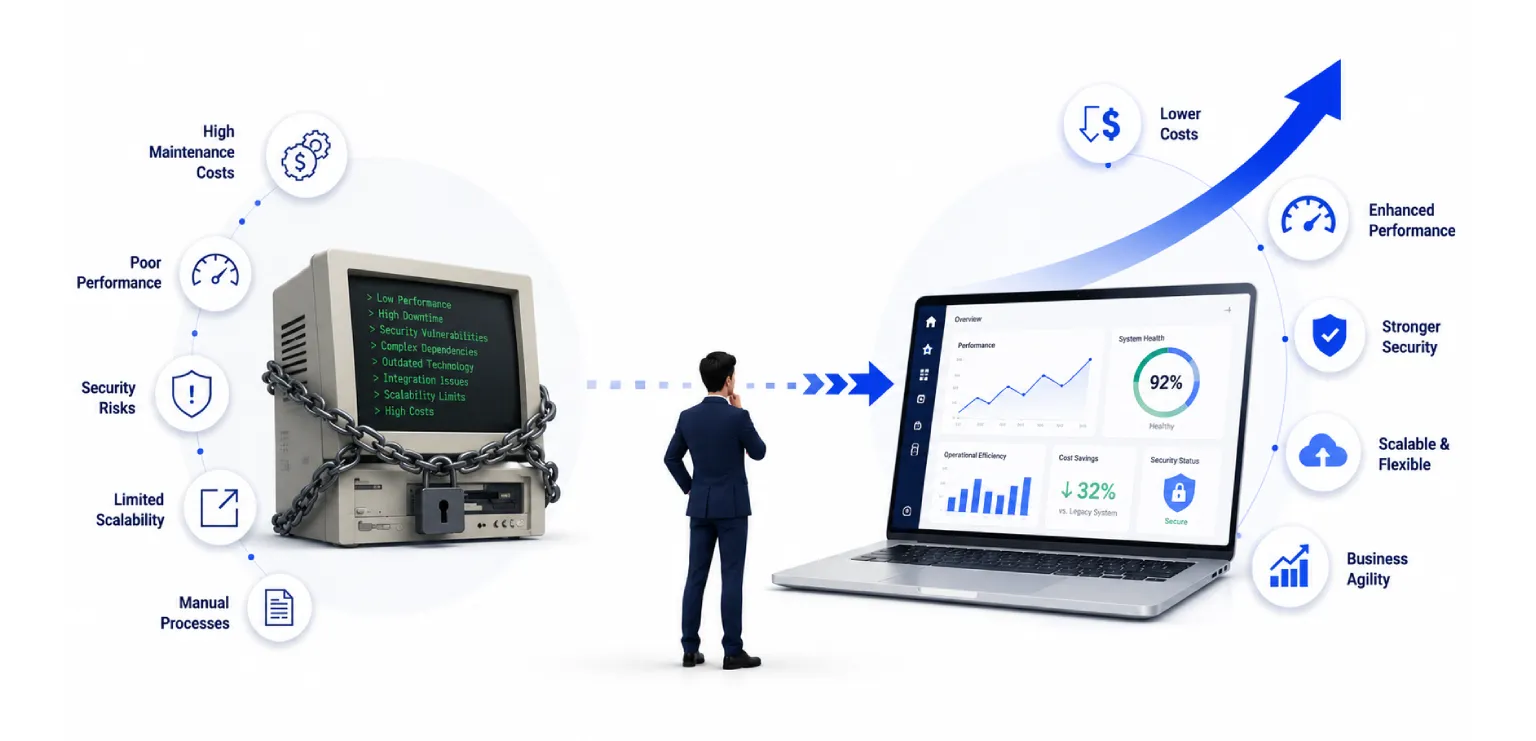
Many organizations don’t realize they’re dealing with legacy application risk until something goes wrong. A critical security issue appears. A software update takes months instead of weeks. Integrating with a new platform becomes nearly impossible. Or worse, the developers who understand the system leave, taking years of knowledge with them.
These aren’t isolated technical issues. They’re business challenges that affect growth, customer experience, operational efficiency, and long-term competitiveness.
According to McKinsey, technical debt makes up 40% of the typical IT balance sheet, with organizations often spending substantial engineering resources maintaining outdated technology rather than developing new technologies.
| 40% of the typical IT balance sheet is technical debt (McKinsey) — budget spent maintaining outdated technology instead of building new capabilities. |
The good news is that these problems rarely appear overnight. They build gradually, leaving behind warning signs that organizations can identify early.
This blog serves as a practical modernization assessment, helping you recognize whether your applications are still supporting your business—or quietly holding it back.
| RELATED READING — This reality check pairs well with our deep dive on the hidden cost of technical debt in legacy applications, which unpacks that McKinsey figure in detail. |
Why Legacy Applications Become Business Risks Instead of Business Assets
Every application is designed to solve a business problem. But over time, businesses evolve faster than the software supporting them.
New customer expectations emerge. Regulations change. Cloud platforms, APIs, and AI-powered tools become part of everyday operations. Meanwhile, applications built ten or fifteen years ago continue operating under assumptions that no longer match today’s business environment.
This is where legacy system problems begin to surface.
Technology Moves Faster Than Legacy Systems
Technology never stands still.
Frameworks reach end-of-life. Operating systems stop receiving updates. Vendors discontinue support. Security standards evolve.
Applications running on unsupported software become increasingly difficult to maintain because every upgrade introduces uncertainty. Even routine maintenance becomes a complex project instead of a standard task.
The longer organizations delay modernization, the harder these systems become to update safely.
Business Expectations Continue to Grow
Customers expect digital experiences that are fast, connected, and always available.
Business teams expect real-time reporting, automation, and seamless integrations across multiple platforms.
However, many older applications were never designed for cloud services, mobile experiences, AI-enabled workflows, or modern APIs. As a result, teams often work around system limitations instead of solving business problems.
Those workarounds eventually become expensive.
9 Warning Signs Your Legacy Application Needs Modernization
Not every old application needs to be replaced immediately.
However, certain warning signs consistently indicate increasing legacy application risk. If several of these sound familiar, it may be time to begin a formal modernization assessment.
|
Nine warning signs that consistently point to rising legacy application risk.
1. Every Software Release Feels Like a Major Project
Releasing new features should help the business move faster.
Instead, many organizations with legacy applications experience the opposite.
Simple updates require weeks of planning, manual testing, and extensive approval cycles because no one is completely confident about what might break.
These slow releases affect more than IT teams. They delay product launches, customer improvements, regulatory updates, and competitive initiatives.
If every deployment feels stressful, the application is likely slowing business agility.
2. Security Updates Are Becoming Increasingly Difficult
Cybersecurity threats evolve every day.
Unfortunately, older applications often struggle to keep up.
Systems running unsupported software may no longer receive vendor patches, making newly discovered security vulnerabilities much harder to address.
This doesn’t automatically mean a breach will happen.
It does mean the organization is accepting higher levels of risk every time critical updates are delayed or unavailable.
For businesses operating in regulated industries, outdated security practices can also increase compliance risk, making audits more challenging and exposing organizations to potential penalties.
3. Integrating with Modern Platforms Feels Like a Constant Challenge
Connected technology is used today by business organizations.
There is a need for CRM software, ERP, cloud-based solutions, AI, analytics, and partner ecosystems to transfer information seamlessly to each other.
The older versions of the software may find it difficult because they were not developed keeping integration limitations in view.
Because of such integration limits, organizations are required to use manual data transfers and other workarounds, which increase their overheads.
The application does not help innovation but rather stands in its way.
4. Your IT Team Spends More Time Maintaining Than Improving
One of the clearest signs you need to modernize is when maintenance consumes nearly all available engineering capacity.
Rather than building new features or improving customer experiences, developers spend their time fixing recurring bugs, resolving compatibility issues, or supporting aging infrastructure.
Eventually, innovation slows—not because the team lacks ideas, but because the application demands constant attention.
This is often where organizations realize that maintaining the status quo is becoming more expensive than investing in modernization.
5. Your Application Can’t Keep Up with Business Growth
Growth is a good problem to have—but only if your technology can support it.
Many legacy applications perform well when user volumes are low or business operations remain relatively stable. The challenge begins when the business expands. More customers, higher transaction volumes, additional locations, or new digital services can quickly expose the application’s limitations.
This is often where organizations hit a scaling ceiling.
You may notice slower response times during peak periods, longer batch processing windows, or performance issues that didn’t exist a few years ago. Instead of supporting growth, the application begins limiting it.
When every increase in demand requires additional workarounds or expensive infrastructure upgrades, it’s a strong indication that the underlying architecture is no longer aligned with business needs.
| SCALING PATH — A scaling ceiling usually traces back to architecture. See how breaking the monolith into microservices removes it, and how application modernization on AWS adds elastic capacity. |
6. Compliance Requirements Keep Getting Harder to Meet
The regulatory environment is constantly changing.
Whether you are in the healthcare, financial services, manufacturing, retail, or any other regulated industry, compliance is only possible when you have systems that are capable of handling modern day security controls, audit trails, encryption capabilities, and reporting needs.
It becomes difficult for old software to comply with the new rules and regulations unless extensive customizations are done to the existing system.
The increasing compliance risk is not always apparent until a compliance audit reveals some deficiencies or regulations change in ways that the existing application does not support.
7. Finding the Right Talent Has Become a Challenge
Technology decisions don’t only affect systems—they also affect people.
Many legacy applications rely on programming languages, frameworks, or platforms that fewer professionals specialize in today. As experienced developers retire or move into other roles, replacing that expertise becomes increasingly difficult.
This ongoing talent scarcity creates several challenges:
| ▪ Hiring takes longer. |
| ▪ Specialized skills come at a premium. |
| ▪ Knowledge is concentrated in just a few individuals. |
| ▪ Projects are delayed because the right expertise isn’t available. |
Even routine updates can become risky when only one or two people fully understand how the application works.
Organizations shouldn’t build their future around technology that depends on disappearing skill sets.
8. Small Changes Require Big Investments
One of the most overlooked signs you need to modernize is when even the smallest request turns into a major project.
Adding a new customer field.
Updating a report.
Integrating with a third-party application.
Changing a business rule.
These should be routine enhancements. Yet many legacy environments require weeks of analysis, development, testing, and approvals before a simple update reaches production.
The issue isn’t the request itself—it’s the complexity hidden beneath the application.
When small changes consistently require significant time, effort, and budget, the software has become harder to evolve than the business it supports.
9. Employees Have Created Workarounds to Get Their Jobs Done
It is common for workers to come up with solutions to keep themselves productive, despite challenges presented by technology.
This is why one of the most obvious symptoms can be seen outside the application, in people’s work.
Working with spreadsheets apart from the system, transferring data manually between applications, getting approvals via e-mail, and using duplicate records are some examples of such compensation.
Slowly but surely, those practices become acceptable as “normal” behavior.
In fact, they lead to extra effort, inconsistency, and inefficiency of the processes.
Once workers lose confidence that the application will help them do their work effectively, modernization is turned into a business need, rather than an IT one.
The Hidden Cost of Waiting Too Long
Many companies delay modernization due to the ongoing work of their applications.
From the purely financial side, it may seem as if the postponement was the wiser move.
However, the true cost of the delay cannot be seen in the company’s budget for IT alone.
It lies in the slowing down of product releases, late delivery of the experience for the customer, growing costs for maintenance, loss of business opportunities, and decreasing competitiveness.
Rather than innovating, engineering spends its precious time working with old systems. The business side sets its expectations lower because it knows how much time it would take to get a new feature. Digital initiatives are delayed by the leadership of the company because of the lack of technology readiness.
The cumulative costs increase steadily until the process of modernization becomes an emergency measure.
| DON’T LET DATA STALL IT — Reporting and analytics are often the first place delay shows up. If your warehouse is part of the legacy estate, see legacy data warehouse modernization on AWS. |
A Simple Modernization Assessment: Five Questions to Ask
If you’re unsure whether it’s time to modernize, start by asking a few practical questions.
| A Simple Modernization Assessment: Five Questions
|
Five practical questions to gauge whether your application still supports the business.
A single “No” isn’t necessarily cause for concern.
But if several answers raise questions, it’s worth conducting a structured modernization assessment to better understand the risks, dependencies, and opportunities before they become larger business challenges.
One should not forget about the fact that modernization does not necessarily imply a full replacement all at once. In accordance with the state of your application and business objectives, the right strategy may include refactoring, repurposing, re-architecture, or selective rebuild of the application. The article Legacy Application Modernization gives an opportunity to define the best way, and Modernize, Rebuild or Retire can assist you in evaluating the opportunities available.
| MATCH THE STRATEGY — Refactor, repurpose, re-architect, or rebuild? Our breakdown of the 6 R’s of application modernization maps each option to when it fits best. |
So, When Is the Right Time to Modernize?
One of the most common questions business leaders ask is, “How do we know when it’s time?”
The answer is simpler than many expect.
The best time to modernize is before your application becomes a business problem.
Before security concerns become incidents.
Before performance issues affect customers.
Before compliance gaps create unnecessary risk.
Before key technical knowledge walks out the door.
And before your competitors begin delivering experiences your technology can’t support.
Organizations that modernize proactively have more control over budgets, timelines, and business continuity. They can prioritize investments, reduce operational risk, and modernize in phases rather than rushing into expensive, high-pressure projects.
Conclusion
Legacy applications do not turn into a burden in an instant, but they introduce a drag that slows down adaptation, innovation, and growth.
If many of the signs mentioned in this article seem familiar to you, then it might be time to think more about this topic. The point is not to renew technology just because it is outdated. The point is to figure out whether the current state of technology helps your business or holds it back in some way.
Conducting a well-structured modernization assessment will provide you with all the necessary understanding for making decisions and decreasing legacy application risk.
At Impressico Business Solutions, we can assist you with evaluating complicated application landscapes, identifying opportunities for modernization, and developing relevant plans to align your technology investments with business needs.
| IMPRESSICO · APPLICATION MODERNIZATION Find out where your applications really stand Impressico Business Solutions helps enterprises assess complex application landscapes, spot the modernization opportunities that matter most, and build phased roadmaps that align technology with business goals. Whether you’re acting on a few warning signs or planning a broader transformation, our Software Engineering Solutions and DevOps & Cloud Services teams can help you cut legacy application risk before it becomes an emergency.
|
Impressico Business Solutions — Helping enterprises tell whether their technology is supporting the business or quietly holding it back.
IBS
Similar articles

Modernize, Rebuild or Retire? A Decision Framework for Enterprise Leaders
August 5, 2026
The Hidden Cost of Technical Debt in Legacy Applications
July 27, 2026
Breaking the Monolith: Migrating Legacy Apps to Microservices on the Cloud
July 10, 2026
Rehost, Replatform, Refactor, Rebuild: Choosing the Right Modernization Path (the 6 R’s)
July 1, 2026
Legacy Application Modernization: A CIO’s Guide to Replatforming & Cloud-Native Transformation
June 22, 2026
Application Modernization on AWS: From Legacy Monoliths to Cloud-Native Systems
May 29, 2026
