


September 15, 2025
Healthcare Mobile Apps: Types, Features and Compliance Essentials
Enjoying this article?
Share it with the world!


Learn how healthcare mobile apps work
| ⚡ Quick Answer Healthcare mobile apps let patients and clinicians manage care on a phone or tablet, from video visits and remote monitoring to medication reminders and clinical workflows. Strong apps combine clear features with encryption, consent controls, FHIR-based EHR integration and compliance with laws such as HIPAA in the US and GDPR in the EU. |
Care is moving closer to where people live and work. Healthcare mobile apps make that possible by connecting patients, clinicians and health systems through secure, everyday devices. Patients can book visits, share readings and message their care team. Clinicians can review records and act on alerts from anywhere.
This guide covers the main app categories, the features that matter most, and the security, interoperability and accessibility essentials. It is written for product owners, CTOs and health-system leaders planning their next digital care initiative.
Types of Healthcare Apps
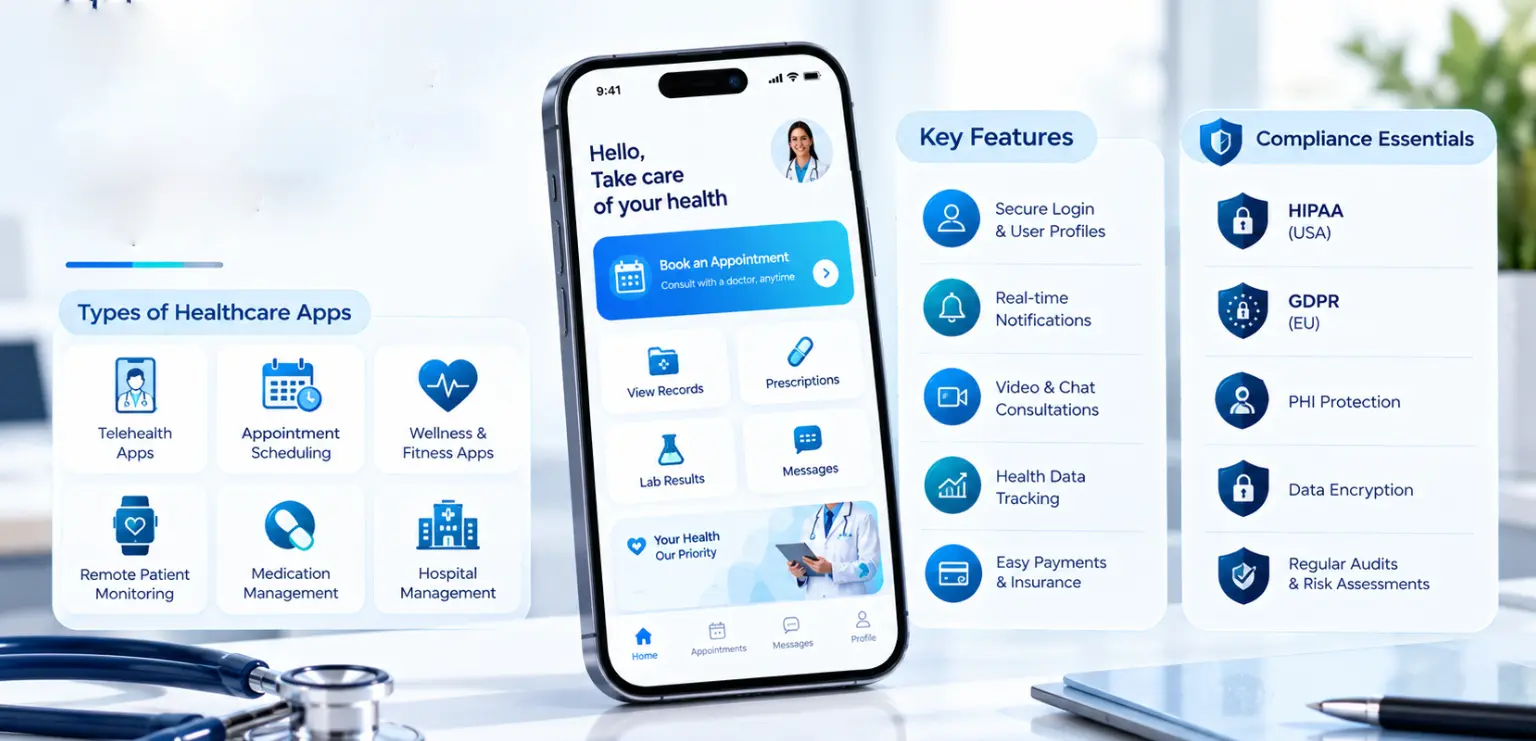
Most types of healthcare apps fall into six groups. Many products combine two or more.
Telemedicine and Virtual Care Apps
These apps support video, audio and chat consultations. They also handle scheduling, e-prescriptions and follow-up notes, bringing specialist care to patients wherever they are.
Remote Patient Monitoring Apps
A remote patient monitoring app collects readings from connected devices such as blood pressure cuffs, glucose meters and wearables. Data flows to the care team, which sets thresholds and responds to alerts.
Patient Engagement Apps
A patient engagement app keeps people involved in their own care. Typical functions include appointment reminders, secure messaging, test results, education content and care-plan tracking.
Medication and Chronic-Care Apps
These apps support long-term conditions such as diabetes, asthma or heart disease. They offer dose reminders, symptom logs, refill requests and progress reports that clinicians can review.
Clinical and Staff Apps
Built for doctors, nurses and administrators, these apps provide mobile access to records, task lists, secure team messaging, bed management and inventory. They help staff spend more time with patients.
Wellness and Prevention Apps
Wellness apps cover fitness, nutrition, sleep and mental well-being. When connected to clinical programs, they extend preventive care into daily routines.
Telemedicine App Features That Matter
The best telemedicine app features keep visits simple for patients and efficient for clinicians. Core capabilities include:
| Secure video and chat: encrypted sessions with stable quality on varied networks | |
| Scheduling and reminders: self-service booking, calendar sync and automated notifications | |
| Virtual waiting room: check-in, intake forms and consent capture before the visit | |
| E-prescriptions: prescriptions sent to pharmacies where local rules allow | |
| Visit notes and follow-ups: summaries, care instructions and next steps in the app | |
| Payments and insurance: cost estimates, claims details and in-app payment | |
| Language and accessibility options: captions, translation support and readable layouts |
Prioritize telemedicine app features that shorten the path from booking to treatment. Add advanced functions such as device data sharing or group sessions after the core flow works well.
Remote Monitoring and Wearables
Remote monitoring extends care beyond the clinic. A well-designed remote patient monitoring app connects to approved devices, validates each reading and shows trends to both patient and clinician.
Platform support is improving. Android 17, released as stable on June 16, 2026, introduced Medical and Fitness Tracker companion device profiles. These profiles give apps a standard way to pair with health devices and wearables on Android.
| ⚙ Sourcing The June 16, 2026 release date is confirmed in Google’s Android 17 announcement. The Medical and Fitness Tracker companion device profiles are not named in that announcement, so this detail is worth confirming against the platform release notes before publishing. |
Design priorities for monitoring apps include:
| Reliable Bluetooth pairing and background sync | |
| Clear thresholds and escalation rules set by clinicians | |
| Battery-friendly data collection | |
| Patient consent for each data type shared | |
| Simple trend views that support shared decisions |
Data Security and Compliance for Healthcare Mobile Apps
Health data is highly sensitive, so security and privacy shape every design decision. Rules vary by region: HIPAA in the US, GDPR in the EU and equivalent local laws elsewhere. Teams should map each market’s requirements early.
Building a HIPAA Compliant App
A HIPAA compliant app protects electronic health information through administrative, physical and technical safeguards. US regulators proposed an overhaul of the HIPAA Security Rule in January 2025. It covers encryption, multifactor authentication, network segmentation, annual penetration tests and tested incident response plans.
The final rule is now expected in July 2027. Designing to these proposed controls today prepares your app for the update.
GDPR and Global Privacy Laws
In the EU, GDPR treats health data as a special category that needs a clear legal basis and strong protection. Similar principles apply in many other regions: purpose limitation, data minimization and user rights over personal data.
Core Security Controls
Whatever the region, health apps share a common set of controls:
| Encryption of data in transit and at rest | |
| Multifactor authentication and secure session handling | |
| Role-based access so users see only what they need | |
| Audit logs that record who accessed which record and when | |
| Granular consent that patients can review and change | |
| Secure development practices guided by OWASP MASVS |
Regular security reviews and thorough testing confirm these controls work as intended. Our article on the importance of mobile app testing explains how testing supports quality and trust.
Interoperability: FHIR, HL7 and EHR Integration
Healthcare mobile apps deliver the most value when they share data with the wider care system. Interoperability standards make that exchange reliable:
| HL7 FHIR offers modern, API-based access to records such as patients, observations and medications. | |
| HL7 v2 messages remain common in many hospital systems. | |
| SMART on FHIR supports secure app launch and authorization inside EHR environments. |
EHR integration lets clinicians see app data inside their usual workflow. Patients, in turn, see accurate results, medications and appointments. Plan integration scope, data mapping and testing with the EHR team from the start.
Accessibility and Inclusive Design
Healthcare serves everyone, including older adults and people with disabilities. Following WCAG guidelines helps healthcare mobile apps work for the widest possible audience.
Practical steps include:
| Support for screen readers such as VoiceOver and TalkBack | |
| Scalable text and strong color contrast | |
| Large touch targets and simple navigation | |
| Plain-language content and clear error messages | |
| Captions for video content |
Accessible design also helps every patient complete tasks faster, which supports engagement and adherence.
What to Look for When Planning Healthcare Mobile Apps
Successful projects start with clear outcomes and the right foundations. Use this checklist when planning:
| Define clinical and business goals. Examples include fewer missed visits or faster follow-up after discharge. | |
| Involve clinicians and patients early. Co-design journeys with the people who will use the app daily. | |
| Choose the platform approach. Weigh native iOS, native Android and cross-platform options against device features, budget and timelines. | |
| Map compliance by region. List HIPAA, GDPR and local requirements before design begins. | |
| Plan interoperability. Confirm FHIR or HL7 interfaces and EHR access with system owners. | |
| Design for accessibility. Build WCAG checks into design reviews and testing. | |
| Plan for support and updates. Budget for security patches, OS updates and new features. |
A patient engagement app often makes a strong first release because it builds on existing workflows. Monitoring and virtual care features can follow as the platform matures.
Platform choice shapes reach and cost. Teams targeting Apple devices can explore iOS app development services, while a hybrid app development company can help when one codebase must serve both platforms.
Key Takeaways
Five things to carry into planning
| Healthcare mobile apps span six main types: telemedicine, remote monitoring, patient engagement, chronic care, clinical staff and wellness. | |
| Focus telemedicine app features on a simple path from booking to treatment. | |
| Android 17 adds Medical and Fitness Tracker companion device profiles that support wearable integration. | |
| Compliance is global: HIPAA in the US, GDPR in the EU and equivalent local laws, with a HIPAA Security Rule update expected in July 2027. | |
| FHIR-based EHR integration and WCAG accessibility make apps useful for clinicians and inclusive for patients. |
Frequently Asked Questions
| What are the main types of healthcare apps? The main types of healthcare apps are telemedicine and virtual care apps, remote patient monitoring apps, patient engagement apps, medication and chronic-care apps, clinical and staff apps, and wellness apps. Many products combine several types, for example a chronic-care app that also offers video visits and device data sharing with the care team. |
| What makes a HIPAA compliant app? A HIPAA compliant app protects health information with encryption, access controls, audit logs and secure authentication. It also needs signed business associate agreements with vendors that handle the data, plus documented policies and risk assessments. The proposed Security Rule update adds expectations such as multifactor authentication and annual penetration tests, with a final rule expected in July 2027. |
| How do healthcare mobile apps protect patient data? These apps protect data through encryption in transit and at rest, multifactor authentication, role-based access and detailed audit logs. Patients control consent for each data type. Teams follow secure development guidance such as OWASP MASVS and test regularly. Regional laws such as HIPAA and GDPR define the minimum safeguards required. |
| How does a remote patient monitoring app work? A remote patient monitoring app pairs with connected devices such as blood pressure cuffs, glucose meters or wearables. It collects readings, checks them for errors and sends them to the care team. Clinicians set thresholds that trigger alerts, while patients see their own trends. On Android 17, companion device profiles support this pairing. |
| Why is FHIR important for healthcare apps? FHIR is an HL7 standard that exposes health records through modern APIs. It lets an app read and write data such as patients, observations and medications in a consistent format. This makes EHR integration faster and more reliable, so clinicians see app data in their usual workflow and patients see accurate records. |
| What features should a patient engagement app include? A patient engagement app should include appointment booking and reminders, secure messaging, test results, medication reminders, education content and care-plan tracking. Accessibility features such as screen reader support and scalable text help every patient use it. Clear notifications and simple navigation encourage people to return and stay involved in their care. |
Plan Your Next Healthcare App
Well-planned healthcare mobile apps improve access, engagement and clinical efficiency while keeping patient data safe. Impressico helps healthcare teams plan secure, interoperable apps.
| Ready to discuss your roadmap? We start with compliance mapping and interoperability, because those shape every other decision in a healthcare build. |
Impressico Business Solutions — healthcare mobile apps, FHIR and EHR integration, and the security engineering that regulated environments demand.

IBS
Similar articles

Mobile App Testing Process: Types, Devices and Automation Explained
November 4, 2022
How Does Custom Mobile App Development Help Boost Your Business?
October 24, 2022
Importance of Mobile App Testing: 7 Benefits for Quality and Growth
October 12, 2022
How Does Mobile App Development Benefit A Small Business?
September 18, 2022
How Mobile Apps Help Businesses Grow: 7 Growth Levers That Compound
September 16, 2022
Android App Development Trends that You Should Know
July 15, 2022
