


November 20, 2026
Salesforce Data Cloud Consulting Services: What Enterprises Need Before Grounding Agentforce
Enjoying this article?
Share it with the world!


Before You Ground Agentforce, Fix the Data
| ⚡ Quick Answer Grounding gives an Agentforce agent real company data to answer from, and in the Salesforce world that data comes from Data Cloud. Before you build, you need a narrow use case, an inventory of where the data lives, data clean enough for the task, a data model and golden fields, identity resolution rules you have tested, knowledge content that is current, access and consent rules, a refresh plan matched to the use case, a test set, and clear ownership across Admins, Data Engineers and Agentforce leads. |
Many companies are excited about Agentforce. The idea is simple. You build an AI agent that can answer customers, help your sales team, or fix service issues without a person doing every step.
But there is a problem that shows up early. The agent is only as good as the data behind it. If the data is messy, old, or spread across ten systems, the agent will give weak answers. Sometimes it will give wrong ones, and it will sound very sure while doing it.
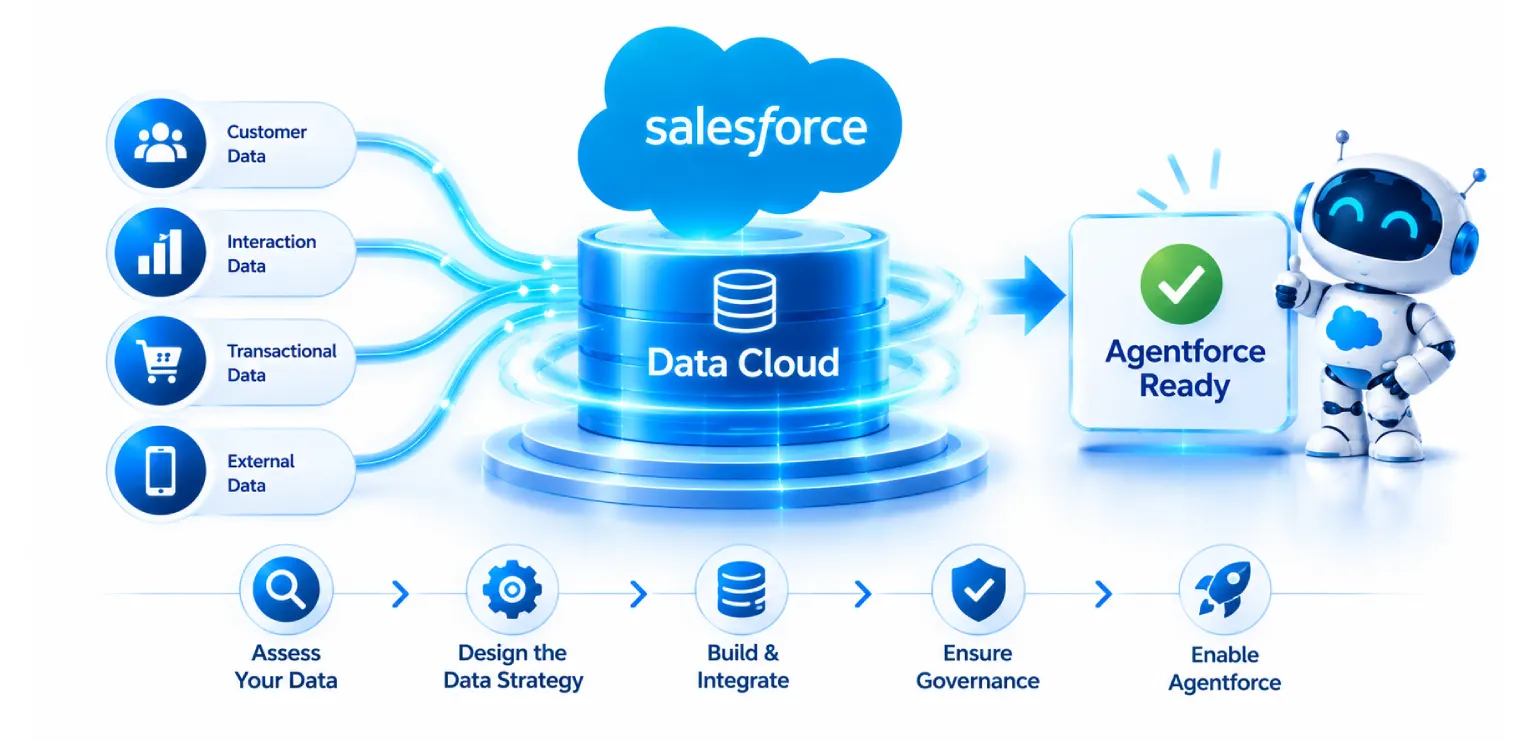
This is why Agentforce grounding matters. Grounding means giving the agent real, trusted company data to work from, so it does not guess. In the Salesforce world, that data usually comes from Data Cloud.
This blog explains what you need in place before you ground Agentforce. It is written for Salesforce Admins, Data Engineers, and Agentforce implementation leads who want a clear plan. We also explain what Salesforce Data Cloud consulting services usually cover, so you know what to ask for and what to expect.
What Is Agentforce Grounding?
An AI model, on its own, knows a lot about the world. It does not know your customers, your products, your contracts, or your return policy. If you ask it about those things without help, it will try to fill the gaps. That is where wrong answers come from.
Grounding fixes this. Salesforce describes grounding as adding relevant company data and context to the prompt, so the model answers from facts and not from guesses. The agent pulls in customer records, past cases, knowledge articles, and other data at the moment it needs them.
There are two broad kinds of data an agent may need:
| Structured data. Things like accounts, orders, invoices, and case history. These sit in tables and fields. | |
| Unstructured data. Things like PDFs, emails, call notes, help articles, and chat logs. These are free text. |
Data Cloud can hold and connect both. For unstructured content, Salesforce uses a search method called retrieval augmented generation, often shortened to RAG. In plain words, the system searches your content for the pieces that match the question, then hands those pieces to the model so it can write a grounded answer.
How Does Agentforce Use Data Cloud?
This is one of the most common questions we hear, so here is the short version.
Agentforce agents work through topics and actions. A topic is a job the agent can do, like “check order status.” An action is a step the agent can take, like looking up an order or updating a record. To do these well, the agent needs fast access to the right facts about the right person.
Data Cloud gives the agent that access in a few ways:
| A single customer view. Data Cloud brings records from many systems and matches them into one unified profile. The agent can then see the full picture of a customer and not just one slice. | |
| Fresh data. Data Cloud can take in data in batches or in near real time, so the agent is not working from last month’s file. | |
| Search over documents. Through vector search and RAG, the agent can find the right paragraph in a policy or manual. | |
| Trust and safety controls. Salesforce routes AI requests through its Einstein Trust Layer, which includes steps such as masking sensitive data and checking outputs. Your Data Cloud setup decides what data the agent is even allowed to see. |
| WHAT DATA CLOUD SUPPLIES THE AGENT
A single customer view Records from many systems matched into one unified profile
Fresh data Taken in batches or in near real time
Search over documents Vector search and RAG find the right paragraph
Trust and safety controls Requests routed through the Einstein Trust Layer The four capabilities listed above, in the order the article sets them out. Each one is a separate piece of setup work. |
| Industry Insight |
If any of these pieces is weak, the agent feels weak. That is why preparation matters more than the agent build itself.
What Is Data Cloud Harmonization?
Data Cloud harmonization is the work of making data from different sources look and mean the same thing.
Here is a simple example. One system stores a phone number as “+91 98765 43210.” Another stores it as “9876543210.” A third stores it in two fields. One system calls a person “Cust_Name.” Another calls the same thing “FullName.” To a human, it is obvious these match. To a machine, they are different.
In Data Cloud, harmonization usually happens in these steps:
| Ingest. Data comes in through data streams from sources like Salesforce CRM, a data warehouse, marketing tools, or web and mobile apps. Raw data lands first in data lake objects. | |
| Map. You map those raw fields to the Data Cloud data model. The standard model uses data model objects, such as Individual, Account, and Contact Point. | |
| Resolve identity. Identity resolution rules decide when two records are the same person or company. The result is a unified profile. | |
| Create insights. Calculated insights, like lifetime value or number of open cases, add useful numbers the agent can use. |
| HARMONIZATION IN FOUR STEPS
Ingest Data streams from CRM, a warehouse, marketing tools or apps
Map Raw fields mapped to data model objects
Resolve identity Rules decide when two records are the same person
Create insights Calculated insights such as lifetime value Step 3 is the one teams underestimate. The two failure modes are described in check 5 below. |
When this is done well, an agent can ask one clean question and get one clean answer. When it is skipped, the agent sees duplicates, gaps, and conflicts.
What Enterprises Need Before Grounding Agentforce
Here is a practical checklist. Think of it as the ground rules before you build anything.
| THE TEN CHECKS BEFORE YOU GROUND AGENTFORCE
A clear use case not a vague goal
A data inventory where it lives, who owns it
Data quality good enough for the task
A data model that fits the job
Identity resolution rules you have tested
Knowledge content clean and organized
Access and privacy plus consent rules
Freshness plans matched to the use case
Test and measure before and after launch
People and ownership Admins, Engineers, leads Each is a section below. Checks 2 and 3 are where most of the surprises turn up. |
1. A clear use case, not a vague goal
“We want AI in service” is not a use case. “We want an agent that handles order status and return questions for our top three product lines” is a use case.
A narrow use case tells you which data the agent needs, which it does not, and how you will measure success. Many failed AI projects start with a goal that is too wide. Start small. Prove it works. Then grow.
2. A data inventory
You cannot ground an agent in data you cannot find. Before you build, list:
| Where each needed piece of data lives | |
| Who owns it | |
| How often it changes | |
| How good it is | |
| Whether it can legally be used for AI |
This is often the first thing Salesforce Data Cloud consulting does, and it is often a surprise. Teams find old systems, shadow spreadsheets, and fields that nobody has used in years.
3. Data quality that is good enough
Perfect data does not exist. But your data must be good enough for the task. Check for:
| Duplicate records | |
| Missing values in key fields | |
| Mixed formats, like dates and phone numbers | |
| Old records that were never closed or cleaned | |
| Conflicting values between systems |
Industry research has pointed to poor data quality as a leading reason AI projects stall. It makes sense. An agent cannot fix what your team has ignored for years. It will repeat it, faster.
4. A data model that fits the job
Data Cloud has a standard data model, and it is smart to use it where you can. Custom objects are fine when needed, but too many of them make mapping, search, and later changes harder.
Decide early which fields are “golden.” For example, which system is the source of truth for email address? For billing address? When two systems disagree, which one wins? Write this down. Data Engineers will thank you later.
5. Identity resolution rules you have tested
Identity resolution is powerful, but it can go wrong in two ways. If your rules are too loose, you merge people who are not the same. If they are too strict, you leave one person split across five profiles.
Both hurt the agent. A wrong merge could lead it to share one customer’s details with another. A missed match could lead it to ask a customer questions they already answered. Test your match rules on a real sample, and have the business review the results.
6. Clean, organized knowledge content
If your agent will answer from articles and documents, the quality of that content matters a lot. Old policies, three versions of the same guide, and long files with no structure will confuse retrieval.
Before you index content for the agent:
| Remove outdated and duplicate files | |
| Add clear titles and headings | |
| Keep one version of the truth | |
| Mark who owns each document and when it was last checked |
7. Access, privacy, and consent rules
An agent should only see what a person in that role is allowed to see. Plan this before launch:
| Which objects and fields can the agent read? | |
| Which actions can it take, and which need a human to approve? | |
| How is consent tracked, and does the agent respect it? | |
| Which data must be masked or kept out? |
This is not only a tech topic. Your legal, security, and compliance teams should be in the room. Rules like GDPR and India’s data protection law make this step important for many companies.
8. Freshness and refresh plans
Different data needs different speeds. A shipping status may need to be minutes old. A customer’s yearly spend may be fine if it updates daily.
Match the refresh rate to the use case. Real-time data costs more to run, so use it only where it adds value. This is also where Data Cloud credits and costs come in, which we cover below.
9. A way to test and measure
Before going live, build a test set of real questions with known good answers. Run the agent against them. Check for wrong facts, missing context, and answers that go beyond what the agent should say.
After launch, keep watching. Track things like how often the agent solves the issue, how often it hands off to a person, and what customers say. Grounding is not a one time task. Data changes, so the agent needs ongoing care.
10. The right people and ownership
Three groups usually share this work:
| Salesforce Admins manage objects, fields, permissions, and the day to day setup inside the org. | |
| Data Engineers build the pipelines, clean the data, and design the model and mappings in Data Cloud. | |
| Agentforce implementation leads own the use case, design the topics and actions, and make sure the agent meets business goals. |
Problems start when these groups work in separate rooms. The Admin changes a field, the Data Engineer’s mapping breaks, and the agent starts giving odd answers. A shared plan and clear owners prevent this.
| Not sure which of the ten you would fail today? A short readiness assessment against one use case answers that faster than a platform demo. We look at your sources, your match rules and the profiles they actually produce. |
What Do Salesforce Data Cloud Consulting Services Include?
Scope varies by partner, but good Salesforce Data Cloud consulting services usually cover these areas:
| Readiness assessment. A review of your data sources, data quality, security setup, and team skills, along with a list of gaps and risks. | |
| Strategy and use case planning. Picking the first use cases for Agentforce and mapping them to the data they need. | |
| Architecture and data modeling. Designing how data flows into Data Cloud, how it maps to the model, and how it links to your CRM, warehouse, and other tools. | |
| Data ingestion and integration. Setting up data streams and connectors, and using options like zero copy access to warehouses where it fits. | |
| Harmonization and identity resolution. Mapping, cleaning, and building unified profiles with tested match rules. | |
| Unstructured data and search setup. Preparing documents, building search indexes, and tuning retrieval for RAG. | |
| Agentforce grounding and build support. Connecting prompts, topics, and actions to the right Data Cloud data. | |
| Governance and security. Setting access rules, consent handling, data masking, and audit steps. | |
| Testing and launch. Building test sets, checking answer quality, and planning a phased rollout. | |
| Training and handover. Helping your Admins and Data Engineers run it on their own after go live. | |
| Ongoing support and tuning. Watching performance, controlling usage costs, and improving results over time. |
When you talk to a partner, ask them to show real examples of past Data Cloud work and not just Agentforce demos. Strong data work is what makes the demos real.
How Much Does a Salesforce Data Cloud Consultant Cost?
There is no single price, and be careful of anyone who gives you one without asking questions. Cost depends on your situation. Here are the main things that move the number:
| Number and type of data sources. Connecting two clean systems is very different from connecting fifteen messy ones. | |
| Data quality. More cleanup means more hours. | |
| Identity resolution complexity. Many systems and many ID types make this harder. | |
| Unstructured data volume. Large document libraries need more prep. | |
| Real time needs. Streaming use cases take more design and testing. | |
| Compliance needs. Regulated industries need more controls and documentation. | |
| Team location and seniority. Rates vary by region and by how experienced the consultant is. | |
| Scope of Agentforce work. One agent or many. |
Most partners price in one of these ways:
| Fixed price discovery or assessment. A short paid study that ends in a plan and estimate. This is a good way to start. | |
| Time and materials. You pay for hours worked. It is flexible, but needs good tracking. | |
| Fixed scope project. A set price for a clear list of work. | |
| Retainer or managed service. A monthly fee for ongoing support and tuning. |
Keep two costs separate in your budget. The first is consulting fees. The second is the Salesforce platform cost. Data Cloud and Agentforce are priced on usage, based on credits, so how much data you process and how often can change your bill. A good consultant will help you design with cost in mind, not just function. For current license pricing, check with your Salesforce account team, as plans and rates change.
| Key Takeaway |
| Worried the estimate will move once the data is opened up? That is the usual reason a fixed price feels risky. A paid discovery prices the work after the sources have been looked at, not before, so the number you budget is the number built on evidence. |
Common Mistakes to Avoid
| Building the agent first and fixing data later. This almost always leads to rework. | |
| Loading every data source on day one. More data is not better data. Bring in what the use case needs. | |
| Skipping the business review of identity matches. Technical teams alone may miss real world edge cases. | |
| Treating knowledge articles as an afterthought. Many agent answers come straight from them. | |
| Ignoring cost. Streaming, large volumes, and frequent refreshes add up. | |
| No plan for change. Data models, products, and policies change. Your grounding must keep up. |
| The Reality |
A Simple Readiness Self Check
Ask your team these questions. If you answer “no” or “not sure” to more than a few, spend time on preparation before you build.
| Do we have one clear use case with a way to measure it? | |
| Do we know where all the needed data lives, and who owns it? | |
| Have we measured duplicates and missing values in key fields? | |
| Have we agreed on a source of truth for important fields? | |
| Have we tested identity resolution on real data? | |
| Are our knowledge articles current and well organized? | |
| Do we know what the agent can see and do, and who approves it? | |
| Do we have a test set and a plan to monitor after launch? | |
| Do our Admins, Data Engineers, and Agentforce leads share one plan? |
Frequently Asked Questions
| What do Salesforce Data Cloud consulting services include? They usually include a readiness check, use case planning, data modeling, data ingestion, harmonization, identity resolution, unstructured data setup, Agentforce grounding support, governance and security setup, testing, training, and ongoing support. |
| How do you prepare data for Agentforce? Start with one clear use case. List the data it needs and where it lives. Clean duplicates and fill key gaps. Map data into the Data Cloud model, set and test identity resolution, organize your knowledge content, set access and consent rules, and build a test set of real questions before launch. |
| What is Data Cloud harmonization? It is the process of making data from many systems consistent. Raw data is brought in, mapped to a shared model, matched to the right person or company, and enriched with useful numbers. The result is a clean, unified view the agent can trust. |
| How much does a Salesforce Data Cloud consultant cost? It depends on the number of data sources, data quality, project scope, compliance needs, and the consultant’s region and experience. Many teams begin with a fixed price assessment to get a real estimate. Also plan separately for Salesforce usage based licensing. |
| How does Agentforce use Data Cloud? Agentforce uses Data Cloud as its source of facts. Data Cloud gives the agent a unified customer view, fresh data, and search over documents, all inside the trust and security controls that Salesforce provides. This is what keeps answers grounded in real company data. |
Conclusion
Agentforce can save time and improve customer experience, but only when it stands on solid data. The agent is the visible part. The data work underneath is what decides if it succeeds.
Before you ground Agentforce, get clear on your use case, know your data, clean what matters, harmonize it in Data Cloud, and set strong rules for access and testing. Bring your Salesforce Admins, Data Engineers, and Agentforce implementation leads into one plan from the start.
If you want help with any of this, Impressico Business Solutions offers Salesforce Data Cloud consulting services, from readiness checks to full Agentforce grounding and support. Reach out to our team to talk about your goals and where your data stands today.
| Key Takeaways
Checks To run before you ground anything
Steps Ingest, map, resolve identity, create insights
Budgets Consulting fees and usage-priced credits
Roles Admins, Data Engineers, Agentforce leads |
| Ground Agentforce on data you can stand behind Impressico Business Solutions works on the part that decides whether the agent is any good: sources, harmonization, identity resolution, knowledge content and the access rules around them. Talk to our Salesforce teamRead the Data Cloud implementation guide |
Impressico Business Solutions delivers Salesforce Data Cloud consulting services, from readiness assessment through harmonization, identity resolution and Agentforce grounding.

IBS
Similar articles

Salesforce Data Cloud vs Snowflake: When Each One Wins the AI-Powered CRM Fight
October 30, 2026
Salesforce Manufacturing Cloud: Account-Based Forecasting for Sales Agreements
October 21, 2026
Salesforce Health Cloud: Modernizing Patient Engagement and Provider Workflows
September 25, 2026
Salesforce Financial Services Cloud vs Sales Cloud: Which One Fits Wealth, Banking, and Insurance
September 23, 2026
Salesforce Industry Clouds: When Vertical CRM Beats Sales Cloud
September 18, 2026
Agentforce Readiness: What to Fix in Your Salesforce Org First
August 17, 2026
