


August 17, 2026
Agentforce Readiness: What to Fix in Your Salesforce Org First
Enjoying this article?
Share it with the world!


Is Your Salesforce Org Ready for Agentforce?
Everyone is talking about Agentforce these days. Salesforce is pushing it hard, and honestly, the idea is exciting. An AI agent that can answer customer questions, update records, and take action on its own, all inside your CRM. Sounds great on paper.
But here is the truth nobody tells you in the demo. Agentforce is only as good as the Salesforce org you plug it into. If your data is messy, your permissions are a mess, and your processes are unclear, the agent will just copy that mess at high speed. It will not fix your problems. It will expose them.
At Impressico Business Solutions, we have seen this pattern again and again with clients who rush into AI without checking their foundation first. So before you flip the switch on Agentforce, let us walk through what you actually need to fix in your org first.
| NEW TO AGENTFORCE? — For a plain-English primer, see What is Salesforce Agentforce, and how it fits with Einstein and Data Cloud in AI-powered Salesforce. |
Why Agentforce Readiness Actually Matters
Think of Agentforce like a new employee. A very fast, very capable employee, but one who has zero common sense outside of what you show them. If you hand this employee outdated customer records, duplicate contacts, and confusing permission rules, they will make mistakes. Except this employee can make thousands of mistakes in minutes, not hours.
This is why Agentforce readiness is not just a technical checkbox. It is the difference between an AI rollout that actually helps your business and one that becomes an expensive, embarrassing failure.
Salesforce’s own research backs this up. Agentforce agents rely on your Salesforce data, mainly through Data Cloud, and unlike general AI models trained on the open internet, these agents only know what exists in your org. That is a strength if your data is solid. It is a serious risk if it is not.
| “Agentforce agents rely on your Salesforce data, mainly through Data Cloud — unlike general AI models trained on the open internet, these agents only know what exists in your org.” |
| RELATED READING — This pairs closely with our broader checklist, Is your Salesforce org ready for AI? |
Does Agentforce Need Data Cloud?
This is one of the most common questions we get, so let us answer it clearly. Technically, you can turn on basic Agentforce features without Data Cloud. But if you want your agent to actually be useful, meaning it understands your full customer picture across sales, service, and marketing, you will need Data Cloud sooner or later.
Here is why. Most Salesforce orgs store data in silos. Sales data sits in one place, service cases in another, marketing activity somewhere else entirely. A human employee can hop between screens and piece the story together. An AI agent cannot do that unless the data is unified first.
Why Data Cloud: From Silos to a Unified Customer Picture
Sales Cloud
Service Cloud
Marketing
→
Data Cloud
Unify + harmonize to one format
→
Agentforce
Full customer picture across every cloud
Unify is not enough. Data must be harmonized — one standard, consistent format the agent can read.
Data Cloud unifies and harmonizes siloed data into one picture the agent can actually use.
As one Salesforce data expert put it plainly, the first order of business is to unify your data, and Data Cloud is the Salesforce platform built to give agents instant access to data across the whole organization by unifying it, whether it sits in Sales Cloud, Service Cloud, Marketing Cloud, Commerce Cloud, or outside systems like data warehouses.
| “The first order of business is to unify your data — Data Cloud gives agents instant access to data across the whole organization, whether it sits in Sales Cloud, Service Cloud, Marketing Cloud, Commerce Cloud, or outside systems like data warehouses.” |
But unifying is not enough on its own. Your data also needs to be harmonized, meaning it needs to follow a standard, consistent format so the agent can actually make sense of it. So yes, in most real business cases, Data Cloud is not optional. It is the backbone that makes Agentforce actually work well.
| GO DEEPER — For how unification and harmonization actually work, see Salesforce Data Cloud explained. |
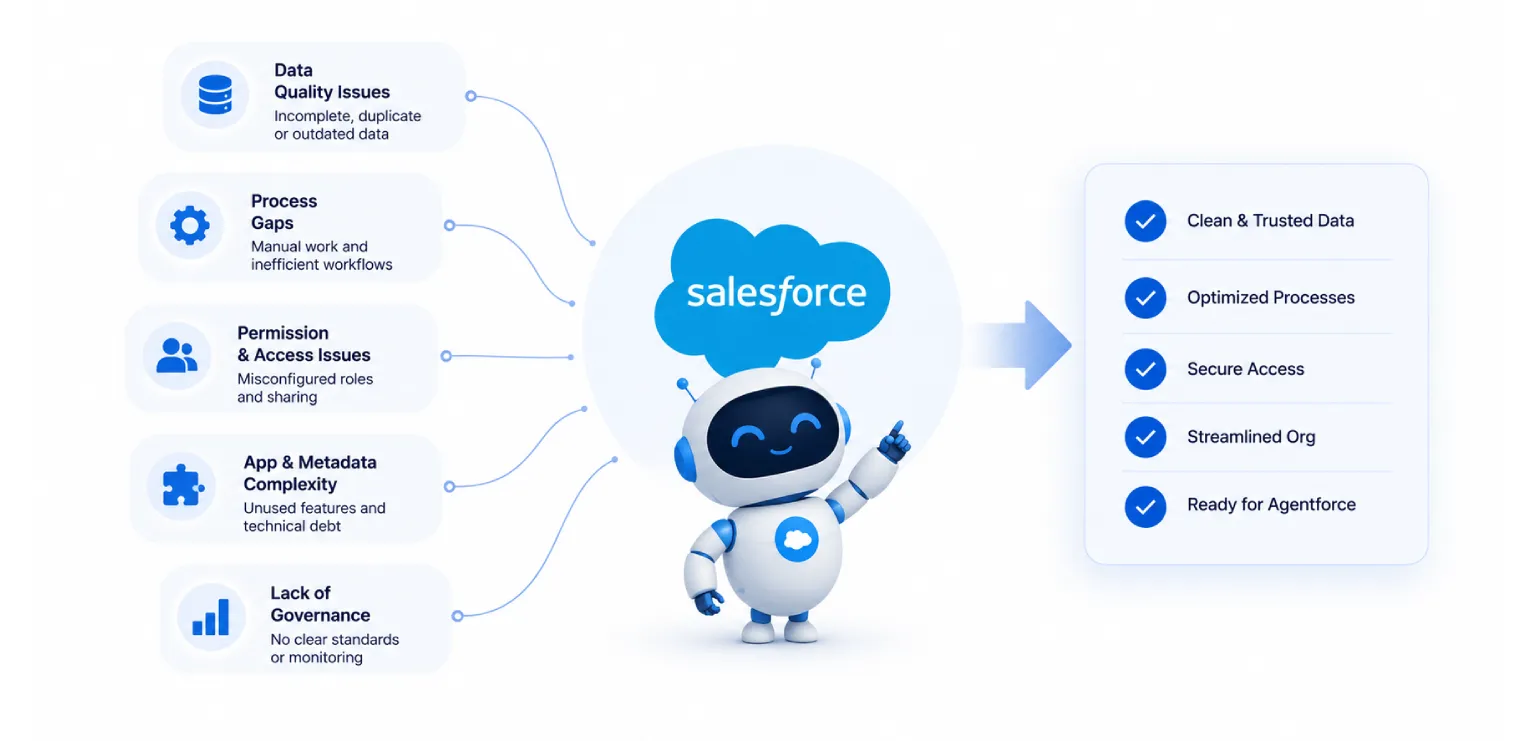
What Should You Fix Before Turning On Agentforce?
Let us get practical. Here is what we recommend checking and fixing before you even think about switching Agentforce on.
| What to Fix Before Turning On Agentforce
|
Five foundations to fix before go-live — in priority order.
1. Clean Up Your Data First
This is the boring part, but it matters more than anything else. Duplicate records, outdated contact info, blank fields, and inconsistent naming will confuse your AI agent just as much as they confuse a new hire.
A useful way to check your data health is to score it. One approach recommends rating each data source your agent will touch on a scale of one to three, where one means it needs serious work and three means it is solid and ready. For each data source, identify what action is needed to get it ready, and assign someone to actually own that work.
Ask yourself these basic questions:
| ▪ Is customer data spread across many systems, or is there one clear source of truth? |
| ▪ Are your fields filled in consistently, or are half of them left blank? |
| ▪ Do you have duplicate accounts, contacts, or leads sitting around? |
| ▪ Is the data actually current, or full of records from years ago that nobody has touched? |
If your data is scattered and inconsistent, fix that first. If your data is fragmented, the agent will simply deliver a fragmented and inconsistent experience back to your customers. Garbage in, garbage out still applies here, just faster and more visible.
2. Fix Your Permissions and Security Settings
This one gets overlooked a lot, and it is a big deal. AI agents can technically see and touch a huge amount of data inside your org, so your permission structure needs to be airtight before go-live.
Make sure your role hierarchy actually matches how your company is really structured, not how it was set up five years ago. Identify sensitive fields, things like salary information, health details, or social security numbers, and lock them down properly. It also helps to actually test this. Log in as different user types and confirm that AI features only show them what they are supposed to see, nothing more.
One experienced Salesforce architect summed it up well when reviewing common readiness gaps: if sensitive fields are not identified or do not have proper field-level security restrictions, and if AI features can reach data they should not, those problems need to be fixed before AI gets switched on, otherwise you are just setting yourself up for failure.
3. Check Your Salesforce Edition and Setup
Agentforce is not available on every Salesforce plan. These features are only available on supported Salesforce editions, generally Enterprise, Unlimited, or above (Oktana). Confirm you are on the right edition before planning anything further.
Beyond that, your basic Salesforce setup needs to be current. This means running the latest Lightning Experience version and confirming your instance is actually compatible with Agentforce’s features. It sounds obvious, but plenty of orgs are running on outdated configurations that were never revisited after the initial setup years ago.
4. Map Out Your Integrations
Agentforce rarely works in isolation. It usually needs to talk to other systems, your phone system, your email tools, maybe external databases or a data warehouse. Before go-live, check that your APIs are actually built, tested, and working reliably.
Since Agentforce often needs to interact with systems such as your CRM, telephony tools, and communication platforms, you need to make sure the APIs and integration tools connecting them are set up and properly tested so data actually flows correctly.
If an integration is flaky or half-built, your agent will hit dead ends or give customers wrong information at exactly the wrong moment.
| PLAN THE ROLLOUT — Sequencing all of this without disrupting your teams is its own discipline. Our Salesforce implementation guide and enterprise Salesforce implementation guide lay out how. |
5. Get Your Governance and Compliance in Order
AI agents handling customer data is a compliance question, not just a technical one. Before rollout, confirm you meet whatever regulations apply to your industry and region, whether that is data privacy law, healthcare rules, or financial compliance standards. Because AI agents handle sensitive customer data, you need to make sure you are meeting both your internal policies and external regulatory requirements.
Skipping this step does not just create risk. It can turn into real legal and financial trouble down the line.
How Do You Prepare a Salesforce Org for Autonomous Agents?
Putting it all together, preparation really comes down to three foundations. You need clean, connected data across customers, interactions, and knowledge; cloud infrastructure that can actually handle AI workloads including your Salesforce org and Data Cloud along with proper security and observability; and solid integrations to the systems where the real work actually happens.
| Three Foundations for Autonomous Agents
|
The three foundations every Agentforce rollout rests on.
None of this is glamorous work. Nobody gets excited about cleaning duplicate records or auditing field permissions. But this is exactly the work that determines whether your AI rollout succeeds or turns into a costly mess. It is not always fun doing the unsexy legwork first, but the payoff of a genuinely high performing AI agent makes it worth it in the end.
| THE RIGHT WAY IN — For how AI gets embedded well across the platform, see embedding AI in Salesforce and real-world Salesforce Einstein AI use cases. |
Our Take at Impressico
We have worked with businesses at every stage of Salesforce maturity, from orgs with pristine data to ones that honestly needed a full reset before AI could even be considered. The pattern is always the same. The companies that slow down and fix their foundation first are the ones who get real value from Agentforce. The ones who rush in end up firefighting instead of innovating.
If you are thinking about rolling out Agentforce, start with an honest audit of your data, your permissions, your integrations, and your compliance posture. Fix what needs fixing. Then bring in the AI. Done in that order, Agentforce can genuinely transform how your teams work. Done the other way around, it just multiplies your existing problems.
Impressico Business Solutions helps businesses assess and prepare their Salesforce orgs for AI adoption, from data cleanup to Data Cloud implementation to full Agentforce rollouts. If you are not sure where your org stands, that is exactly the conversation worth having before you go live.
| WHY A PARTNER HELPS — On choosing the right help for a readiness audit and rollout, see the role of a Salesforce consulting partner. |
| IMPRESSICO · SALESFORCE SERVICES Fix the foundation first — then bring in the AI Impressico Business Solutions helps businesses assess and prepare their Salesforce orgs for AI adoption — from data cleanup to Data Cloud implementation to full Agentforce rollouts. If you are not sure where your org stands, our Salesforce services team can run an honest audit of your data, permissions, integrations, and compliance posture before you go live.
|
Impressico Business Solutions — Helping businesses fix the foundation first, so Agentforce transforms how teams work instead of multiplying existing problems.

IBS
Similar articles

Salesforce Health Cloud: Modernizing Patient Engagement and Provider Workflows
September 25, 2026
Salesforce Financial Services Cloud vs Sales Cloud: Which One Fits Wealth, Banking, and Insurance
September 23, 2026
Salesforce Industry Clouds: When Vertical CRM Beats Sales Cloud
September 18, 2026
Is Your Salesforce Org Ready for AI? An Enterprise Readiness Checklist
August 7, 2026
Salesforce Data Cloud Explained: Unifying Customer Data for AI
July 29, 2026
Einstein AI Use Cases Across Sales, Marketing & Service Cloud
July 13, 2026
