


November 18, 2026
Salesforce Data Cloud Implementation: A CIO Guide to Deployment, Harmonization, and Agentforce Readiness
Enjoying this article?
Share it with the world!


What a Data Cloud Project Actually Involves
| ⚡ Quick Answer A Salesforce Data Cloud implementation is the work of getting your data in, connected and trusted — not just switching the product on. Most projects follow six steps: plan the use case, connect sources, map fields, harmonize and resolve identities, build and activate, then govern. A focused first phase typically runs 8 to 12 weeks; an enterprise programme 6 to 12 months or more. Salesforce now calls the product Data 360. |
Most companies don’t have a data shortage. They have a data mess. Customer details live in the CRM, the billing tool, the website, the help desk and a bunch of spreadsheets nobody wants to own. Each one tells a slightly different story about the same customer.
If you’re a CIO, you’ve likely heard the pitch. Connect everything to Salesforce Data Cloud, turn on Agentforce, and wait for the results. The idea is good. The road there is longer than the pitch makes it sound. This guide walks through what a Salesforce Data Cloud implementation really involves, how long it takes, what it costs, and how to get your data ready for Agentforce.
One note on names. Salesforce has started calling this product Data 360 in its newer material. Plenty of buyers still search for Data Cloud, so that’s the name we use here. It’s the same platform.
What is Salesforce Data Cloud implementation?
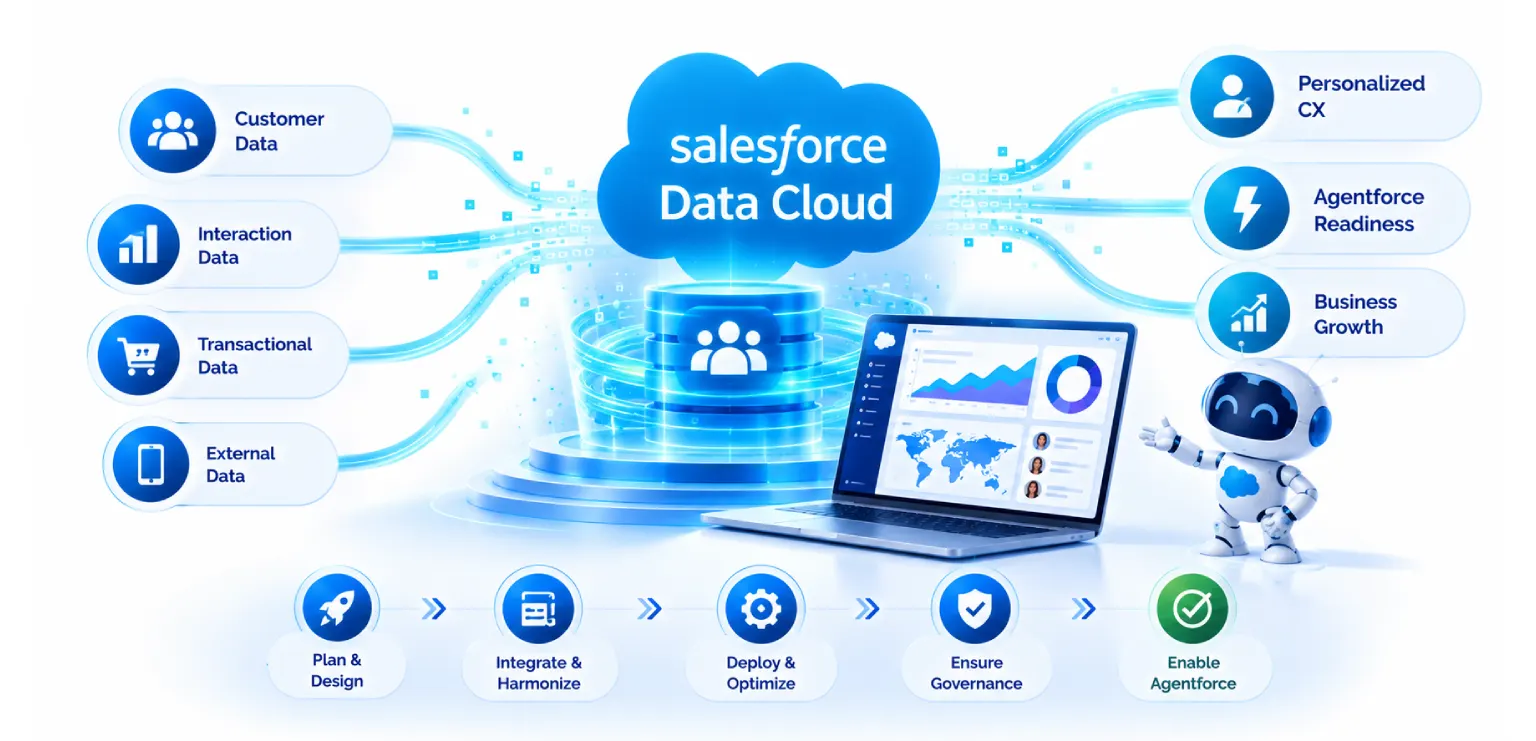
Salesforce Data Cloud pulls customer data from many places into one connected view. It can take in data from Salesforce apps, other business systems, data warehouses, websites and mobile apps. Then it cleans that data up, links records that belong to the same person, and lets other Salesforce tools use the result.
So what is Salesforce Data Cloud implementation? It’s the whole job of getting your data into the platform and making it useful. That means picking use cases, connecting sources, mapping fields, setting identity rules, and then using the unified data for marketing, sales, service and AI. It is much more than installing software.
Think of a library. Buying the shelves is the easy bit. The hard part is collecting the books, sorting them, labeling them, and making sure people can actually find what they need.
Most projects follow the same rough path:
| Plan the use case. Decide which business problem you want to fix first. | |
| Connect the data sources. | |
| Map your fields to the Data Cloud model. | |
| Harmonize the data and resolve identities. | |
| Build segments and insights, then put them to work. | |
| Set rules for access, quality and cost, and keep an eye on them. |
| THE PATH MOST PROJECTS FOLLOW
Plan the use case Pick the business problem to fix first
Connect sources Bring the systems in
Map fields Match them to the Data Cloud model
Harmonize & resolve Make it speak one language
Build & activate Segments and insights, put to work
Govern & watch Access, quality and cost rules Six steps, in the order the guide sets them out. |
Why CIOs are looking at Data Cloud now
Three things usually push CIOs toward Data Cloud.
The first is scattered customer data. Teams can’t see the full picture, so they guess. Marketing sends a discount to someone who just filed a complaint. Sales calls a client who already left.
The second is AI. Gartner has warned that many AI projects will get dropped when the data behind them isn’t ready. The exact figure matters less than the point. Weak data gives weak AI.
The third is Agentforce. It’s Salesforce’s platform for AI agents that answer questions and take action. Those agents are only as good as the data and rules sitting behind them.
| Industry Insight |
What is Data Cloud harmonization?
This is the question we hear most, so let’s keep it simple.
Harmonization means taking data from different systems and making it speak the same language. One system calls a field Cust_Email. Another calls it email_address. A third stores phone numbers with country codes and a fourth doesn’t. Harmonization lines all of that up so the data can be used together.
It happens in four steps.
| HARMONIZATION IN FOUR STEPS
Mapping Each source field matched to a standard field in the common data model
Cleaning Dates, phones, countries and emails made consistent; duplicates flagged
Identity resolution Match rules decide that Jon Smith, Jonathan Smith and a web visitor are one person
Shared meaning One clear definition for terms like active customer or churned Identity resolution is the step teams find hardest. |
Mapping. Each source field gets matched to a standard field in the Data Cloud model. Salesforce uses a common data model so data from different places lands in the same shape.
Cleaning. Dates, phone numbers, country names and email formats are made consistent. Duplicates and empty records get flagged.
Identity resolution. Many teams find this the hardest part. The platform uses match rules to decide that Jon Smith in your CRM, Jonathan Smith in billing and an anonymous web visitor are one person. When the rules link them, you get a single unified profile.
Shared meaning. Terms like active customer or churned need one clear definition. If sales and finance define them differently, even a perfect profile will confuse people.
None of this is glamorous. But it decides whether your reports, segments and AI agents can be trusted.
A word of warning. If your match rules are too loose, different people get merged into one profile. If they’re too tight, one person ends up split into many. Both cause trouble. Test your rules on a small sample first and check the results by hand.
Data Cloud for Agentforce: why readiness matters
An Agentforce agent reads the context and then takes steps. When a customer asks about an order, the agent needs to know who the customer is, what they bought, what’s open in support, and what they’re allowed to see.
Data Cloud is meant to supply that context. It can ground an agent’s answers in your own company data, which makes the agent less likely to invent things. It also ties the agent’s actions to real customer records.
But an agent can’t fix bad data. If a customer’s profile is split in three, the agent might greet a loyal client like a stranger. If product data is old, it might quote the wrong price. If access rules are loose, it might share something it shouldn’t.
So Agentforce readiness is really data readiness. A simple checklist helps.
| Pick one clear use case. Start with a narrow job like order status or case triage. | |
| Know your source of truth for each key field. | |
| Check that unified profiles are right on a test sample. | |
| Clean up knowledge articles. Agents read those too, and old or clashing content leads to bad answers. | |
| Set permissions and respect customer consent. | |
| Test on real questions before launch, and put limits on what the agent can do. | |
| Decide how you’ll measure success, such as faster resolution or fewer handoffs. |
| Not sure whether your data is ready for an agent? A short readiness assessment on one use case tells you more than a platform demo. We look at your sources, your match rules and the profiles they actually produce. |
How long does Salesforce Data Cloud implementation take?
The honest answer is that it depends on scope. Still, CIOs need something to plan with, so here’s a range based on common industry experience. Treat it as a guide, not a promise.
| HOW LONG IT TAKES, BY SCALE Focused first phase — 8 to 12 weeks One or two use cases, a few sources, basic identity resolution Mid-size rollout — 3 to 6 months More sources, trickier identity rules, more than one channel Enterprise program — 6 to 12 months or more Many business units, big volumes, strict compliance, warehouse work Bars are scaled to the midpoint of each range given below. |
| A focused first phase, with one or two use cases, a few sources and basic identity resolution, often takes about 8 to 12 weeks. | |
| A mid-size rollout with more sources, trickier identity rules and more than one channel often runs 3 to 6 months. | |
| An enterprise program with many business units, big data volumes, strict compliance and heavy warehouse work can take 6 to 12 months or more, usually in phases. |
What slows projects down? In our experience it’s rarely the tool. It’s usually one of these.
| Data owners who aren’t clear or aren’t available | |
| Poor data quality that shows up late | |
| Use cases that keep changing | |
| Security and legal reviews that start too late | |
| Too many sources in the first phase |
Our tip is to start small and prove value. Launch one use case, show a result, then add more. Teams that try to connect everything on day one often end up with a long project and little to show for it.
How much does Salesforce Data Cloud implementation cost?
There are two kinds of cost, and you should plan for both.
1. Platform cost. Salesforce prices Data Cloud by usage and edition. Credits get used when you bring in, process and use data. Pricing and packaging change from time to time, so check current numbers with Salesforce or your account team. Don’t rely on old blog posts for license prices, this one included.
2. Implementation cost. This is the work done by your partner and your own team. It depends on a few things:
| How many data sources you have, and what type | |
| The size and quality of the data | |
| How complex identity resolution gets | |
| How many use cases and channels you want | |
| Whether you need custom integrations or warehouse connections | |
| How much training and change support you need |
A small focused project costs far less than a multi-region program, and the gap can be big. We won’t give one number here, because a fixed price without a scoping call is a guess. What we can say is that the cheapest plan on paper is often the most expensive one in the end. Skipping cleanup and governance saves money in month one and costs a lot more in month nine.
To keep costs in check:
| Bring in only the data your first use cases need | |
| Watch credit use from day one and set alerts | |
| Remove data streams you no longer use | |
| Work out the usage model before you scale, not after |
Common mistakes in Data Cloud projects
A few mistakes show up again and again.
Treating it like a data dump. Pulling in every table you own doesn’t create value. It creates cost and noise.
Skipping the business case. If nobody can say which decision or action will get better, the project drifts.
Leaving governance for later. Consent, access and retention rules are much harder to add after the fact.
Ignoring change management. Marketers, sales reps and service agents need to know how to use the new profiles. A great platform that nobody uses is still a failure.
Rushing to the agent. Some teams jump straight to Agentforce and then wonder why the answers are off. The fix is almost always in the data layer.
How do you choose a Salesforce Data Cloud partner?
A good Data Cloud implementation partner does more than set up screens. They help you decide what to build first, warn you about hidden costs, and leave your team able to run things alone.
When you review Salesforce Data Cloud consulting services, these questions are worth asking.
| Have they done this before, in a business like yours? Ask for real examples, not slides. Retail, finance, health and manufacturing all have different data rules. | |
| Do they know the whole Salesforce stack? Data Cloud touches sales, service, marketing and Agentforce. Someone who only knows one cloud may miss how the pieces fit. | |
| How do they handle harmonization and identity resolution? Ask how they test match rules and measure profile accuracy. | |
| Do they bring up governance early? If privacy and consent only appear at the end, be careful. | |
| Are they honest about Agentforce? A good partner tells you what’s ready now and what isn’t. | |
| How do they price and scope? Look for a phased plan with clear outputs. Watch out for vague estimates with no assumptions. | |
| What happens after go live? Ask about training, support and how knowledge gets handed to your team. | |
| Are they certified and active in the Salesforce world? Certifications help, but they aren’t enough alone. |
Ask to talk to a past client too. Ten minutes on a reference call often tells you more than a long proposal.
| Looking for a Salesforce Data Cloud partner? Impressico works across the Salesforce stack and ties Data Cloud work to the decisions it is meant to improve. Phased scope, clear outputs, and honest answers about what Agentforce is ready for. |
A simple phased roadmap for CIOs
If you want a practical place to start, this four phase path works for many teams.
Phase 1, Assess (2 to 4 weeks). Review your data sources, pick one or two high value use cases and check data quality. Agree on owners and on how you’ll measure success.
Phase 2, Build the foundation (6 to 10 weeks). Connect the first sources, map them to the data model, set identity rules and put basic governance in place.
Phase 3, Activate. Use the unified data for something real, like a targeted segment, a service view or a personalized journey. Then measure what happened.
Phase 4, Add Agentforce. Once you trust the data, launch a narrow agent with clear limits. Test it, watch it and improve it. Then widen the scope a step at a time.
| Key Takeaway |
Frequently asked questions
| Is Data Cloud the same as a data warehouse? No. A warehouse mainly stores and analyzes large amounts of data. Data Cloud is built to unify customer data and use it inside Salesforce apps and AI. Many companies run both, and Data Cloud can connect to common warehouses. |
| Do we need Data Cloud to use Agentforce? Agents can run on limited data, but they work best with rich, connected customer context. Data Cloud is one of the main ways to provide that. |
| Can we start without cleaning all our data first? Yes, and you should. Clean only what your first use case needs. Trying to fix everything up front just delays the project. |
| Who should own the project? Ideally a business sponsor and an IT lead together. If it sits only in IT, business value gets lost. If it sits only in the business, technical risks get missed. |
Final thoughts
A Salesforce Data Cloud implementation is less about technology and more about discipline. Pick a clear use case. Connect only what you need. Put real effort into harmonization and identity. Set rules for privacy and access. Then bring in Agentforce on top of data you can trust.
CIOs who work this way usually see value sooner and skip the expensive rework that comes from rushing. The ones who struggle mostly treated data as an afterthought.
| Key Takeaways
Steps From use case to governance
Harmonization stages Mapping, cleaning, identity, meaning
Weeks For a focused first phase
Phases Assess, build, activate, then Agentforce |
| Planning a Data Cloud project? Planning a Data Cloud project, or want to know how ready your data is for Agentforce? The team at Impressico Business Solutions can help you scope it, price it and build it in phases. Reach out and we’ll start with a short readiness review. |
Impressico Business Solutions helps CIOs scope, deliver and govern Salesforce Data Cloud and Agentforce programmes.

IBS
Similar articles

Salesforce Manufacturing Cloud: Account-Based Forecasting for Sales Agreements
October 21, 2026
Salesforce Health Cloud: Modernizing Patient Engagement and Provider Workflows
September 25, 2026
Salesforce Financial Services Cloud vs Sales Cloud: Which One Fits Wealth, Banking, and Insurance
September 23, 2026
Salesforce Industry Clouds: When Vertical CRM Beats Sales Cloud
September 18, 2026
Agentforce Readiness: What to Fix in Your Salesforce Org First
August 17, 2026
Is Your Salesforce Org Ready for AI? An Enterprise Readiness Checklist
August 7, 2026
