September 9, 2026
Compliance-as-Code: Automating SOC 2, HIPAA, and PCI-DSS in CI/CD Pipelines
Enjoying this article?
Share it with the world!


How to Automate SOC 2, HIPAA & PCI-DSS in CI/CD
Compliance cannot be done as something started a few weeks before an audit. Modern tools evolve so rapidly that it becomes impossible for teams to rely on spreadsheets, screenshots, and manual collection of evidence to prove the implementation of security and compliance controls.
This is where compliance-as-code comes into play. Since we already have security controls integrated into CI/CD pipelines, we can move to the next step and encode relevant compliance requirements as policies that could be automatically evaluated. Instead of questioning the compliance of an environment at a certain point in time, we can ensure that the right controls are implemented through code, infrastructure, and deployment changes.
But there is also a good business case behind such an approach. In 2026, IBM revealed that being found non-compliant with regulations increases the cost of a data breach by more than $200,000.
| +$200,000 Being found non-compliant with regulations adds more than this to the average cost of a data breach (IBM, 2026). Compliance is risk mitigation and cost control. |
And for companies that operate within regulated industry, the purpose of automation is not in automating every process associated with compliance. It is in automation of those controls that could be easily verified, gathering evidence as part of work, and leaving the rest of the processes under human control.
| THE PREDECESSOR — This builds directly on shift-left security in CI/CD pipelines, part of the wider DevSecOps model. If your pipeline security isn’t in place yet, start with DevOps pipeline readiness and how to automate your CI/CD pipeline for SaaS. |
What Is Compliance-as-Code?
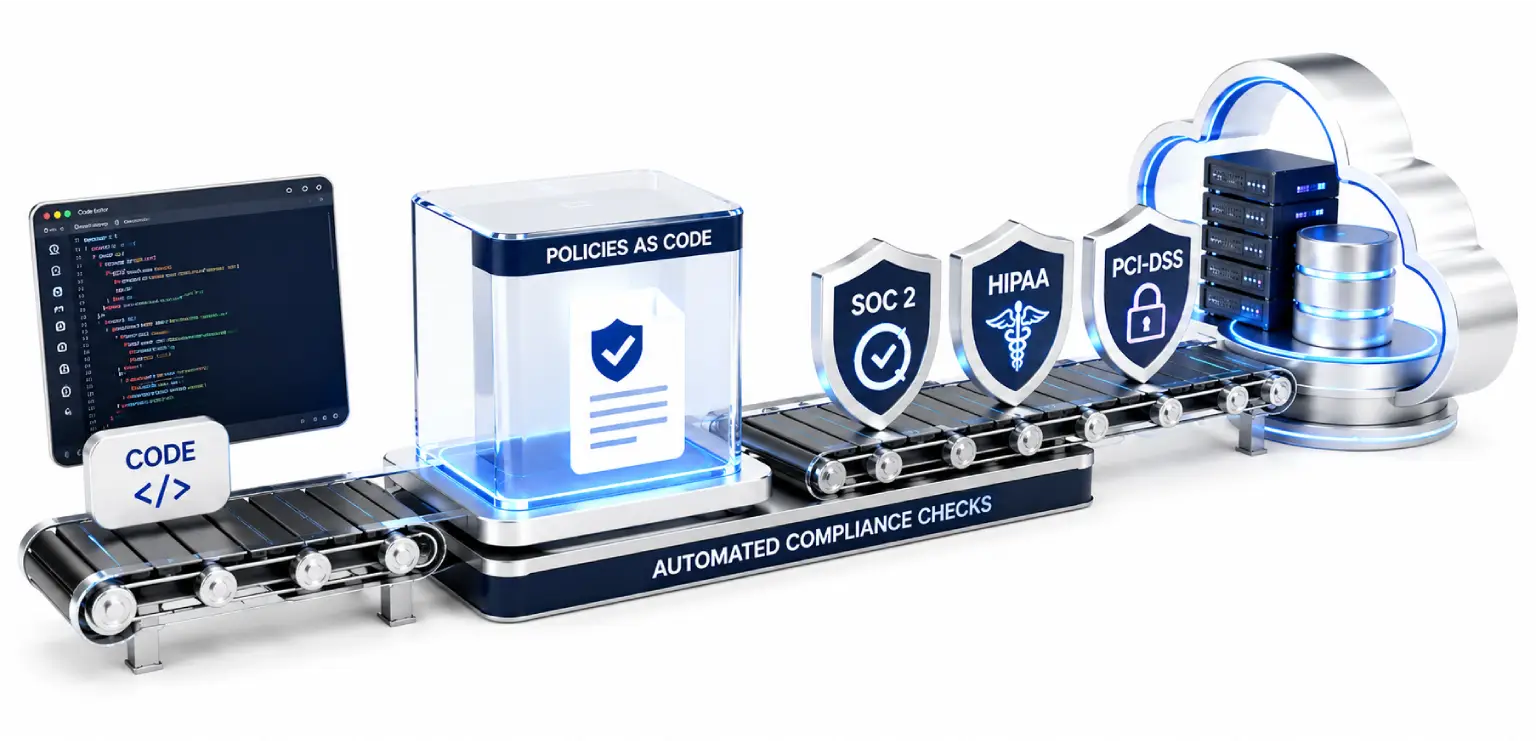
Compliance-as-code means expressing applicable compliance requirements as machine-readable policies, controls, and automated checks that can be evaluated throughout the software development lifecycle.
Instead of keeping a requirement only in a policy document, we translate the relevant part into something our technology environment can actually check.
The basic flow looks like this:
The Compliance-as-Code Flow
Compliance Requirement
→
Technical Control
→
Policy
→
Automated Check
→
Evidence
→
Remediation
From a requirement in a document to an automated, evidence-producing control.
For example, if a compliance requirement calls for appropriate access controls, we may define technical rules around permissions, privileged access, or identity configurations. Those rules can then be checked automatically whenever relevant infrastructure or configuration changes.
This makes compliance more continuous and repeatable. IBM describes policy-as-code as a way to express security, compliance, and organizational rules in machine-readable code that can be automatically enforced across IT environments and DevOps pipelines.
Compliance-as-code therefore does more than create another security gate. It connects regulatory expectations with the systems that actually deliver and operate software.
SOC 2
Map Trust Services Criteria to technical controls; auto-collect evidence from approvals & scans.
HIPAA
Automate technical safeguards: access, encryption, secrets, logging. Govern the rest.
PCI-DSS
Bring card-data controls into dev, deploy & monitoring — scoped to your environment.
The same pipeline approach adapts to SOC 2, HIPAA, and PCI-DSS.
How Do You Automate SOC 2 Compliance?
To understand how to automate SOC 2 compliance, we first need to identify which Trust Services Criteria and controls apply to our environment. We can then map those requirements to technical activities that can be checked automatically.
SOC 2 evaluates controls related to areas such as security, availability, processing integrity, confidentiality, and privacy, depending on the scope selected for the assessment.
The practical approach is to connect those controls with normal engineering activity rather than creating a separate compliance process.
| Compliance Area | Example Technical Control | Automated Evidence |
| Access control | Validate IAM roles and privileged permissions | Access and policy records |
| Change management | Require approved pull requests and controlled deployments | PR and deployment history |
| Security | Run applicable security and configuration checks | Scan and policy results |
| Monitoring | Validate required logging and monitoring configurations | Configuration records |
| Infrastructure | Check infrastructure against approved policies | IaC and cloud policy results |
The important point is that not every SOC 2 requirement should become a CI/CD rule. Some controls can be automated effectively, while others require documented processes, management review, or human assessment.
Automate Evidence Alongside the Control
When we look at how to automate SOC 2 compliance effectively, one of the biggest advantages is that evidence can be created while the work is happening.
A deployment approval, access change, security check, policy evaluation, or configuration validation can leave a trace that may later support an audit.
IBM’s DevSecOps documentation provides an example of this approach: its IaC CI pipeline collects evidence and result artifacts from activities such as testing, scanning, and signing and associates that information with the built artifacts.
This is much more useful than trying to reconstruct months of engineering activity when an audit approaches.
Can HIPAA Compliance Be Automated in CI/CD?
Yes, but only to a point.
We can automate many technical safeguards associated with HIPAA, but we should not claim that a CI/CD pipeline can make an organization completely HIPAA-compliant on its own.
For healthcare organizations, compliance automation can help continuously validate technical controls around:
| ▪ Access permissions and identity configurations |
| ▪ Encryption-related settings |
| ▪ Secrets and credential management |
| ▪ Logging and monitoring |
| ▪ Infrastructure configurations |
| ▪ Security policies |
| ▪ Deployment controls |
| ▪ Configuration changes |
For example, a pipeline can check whether a new infrastructure configuration violates an approved security policy before that configuration reaches production.
What Still Requires Human Oversight?
Compliance involves more than technical configuration.
Risk analysis, workforce procedures, incident response decisions, policies, vendor relationships, organizational responsibilities, and other governance activities still require people.
This distinction matters because automation should reduce repetitive compliance work, not create a false sense that compliance has become completely automatic.
The better model is to automate what can be verified consistently and govern what requires judgment.
How Does PCI-DSS Work With CI/CD?
PCI-DSS in CI/CD means bringing applicable payment-card security controls closer to the systems and changes that can affect the cardholder data environment.
Rather than waiting for a periodic review, we can incorporate relevant checks into development, infrastructure, deployment, and monitoring workflows.
Depending on the environment and applicable requirements, these controls may include:
| ▪ Access and privilege validation |
| ▪ Secure configuration checks |
| ▪ Vulnerability management |
| ▪ Change control |
| ▪ Logging requirements |
| ▪ Infrastructure validation |
| ▪ Deployment approvals |
| ▪ Security policy enforcement |
The exact controls will depend on the organization’s PCI-DSS scope and architecture. We should therefore avoid treating a generic pipeline checklist as proof of PCI-DSS compliance.
| AUTOMATE THE REPEATABLE — These checks depend on a strong automation base. See our DevOps automation framework for SaaS and guidance on choosing CI/CD tools. |
Turning PCI-DSS Requirements Into Pipeline Policies
A useful implementation model is:
| Requirement → Control → Pipeline Check → Decision → Evidence |
Suppose a policy requires a particular configuration to be maintained. Instead of relying only on a manual review, we can express the relevant technical condition as a policy and evaluate it during infrastructure or deployment workflows.
If the condition fails, the pipeline can apply a predefined action. A serious violation may stop deployment, while a lower-risk issue may generate a warning and create a remediation record.
This connects compliance requirements to actual engineering decisions.
What Are the Benefits of Compliance Automation in CI/CD?
The biggest benefit is not simply faster scanning. It is creating a more consistent relationship between compliance requirements and the systems that implement them.
| ▪ Continuous Compliance Visibility. We can identify control failures closer to the moment they occur instead of discovering them during a periodic review. |
| ▪ Less Manual Evidence Collection. Evidence can be generated from existing engineering workflows, reducing the need to collect screenshots and records manually. |
| ▪ Consistent Policy Enforcement. A coded policy can be evaluated repeatedly using the same logic instead of depending on different people interpreting the same requirement differently. |
| ▪ Faster Remediation. When a compliance problem appears close to the change that caused it, the responsible team can usually investigate it with better context. |
| ▪ Better Audit Readiness. Compliance becomes an ongoing engineering activity instead of a project that suddenly becomes urgent before an audit. |
Gartner’s 2026 Market Guide for DevOps Continuous Compliance Automation Tools highlights the need for organizations to enforce policy guardrails, address compliance gaps, and systematically audit security and compliance policies throughout the software development lifecycle.
What Tools Are Used for Compliance-as-Code?
There is no single compliance as code tools category that solves every requirement. Most organizations need several capabilities working together.
Common categories include:
| ▪ Policy-as-code tools: Define machine-readable rules for security, configuration, and compliance requirements. |
| ▪ Infrastructure-as-code security tools: Check Terraform and other infrastructure definitions before deployment. |
| ▪ Cloud compliance tools: Continuously evaluate cloud environments against selected policies and benchmarks. |
| ▪ CI/CD policy controls: Apply compliance decisions during builds, testing, and deployment. |
| ▪ Configuration monitoring: Identify changes that introduce compliance gaps or configuration drift. |
| ▪ Evidence and compliance platforms: Collect control results, maintain audit trails, and organize evidence. |
Gartner describes continuous compliance automation tools as supporting automated enforcement and assessment of security and compliance policies within application delivery workflows, along with audit reporting.
How Should We Choose Compliance-as-Code Tools?
The number of checks a platform offers should not be our only consideration.
We should evaluate whether the tool can:
| ▪ Integrate with our existing CI/CD environment |
| ▪ Support the compliance frameworks we actually need |
| ▪ Connect policies to technical controls |
| ▪ Provide useful evidence |
| ▪ Maintain traceability and audit history |
| ▪ Handle exceptions |
| ▪ Reduce false positives |
| ▪ Support multiple cloud or infrastructure environments |
| ▪ Give engineers enough context to remediate findings |
The right tool is the one that fits our operating model rather than the one with the longest feature list.
| CHOOSING HELP — On selecting the right partner for a compliance-and-CI/CD engagement, see the DevOps consulting partner for SaaS guide. |
Is Policy-as-Code the Same as Compliance-as-Code?
No.
Policy-as-code is a mechanism. Compliance-as-code is the broader practice.
Policy-as-code allows us to turn rules into machine-readable logic that can be automatically evaluated. Compliance-as-code uses this capability, along with control mapping, evidence collection, monitoring, reporting, and remediation, to manage applicable compliance requirements more continuously.
A simple way to understand the relationship is:
Compliance Requirement
↓
Compliance-as-Code
↓
Policy-as-Code
↓
Automated Technical Control
↓
Evidence
Policy-as-code is one building block of a broader compliance-as-code strategy.
So, policy-as-code can be an important building block of a broader compliance-as-code strategy.
A Practical Compliance-as-Code Workflow for CI/CD
Knowing how to automate SOC 2 compliance becomes much easier when we follow a defined sequence.
1. Identify Applicable Requirements
We should first determine which parts of SOC 2, HIPAA, PCI-DSS, or another framework actually apply to our organization, applications, infrastructure, and data.
2. Map Requirements to Technical Controls
Next, we translate relevant requirements into technical controls that our systems can evaluate.
A broad requirement is not automatically an executable rule. We need to determine what condition would demonstrate that the technical part of the requirement is being followed.
3. Define Policies as Code
The applicable controls can then be represented as machine-readable policies.
This gives engineering teams something that can be tested consistently rather than interpreted differently during every review.
4. Place Checks in the Right Workflow
Not every compliance check belongs at the same point.
Some controls can be checked when code or infrastructure changes are proposed. Others make more sense during deployment or through continuous monitoring after release.
5. Decide What Blocks and What Warns
We should use risk-based decisions rather than turning every policy failure into a deployment blocker.
A serious violation may need to stop a release. A lower-risk issue may generate a warning, while another condition may simply be recorded for monitoring.
6. Generate Evidence Automatically
Each meaningful policy evaluation should ideally create useful evidence that can be traced back to the relevant change, environment, or deployment.
7. Manage Exceptions
Exceptions should have an owner, reason, approval, expiration or review date, and enough context to explain why the control was temporarily bypassed.
8. Review and Improve
Policies should evolve as infrastructure, applications, threats, and regulatory requirements change.
Common Mistakes When Automating Compliance in CI/CD
| ✗ Trying to Automate Everything. Not every compliance requirement can be expressed as a technical pipeline rule. Trying to do so can create misleading results. |
| ✗ Creating a Separate Compliance Pipeline. Compliance should connect with existing development, security, and deployment workflows rather than becoming another disconnected process. |
| ✗ Blocking Too Many Releases. If every policy warning stops delivery, teams may eventually work around the controls. Risk-based enforcement is more sustainable. |
| ✗ Automating Checks Without Evidence. A system may identify a compliance issue but fail to retain enough information to demonstrate what was checked, when it was checked, and what happened afterward. |
| ✗ Assuming a Passing Scan Means Full Compliance. A successful technical check proves only what that check evaluated. It does not automatically demonstrate compliance with an entire framework. |
How Do We Measure Compliance Automation?
We should measure whether automation is reducing compliance effort and improving control visibility, not simply count the number of policies created.
Useful metrics include:
| ▪ Percentage of applicable controls automated |
| ▪ Percentage of evidence collected automatically |
| ▪ Time required to prepare audit evidence |
| ▪ Compliance violations detected before deployment |
| ▪ Average remediation time |
| ▪ Number of recurring violations |
| ▪ Age of compliance exceptions |
| ▪ Manual compliance tasks eliminated |
| ▪ Percentage of environments continuously monitored |
A simple scorecard can focus on four areas:
| Coverage → Enforcement → Evidence → Remediation |
If coverage is high but evidence is poor, the automation is incomplete. If enforcement is strong but remediation takes months, the process still has a weakness. Looking at all four areas gives compliance leaders a more realistic picture.
| MEASURE WHAT MATTERS — Tie these to overall delivery health with the DevOps metrics every CTO should track, and baseline with measuring DevOps maturity. |
FAQs
What Is Compliance-as-Code?
Compliance-as-code is the practice of representing applicable compliance requirements as machine-readable policies and automated controls. These controls can be evaluated throughout the software development lifecycle while producing evidence for monitoring and assessment.
How Do You Automate SOC 2 Compliance?
We can automate applicable SOC 2 controls by mapping requirements to technical policies, checking those policies within development and deployment workflows, and automatically collecting evidence from activities such as approvals, configuration checks, and security validation.
Can HIPAA Compliance Be Automated in CI/CD?
Certain technical safeguards can be continuously checked and enforced through CI/CD, including access, configuration, secrets, encryption-related settings, and logging. However, HIPAA compliance also includes organizational and governance responsibilities that cannot be fully automated.
What Tools Are Used for Compliance-as-Code?
Common capabilities include policy-as-code, infrastructure compliance scanning, cloud posture management, CI/CD policy enforcement, configuration monitoring, and automated evidence collection.
Is Policy-as-Code the Same as Compliance-as-Code?
No. Policy-as-code turns rules into machine-readable logic, while compliance-as-code uses policy automation as part of a broader approach to control mapping, continuous validation, evidence collection, and compliance management.
From Shift-Left Security to Continuous Compliance
Security controls in CI/CD are only one part of building a reliable software delivery process. The next step is connecting those controls to the compliance requirements that govern our environments.
Compliance-as-code allows us to move from periodic compliance checks toward continuous validation, while still keeping human oversight where judgment is required. At Impressico Business Solutions, we help organizations connect security, compliance, and CI/CD practices so regulated environments can maintain stronger control without turning delivery into a manual process.
| IMPRESSICO · DEVOPS & CLOUD SERVICES Move from periodic audits to continuous compliance Impressico Business Solutions helps organizations connect security, compliance, and CI/CD practices – automating the controls that can be verified consistently, generating audit evidence as work happens, and keeping human oversight where judgment is required. Whether you’re mapping SOC 2, HIPAA, or PCI-DSS to your pipeline, our DevOps & Cloud Services team can help you design, implement, and measure it.
|
Impressico Business Solutions – Automate what can be verified, govern what requires judgment.

IBS
Similar articles
Shift-Left Security in CI/CD Pipelines: A Practical Playbook
September 4, 2026
DevSecOps: Shifting Security Left Without Slowing Delivery
September 2, 2026
Is Your Engineering Team Ready for Platform Engineering? A Readiness Checklist
August 12, 2026
Measuring Platform Engineering ROI: DORA and SPACE Explained
July 31, 2026
Internal Developer Platforms: Building a Golden Path for Engineering Teams
July 22, 2026
AIOps in Practice: Using AI to Cut Incidents and MTTR
July 6, 2026