November 6, 2026
Kubernetes Cost Optimization: 10 Patterns That Cut Spend Without Hurting Performance
Enjoying this article?
Share it with the world!


Kubernetes Cost Optimization: 10 Proven Patterns
| ⚡ Quick Answer Kubernetes cost optimization starts with finding the compute your applications actually need, rather than what was allocated to them. The ten patterns here fall into four kinds of move: match capacity to demand (rightsizing, HPA and VPA, cluster autoscaling, bin packing), buy compute better (Spot, instance types and plans), stop paying for idle (non-production schedules, storage and network) and see it and govern it (cost allocation, AI recommendations). Test performance after every change. |
Kubernetes cost optimization begins by identifying the amount of compute resources required by your applications, instead of the resources that have been allocated to your applications. With growth in the size of Kubernetes environments, there is a likelihood of higher cloud expenses because of over-provisioned containers, unused nodes, excessive replicas and wasteful storage without increasing application performance.
As an engineer or lead working with Kubernetes, your task would be to reduce Kubernetes costs without jeopardizing application availability, scalability and latency. It is not just about reducing CPU and memory utilization. It means understanding workload behavior, automated infrastructure management and measurement of performance.
Here are 10 actionable patterns that will optimize infrastructure use without impacting production workloads.
Why Kubernetes Costs Increase Even When Your Cluster Looks Healthy
A running Kubernetes cluster does not necessarily imply that resource usage is optimal. Applications can allocate more CPU and RAM than they actually utilize, while development environments are still running even during off hours. Bad pod placement is another cause of partial utilization of expensive nodes.
Hidden costs may be incurred through storage, network communications between zones, and cloud resources not associated with active workloads.
Kubernetes cost optimization requires visibility into those costs before any infrastructure adjustments.
10 Kubernetes Cost Optimization Patterns That Preserve Performance
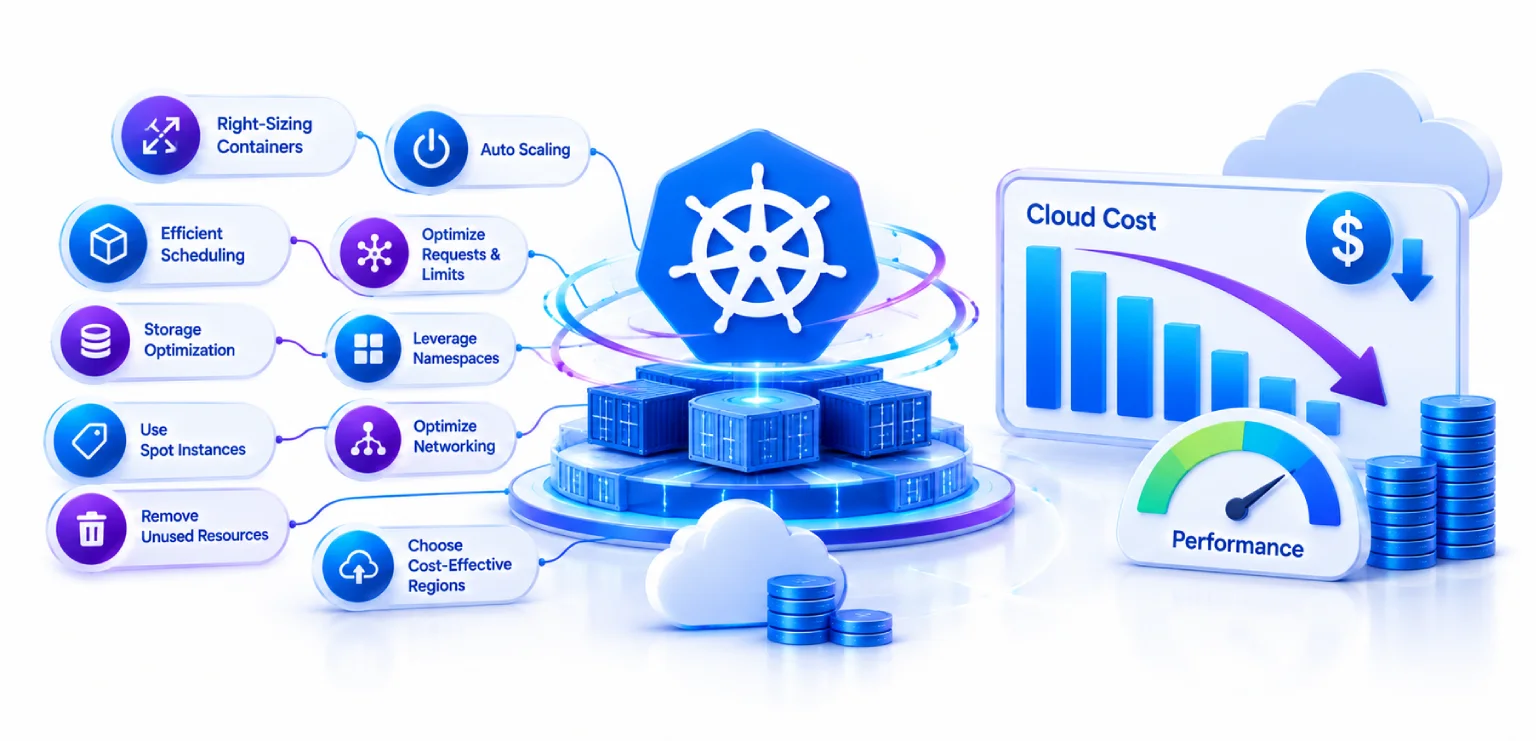
| TEN PATTERNS, FOUR KINDS OF MOVE MATCH CAPACITY TO DEMAND 1. Rightsizing2. HPA + VPA3. Cluster autoscaling4. Bin packing BUY COMPUTE BETTER 5. Spot Instances9. Instance types & plans STOP PAYING FOR IDLE 6. Schedule non-prod8. Storage & network SEE IT AND GOVERN IT 7. Cost allocation10. AI recommendations Numbers are the pattern order used below. |
1. Implement K8s Resource Rightsizing Based on Actual Usage
Overprovisioning is one of the initial issues that should be addressed. If the container requests four CPUs but uses only one, the unused capacity may block the sharing of the node by other applications.
Historical data about the use of CPU and memory should be utilized to optimize resource requests and limits. There are available tools like Vertical Pod Autoscaler (VPA), Goldilocks and KRR to find an appropriate configuration.
But make sure not to rely solely on average consumption. Seasonal factors should also be considered before reducing the resources.
Performance testing: Monitor CPU throttling, memory pressure, out-of-memory (OOM) kills and latency of the applications after each step. It will make K8s resource rightsizing safer for production environments.
2. Combine HPA and VPA for Smarter Workload Scaling
The Horizontal Pod Autoscaler (HPA) scales up or down the number of pod replicas based on the workload demand. The VPA either advises or modifies the resource consumption of individual containers, such as CPU and memory.
These tools are designed to align the infrastructure capacity with application demands. For instance, an increase in the traffic of an API could lead to horizontal scaling, and the recommendations for resources can be reviewed to prevent oversized containers.
It is important to configure them appropriately, especially when both have an effect on the utilization of CPU and memory.
3. Use Cluster Autoscaling to Remove Unused Compute Capacity
This scaling approach does not necessarily mean that unused worker nodes will be automatically freed up. In the case of decreased load, the infrastructure can stay provisioned when there is enough capacity on fewer nodes.
Cluster Autoscaler and Karpenter provide solutions to solve this problem through the optimization of node capacity based on pending pods and the requirements for scheduling.
In the case of AWS, Karpenter can dynamically allocate appropriate instance types and consolidate workloads onto fewer nodes where possible.
Performance test: Monitor pending pods, node provisioning time, and scheduling failures.
4. Improve Node Consolidation and Workload Bin Packing
Mismanagement in allocation of workload will result in some of the nodes being underutilized. Node consolidation and bin packing ensure that suitable workloads are scheduled on a smaller number of machines.
Look at pod affinities, anti-affinities, taints and tolerations and topology constraints. This will determine what kinds of workloads can be scheduled and prevent any kind of consolidation.
It is important that all the workloads are not scheduled on one node. Critical applications should have their own separate capacity for availability.
5. Use AWS Spot Instances for Better EKS Cost Reduction
Spot Instances allow you to use AWS spare EC2 capacity at discounted rates, but AWS can take back this capacity whenever needed.
It is especially helpful in building fault-tolerant workloads like batch jobs, CI/CD tasks, background workers, and stateless applications.
In order to reduce EKS cost, use multiple instance types and AZs, implement interruption recovery, and have on-demand capacity available for critical workloads. Pod Disruption Budgets can also be used to protect availability during planned interruptions.
Do not move databases or workloads with high availability needs to Spot without any recovery mechanism in place.
6. Schedule Non-Production Environments to Reduce Idle Spending
Sometimes development, test & staging environments can be using resources.
Using scheduled scaling will help reduce replica counts or turn off non-production resources. For example, if you only use your test environment during the week, you don’t need to have the normal amount of resources during the weekend.
Ensure you know what shared services, databases & automated tests are in place so these can stay running.
This is an easy way to reduce Kubernetes costs.
7. Introduce Kubernetes Cost Allocation Across Teams
Do you know what application, team or environment is causing you to spend money on Kubernetes?
Kubernetes Cost Allocation will help you by allocating your infrastructure costs to different namespaces, workloads, pods and teams.
Having consistent naming and resource information will make it easier to identify who owns the resources. Cost Allocation can help with showback (where teams see their infrastructure expenses) and chargeback (where costs are assigned to their budgets).
This will hold people accountable and help the platform team identify what workloads need optimizing.
For organizations looking to connect infrastructure spending with financial accountability, FinOps Consulting Services can help establish better cloud cost visibility, allocation practices and ongoing optimization strategies.
8. Optimize Persistent Storage and Network Transfer Costs
Compute is not the only cause for unnecessary Kubernetes costs. Underused storage, excessive volume size, excessive number of snapshots and cross-zone traffic can lead to increased costs of infrastructure.
Look at the storage classes, storage volume utilization, retention policies and applications’ data needs. Locate underused resources and eliminate them using proper cleanup procedures.
For networking, look for recurring cross-zone traffic, unnecessary data transfers and inefficient service-to-service communications.
Remember to always test the performance, IOPS and network latency prior to making any changes.
9. Choose Cost-Efficient Compute and Cloud Purchasing Options
Different applications have different compute needs. Memory-intensive applications could be best served by a memory-optimized machine, while a CPU-intensive application would run best on a compute-optimized machine.
Consider using Graviton-enabled machines if the application architecture allows. Savings Plans from Amazon Web Services can be considered for applications that are predictable in nature, and Spot capacity for unpredictable applications.
A good strategy would be to divide predictable applications from unpredictable applications and purchase accordingly.
10. Apply Kubernetes Cost AI Optimization and Automated Recommendations
Using AI to optimize your infrastructure will help the platform team identify any cost anomalies, predict what resources you’ll need and find any workloads that need attention.
Rather than manually checking, use the automated suggestions to identify any over-provisioned containers, odd usage and under-utilized nodes.
However, don’t automatically implement any AI suggestions. Have some approvals in place, policy checks, canary testing and rollbacks in place before any critical workloads are changed by automated systems.
This will make Kubernetes Cost AI Optimization more practical.
| Know which of these ten to do first? The patterns are not equally valuable in every cluster. A short review of your usage data says which two or three will move your bill, and which will only move your risk. |
Best Kubernetes Cost Optimization Tools: Open Source and Commercial Options
Depending on what you want to do, there are many tools to choose from. If you want to track your costs, get suggestions or automate your infrastructure.
If you want to explore solutions beyond Kubernetes-specific platforms, our guide to The Best Cloud Cost Management Tools in 2026 covers tools that help organizations monitor, analyze and control cloud spending across different environments.
If you’re looking for open source Kubernetes Cost Optimization tools, OpenCost provides insights into your infrastructure allocation. Goldilocks and KRR help identify resource rightsizing opportunities, while Karpenter helps improve node utilization through automated node provisioning and consolidation.
These tools can work together. For example, a platform team can use OpenCost to identify expensive namespaces, KRR to find resource optimization opportunities and Karpenter to improve node utilization.
Which tools work best will depend on your cluster architecture, cloud provider and operational requirements.
How Much Can You Save With Kubernetes Rightsizing?
How much you save will depend on how much resources you’re currently using, the price of your infrastructure, how your workloads behave and how much you can consolidate your nodes.
If you have a workload requesting 8 vCPUs on your running pods. You review the historical data and test your new configuration. You find that you only need 5 vCPUs.
This means you’ve reduced the CPU requested by 37.5%.
However, this doesn’t necessarily mean you’ll save 37.5% on your cloud bill. It depends on how much you can reduce your nodes.
| WHAT RIGHTSIZING ACTUALLY CHANGES Requested before — 8 vCPU Requested after — 5 vCPU 37.5% less CPU requested But the bill only falls as far as you can reduce nodes The article’s own example, with its own caveat attached. |
A Better Approach: Measure Cost Per Transaction, Not Just Cluster Spend
An often overlooked part of Kubernetes cost optimization is looking into how efficient your infrastructure is based on the output of your business.
You might reduce your CPU usage but if your applications are slower or you’re completing less transactions.
Implement a framework that tracks:
| MEASURE ALL THREE, OR NONE OF THEM COUNT
Cost Infrastructure spend per successful transaction or API call
Performance Response time, throughput and CPU throttling
Reliability Error rates, availability and SLOs Cheaper infrastructure that serves fewer transactions is not a saving. |
| Cost – How much you’re spending on infrastructure per successful transaction/API call. | |
| Performance – How fast your application is responding, throughput and CPU throttling. | |
| Reliability – Error rates, availability and SLO’s. |
If you’re spending less on infrastructure but your cost per successful transaction has increased then your optimization hasn’t really improved your efficiency.
This will help platform leads make better decisions on whether your infrastructure changes are really helping.
| Cost per transaction is a FinOps problem, not just an engineering one Getting infrastructure spend attributed to teams and tied to business outcomes takes a process as much as a tool. That is the work we do alongside platform teams. |
FAQ's
| 1. How do you reduce Kubernetes costs without affecting performance? Start by rightsizing your resources, autoscaling your workloads, consolidating your nodes and allocating costs. Ensure you’re tracking latency, CPU throttling & availability. |
| 2. What are the best Kubernetes cost optimization tools? Some good tools are OpenCost, Kubecost, Goldilocks, KRR & Karpenter. Choose based on whether you need cost visibility, resource recommendations or automated infrastructure provisioning. |
| 3. What is Kubernetes cost allocation? This is when you allocate your Kubernetes infrastructure costs to different namespaces, applications, teams & workloads. This will improve your visibility and accountability. |
| 4. How do you use Spot Instances with Kubernetes? Run workloads that can tolerate interruptions on a range of Spot resources. Set up graceful termination & have alternative resources for your critical applications. |
| 5. Does Kubernetes autoscaling automatically reduce cloud costs? Not always. Whilst HPA will reduce your pod replicas, you might need to autoscale your nodes to remove any unused compute resources. |
Conclusion
Successful Kubernetes cost optimization should help you to be more efficient with your resources without causing any performance or reliability issues. Using rightsizing, smart scaling, allocating your costs, buying cost-efficient resources and tracking performance will help your platform team create more cost-efficient Kubernetes environments.
When organizations face challenges in running their cloud infrastructure, Impressico Business Solutions will be there to ensure that the organization integrates its infrastructure management with financial management via the FinOps approach.
| Key Takeaways
Patterns Across four kinds of move
Levers Capacity, purchasing, idle, governance
Per cent Less CPU requested in the worked example
Metrics Cost, performance and reliability together |
| Make your Kubernetes spend match your actual usage Impressico helps platform teams rightsize, automate and govern Kubernetes cost, and ties the work to the FinOps practice that keeps the savings in place. |
Impressico Business Solutions helps platform and finance teams make Kubernetes and cloud spending visible, efficient and accountable.

IBS
Similar articles

FinOps Consulting Services: What to Expect From a Cloud Cost Partner in 2026
November 2, 2026
Cloud Cost Optimization Services: What a Modern FinOps Engagement Actually Delivers
October 28, 2026
SAST vs DAST vs SCA: Choosing the Right Security Tools for Modern DevOps Pipelines
October 19, 2026
Compliance-as-Code: Automating SOC 2, HIPAA, and PCI-DSS in CI/CD Pipelines
September 9, 2026
Shift-Left Security in CI/CD Pipelines: A Practical Playbook
September 4, 2026
DevSecOps: Shifting Security Left Without Slowing Delivery
September 2, 2026