


November 12, 2026
LLM-as-a-Judge: How to Automate Evaluation of GenAI Outputs at Scale
Enjoying this article?
Share it with the world!


Can You Prove Your GenAI Is Any Good?
| ⚡ Quick Answer LLM-as-a-Judge means using one language model to grade another’s output against a written rubric, so quality checks scale past what people can read. It reduces the need for manual review, which is slow and inconsistent, and for word-overlap metrics like BLEU and ROUGE, which cannot tell whether an answer is true or useful. Most teams score on some mix of accuracy, relevance, helpfulness, faithfulness and consistency, using single scoring for volume, pairwise comparison for picking between versions, and rubrics when they need detail. The method has real limits — judges favour long answers, favour whichever answer comes first, and score the same text differently on a second pass — so the work is calibrating the judge against human scores on your own data before you trust it, and keeping people on the high-risk cases. |
Let’s say your team just launched a GenAI chatbot. It’s live, customers are using it, and everyone’s pretty pleased for a week or so. Then your boss asks, “So, are the answers any good?” And suddenly nobody knows what to say.
It happens more than you’d think. Building the app is the fun bit. Checking whether it still works week after week? That’s where most teams get stuck. One way out is LLM-as-a-Judge. Here we’ll cover what it is, how it works, where it breaks, and how your company can get started without a mess.
What is LLM-as-a-judge?
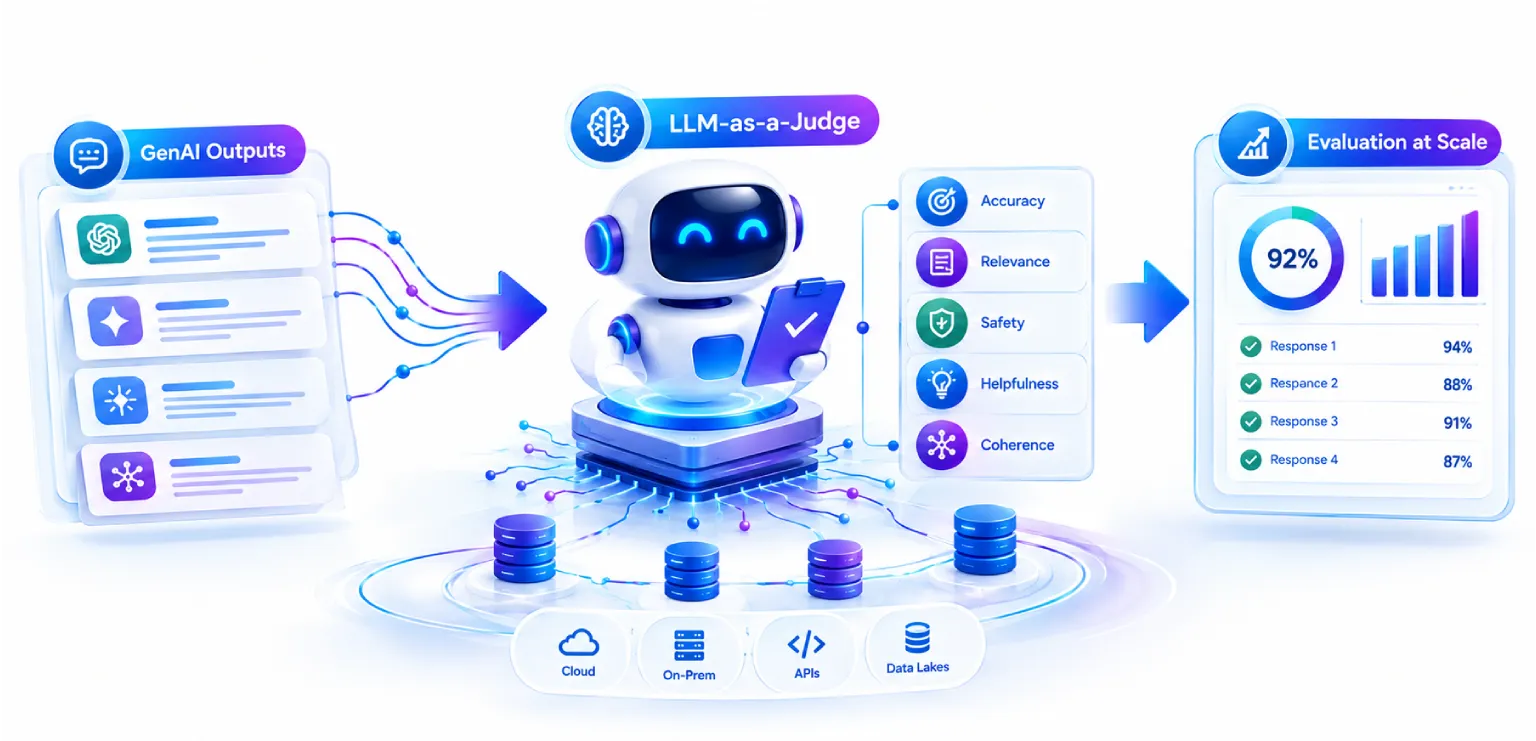
The idea is simple enough. Take one AI model and have it grade the work of another. The judge gets the user’s question, the answer your AI gave, and a list of rules about what a good answer looks like. Then it gives a score. Most of the time it also writes a few lines on why.
Picture a teacher with a pile of exam papers and one marking guide. She doesn’t make up new rules for every paper. She follows the guide, paper after paper. A judge model works the same way, just a lot quicker.
That speed is the whole point of automated LLM evaluation. A person gets tired by lunch. A model doesn’t. Leave it running overnight and it’ll go through thousands of answers, treating each one the same.
Why manual review and old metrics don’t cut it
Before judges, most teams used one of two methods. Both fall apart once volume goes up.
The first is manual review, where real people read the AI answers and rate them. People are still great at it. But they’re slow, they cost money, and two of them rarely agree fully. Ask two reviewers to score the same answer and you may get a 3 and a 5. Ask one reviewer to go through 300 answers in a day and the last 100 won’t get the same care as the first 20. And if your team tweaks a prompt every week, you can’t ask people to start over each time.
The second method is the old school metrics, such as BLEU and ROUGE. These were made for tasks like machine translation. They mostly count how many words in the AI answer match the words in a reference answer. For GenAI this is a poor fit. Two answers can say the exact same thing in different words and get a low score. Another answer can copy the reference closely, get one key fact wrong, and still score high. Word counting just can’t tell you if an answer is true or useful.
What teams really wanted was something in the middle. Quick like a metric, but able to get the meaning like a person would. That gap is exactly where LLM-as-a-Judge sits.
The key criteria: what are you actually checking?
Good LLM evaluation metrics begin with a simple question. What does a good answer mean for your business? Most teams pick a mix of these five.
Accuracy. Is the answer correct? If your bot says a refund window is 30 days and it’s really 14, that’s a miss.
Relevance. Did the answer deal with what the user asked? A long, polished reply that dodges the question is still a bad reply.
Helpfulness. Can the person use the answer? It should be clear and easy to act on.
Faithfulness. Does the answer stay true to the source documents it was given? This one matters a lot for systems that search company files. The model shouldn’t make things up.
Consistency. Ask the same thing twice, or in two different ways. Do the answers agree?
No need to use all five every time. A tool that drafts marketing copy cares more about tone and helpfulness. A tool that answers questions about insurance policies cares a lot about accuracy and faithfulness. Pick what fits, and write each one down in plain words so the judge doesn’t have to guess.
How does an LLM judge score a response?
Every judge needs three things to work with.
Criteria. These tell it what to look at. For example, “Check if every claim in the answer is backed by the given text.”
A scoring rubric. This says what each score means. A 1 could mean “mostly wrong or made up” and a 5 could mean “fully correct and well supported.” The clearer you are about each level, the steadier the scores get.
A reference answer, if you have one. When a known good answer exists, the judge can compare against it. Plenty of tasks don’t have one, like open chats or summaries. In that case the judge uses the rubric and the source material alone.
Here’s a small trick that helps more than you’d expect. Ask the judge to write a brief justification for the score before giving the score itself. Scores usually get better this way, and your team gets something to read when they want to know why an answer lost points.
This is what people mean by GenAI quality scoring. A vague feeling like “seems okay” turns into numbers you can put on a dashboard and watch over time.
| How a Judge Reaches a Score Criteria What to look at. “Check if every claim in the answer is backed by the given text.” A scoring rubric What each score means. 1 is mostly wrong or made up; 5 is fully correct and well supported. A reference answer If you have one. Plenty of tasks, like open chats or summaries, do not. Brief justification The judge writes why first — which is what makes the score that follows more reliable The score Returned after the justification, in a fixed format your code can read Order matters Asking for the justification before the score is the small trick that helps more than you would expect. The three inputs a judge works from, and why the justification comes before the score. |
Three ways to set up a judge
You can set up a judge in more than one way. Which one you pick depends on what you want to learn.
Single-response evaluation. The judge looks at one answer and gives it a score, or just pass or fail. It’s the simplest option and works well for checks like faithfulness or safety on a huge number of outputs. The catch is that scores can drift. A 4 today may not feel like a 4 next week.
Pairwise comparison. Here the judge sees two answers to the same question and picks the better one. People find this easier than scoring in a vacuum, and judges do too. It’s a good fit when you want to know if a new prompt or model beats the old one. But it only tells you which is better, not how good either of them is.
Rubric-based evaluation. The judge scores the answer on several points, each with its own scale. Say, accuracy 4, tone 5, completeness 3. You get a fuller picture and your team can see what to fix. It takes more time to set up, but most business teams land here sooner or later.
A rough rule: single scoring for quick checks at high volume, pairwise when you’re picking between two versions, rubrics when you need the details.
Where judges help: RAG, agents and chatbots
LLM-as-a-Judge isn’t only for simple question and answer bots. It shows up across the main kinds of GenAI systems.
RAG apps. RAG means retrieval augmented generation. The system first finds some documents, then writes an answer based on them. So there are two things to check. Did it find the right documents? And did the answer stick to them? A judge can score both, and it can catch the common problem of claims that sound good but aren’t in the source.
AI agents. Agents do more than chat. They plan steps, use tools and take actions. A judge can look at the whole trail. Did the agent pick the right tool? Did it finish the job? Did it do anything odd or risky on the way? By hand, on long tasks, that’s close to impossible.
Conversational AI. In a long chat, quality depends on the full conversation and not just the last message. A judge can check if the bot remembered what the user said earlier, stayed polite, stayed on topic, and actually solved the problem by the end.
How to automate evaluation across big datasets and pipelines
The real value shows up when you stop running checks by hand and make them part of your normal work. Here’s one way to go about it.
Build a test set. Gather a few hundred examples that look like real user questions. Mix in easy ones, hard ones and a few weird ones. Real data from production works best, as long as you remove private details.
Run your AI on the test set. Save every output.
Let the judge score all of it. Run the judge in batches. Save the scores, the reasons, and which prompt and model version made each answer.
Plug it into your pipeline. Treat this like a software test. Any time someone changes a prompt, swaps a model or updates a document source, the test set runs on its own. If scores fall below your limit, the change waits until someone looks at it. It’s the same idea as CI/CD for normal code.
Keep checking after launch. Take a small slice of live traffic and score it. Your test set can’t cover everything, and this is how you notice quality slipping slowly over time.
Evaluation stops being a one-off once the test set runs itself on every change.
| Evaluation as Part of the Pipeline Build a test set A few hundred examples that look like real user questions — easy, hard and weird Run your AI on it Save every output Let the judge score In batches, saving scores, reasons and which prompt and model version made each answer Plug it into your pipeline The test set runs on its own whenever a prompt, model or document source changes Keep checking after launch Score a slice of live traffic, because the test set cannot cover everything It stops being a one-off Evaluation becomes part of the normal work once the test set runs itself on every change. Figure 2 — The five steps the post sets out for automating evaluation across datasets and pipelines. |
| Not sure your evaluation would survive a real audit? Most teams can tell you their model is live. Far fewer can show what good means, who agreed it, and how today’s quality compares with last month’s. We help teams build the test set, calibrate the judge against their own experts, and wire it into the release pipeline. Talk to us about GenAI evaluationExplore our Generative AI services |
Popular frameworks and tools
You don’t need to build all this from zero. A few open source tools already do the heavy lifting.
Ragas was built mainly for RAG systems. It comes with ready metrics like faithfulness, answer relevance and context precision. A good place to start if your main use is answering questions from documents.
DeepEval works a lot like a unit testing tool for LLM apps. Developers tend to feel at home with it. It covers many metrics, including some for agents and chats, and it fits well into automated pipelines.
promptfoo is handy for testing and comparing prompts and models side by side. It’s quick to set up, runs from the command line, and many teams use it to check changes before they go live.
These tools change quickly, so check the latest docs before choosing. Plenty of teams mix them. For example, promptfoo for quick prompt comparisons and Ragas or DeepEval for deeper checks on RAG and agents.
What are the limitations of LLM-as-a-judge?
Judges are useful, but they’re far from perfect. You should know the usual problems before you lean on them.
Judge bias. Studies show some judge models like longer answers even when they aren’t better. Some favor whichever answer comes first in a pairwise test. Some also lean toward answers written in a style close to their own. The NeurIPS 2023 paper Judging LLM-as-a-Judge with MT-Bench and Chatbot Arena names these as verbosity, position and self-enhancement bias, and measures them: only GPT-4 held its verdict when the two answers were swapped in more than 60% of cases (65%, against 46% for GPT-3.5 and 24% for Claude-v1), and it was fooled by a padded answer 8.7% of the time against 91.3% for the weaker judges tested.
Inconsistent scoring. Ask the same judge to score the same answer twice and you might get two different numbers. Fuzzy rubrics make this worse.
Model limits. A judge can only catch what it understands. On deep technical, legal or medical topics it may miss errors that an expert would spot at once. It can also be fooled by an answer that sounds confident but is wrong.
Cost. Each judgment is one more model call. Score millions of outputs with a big model and the bill grows fast. Asking for a long justification on every score adds up too.
None of this means you should skip the method. Just use it with care, and keep a few checks in place.
How accurate is LLM-as-a-judge evaluation?
Honestly, it depends on your setup. Research on strong judge models has found that their ratings can match human reviewers about as often as two humans match each other. On the MT-Bench study, GPT-4 agreed with human reviewers 85% of the time once tied votes were excluded, against 81% agreement between the humans themselves. That’s encouraging. But it doesn’t hold for every task. Agreement tends to be good on general quality checks and weaker on specialist topics, or when two answers are both good and only slightly different.
So don’t just trust a number someone else measured. Test it on your own data. The next section shows how.
How to make your judge more reliable
What you want is simple: judge scores that line up with what your own experts would say. Here’s how teams get there.
Start with human checks. Take 100 to 200 outputs and have your domain experts score them. Make sure that sample looks like your real traffic: the straightforward cases and the awkward ones, across the topics your system actually gets asked about. A set drawn only from clean, typical questions will tell you the judge is reliable right up until it meets something unusual. Then run the judge on the same ones and compare. If they agree most of the time, great. If not, there’s work to do.
Next, look at the cases where the judge and the humans disagree. Most of the time the rubric is the problem. A term was unclear, or an example was missing. Fix the rubric, add a few worked examples to the judge prompt, and test again. Do this a few times until the agreement feels solid.
You can also cut down bias with a few easy tricks. In pairwise tests, run every comparison twice with the order swapped. Tell the judge not to reward length. Use a different model as the judge than the one that wrote the answer. Keep the temperature low so scores stay steady, and for big decisions, run the judge a few times and go with the majority.
And don’t send your human reviewers home. Keep them on the tricky, high risk cases and let the judge handle the bulk. Check the agreement again every few months, because models, data and user habits all change.
| The calibration is the hard part, and the part teams skip Anyone can point a judge at their outputs. Making the scores agree with your own domain experts, and keeping them agreeing as your data moves, is where the work actually sits. That is the part we do with you. |
When should you use LLM-as-a-judge?
It works well when:
| You have far more outputs than people can read. | |
| You change prompts, models or data often and need quick feedback. | |
| The tasks are open ended, so simple word matching fails. | |
| You want to keep an eye on live systems all the time. |
Be more careful, or add heavy human review, when:
| The content is high risk, like medical, legal or money advice. | |
| The task has one clear right answer that plain code can check, like a math result or a date format. A small script is cheaper and more exact there. | |
| You don’t have any human scored examples yet to test the judge against. |
How do you build an LLM-as-a-judge system?
Here’s a path your team can follow.
1. Write down what good means. Pick three to five criteria from the list above and describe them in plain words.
2. Write a clear rubric. Explain each score level with an example. Keep the scale small, like 1 to 5 or even just pass and fail.
3. Choose the judge model. Start with a strong one. Once you’ve shown a smaller, cheaper model agrees with humans, you can switch to save money.
4. Write the judge prompt. Include the question, the answer, any source text, the rubric and any reference answer. Ask for the brief justification first, then the score in a fixed format like JSON so your code can read it.
5. Test against human scores. Compare, fix, and repeat.
6. Run it at scale. Batch the checks, store the results and track the cost.
7. Connect it to your pipeline. Set pass marks and stop releases that fall below them.
8. Keep improving. Look at failures every week and add new problem cases to your test set so the system learns from real mistakes.
Enterprise use cases and business benefits
Plenty of companies already use this, and in very different ways.
Customer support. Score every bot reply for accuracy, tone and whether the issue got solved. Send weak ones to a person.
Internal knowledge assistants. Check that answers come from approved documents and don’t invent policy.
Marketing and content. Make sure generated copy fits the brand voice and avoids claims you can’t make.
Banking and insurance. Review AI summaries of long documents for missing or wrong details before they reach a customer.
Software teams. Compare model versions and prompt changes before pushing anything to production.
The benefits are not hard to spot:
| Quality checks that took weeks of reading can take hours. | |
| Your experts spend their time on hard cases instead of thousands of routine answers. | |
| Problems get caught before customers see them, so your AI becomes more reliable and you can see its quality over time. | |
| Teams can release changes with more confidence, since they can measure what each change did. |
Recommendations for CXOs
If you run a company that’s investing in GenAI, here’s what we’d suggest.
1. Treat evaluation as part of the project. Don’t leave it for the end. Plan it and fund it from day one, just like testing for any serious software.
2. Set clear standards. Decide what good enough means for each use case. Agree on the criteria, the minimum scores and who signs off. An internal drafting tool doesn’t need the same bar as a bot that gives advice to customers.
3. Start small and prove it. Pick one important use case. Build a test set, set up a judge and check it against your experts. Once it works, spread it to the rest.
4. Keep humans in the loop where risk is high. Use the judge to scale your reviews. Don’t let it replace human judgment on sensitive calls.
5. Monitor all the time. Quality can slip when your data changes, when a model provider updates a model, or when users start asking new things. Set up dashboards and alerts so you spot a drop early.
6. Measure business value, not just scores. Tie your results to things you care about, like fewer support escalations, faster releases, lower review costs, fewer complaints and happier customers. If scores go up but business results don’t move, your rubric may be measuring the wrong thing.
7. Watch the cost. Track what you spend on evaluation. Use cheaper models for routine checks and keep the stronger ones for the tough cases.
Final thoughts
GenAI only creates value when people can trust it, and trust comes from measuring quality in a steady, repeatable way. LLM-as-a-Judge gives teams a practical way to do that without hiring a huge team of reviewers. It’s not magic, and it still needs human checks to stay honest. Set up well, though, it helps you ship better AI, faster, with fewer nasty surprises.
At Impressico Business Solutions, we help companies design, build and scale GenAI solutions with strong evaluation built in from the start. If you’re planning to bring LLM-as-a-Judge into your AI pipeline, or you just want to know how reliable your current GenAI apps are, our team would be happy to talk.
| Key Takeaways
It reduces manual review It does not remove it — people stay on the high-risk cases.
Justification before score Asking for the reason first makes the score that follows better.
Judges have known tilts Length, position and self-preference, all measured in the research.
Calibrate on your own data Against a sample that looks like your real traffic, not a clean one. |
| Find out how reliable your GenAI really is Impressico helps enterprises put measurable quality behind GenAI — building the test set, writing the rubric, calibrating the judge against your own domain experts, and connecting it to the release pipeline so quality is checked on every change rather than once at launch. Request a GenAI evaluation reviewExplore our AI and data engineering services |
Impressico Business Solutions — GenAI engineering, evaluation and data platforms for the enterprise.

IBS
Similar articles

AI Observability Tools: How to Monitor LLMs, Agents, and GenAI in Production
October 26, 2026
Hybrid Search: Combining Semantic and Keyword Retrieval for Better RAG Results
September 21, 2026
Chunking Strategies for RAG: What Actually Works in Production
September 16, 2026
Vector Databases Compared: Pinecone vs Weaviate vs Qdrant vs pgvector for Enterprise RAG
September 14, 2026
RAG at Scale: Enterprise Retrieval-Augmented Generation Architecture
September 11, 2026
7 Signs Your Organization Is Ready for AI Agents
August 14, 2026
